
Disclaimer: This Jupyter Notebook contains content generated with the assistance of AI. While every effort has been made to review and validate the outputs, users should independently verify critical information before relying on it. The SELENE notebook repository is constantly evolving. We recommend downloading or pulling the latest version of this notebook from Github.
Building an AI Agent from Scratch
AI agents have quickly become one of the most talked-about applications of large language models (LLMs). Frameworks and libraries make it easy to spin one up in a few lines of code, but that convenience comes at a cost: the core ideas are buried under layers of abstraction. When something goes wrong, such as the agent looping endlessly, calling the wrong tool, or forgetting something important, it is hard to reason about why without understanding what is happening underneath. This notebook takes the opposite approach. By building an agent from the ground up, we strip away the framework machinery and look directly at the handful of ideas that make an agent work.
At its heart, an agent is surprisingly simple: a language model placed inside a loop, with the ability to remember what has happened and to act on the world. We therefore start by implementing the two core components separately. The memory gives the agent a record of the conversation, its own previous steps, and the results of its actions, which is the context it needs to decide what to do next. The tools are the functions the agent can call to go beyond text generation, such as searching for information, performing calculations, or interacting with external systems. We will look at how tools are described to the model, how the model's output is parsed into an actual function call, and how the result is fed back into memory.
With these building blocks in place, we present two different but deliberately simple implementations of the agentic loop. Both use the same memory and tools, but they differ in how they organize the interaction between the model, its context, and its actions. Comparing them makes it clear that there is no single "correct" way to build an agent, and that design decisions about control flow, prompting, and state management shape how the agent behaves. Each implementation is small enough to read in a few minutes, so every step of the loop (observe, decide, act, update memory) stays visible.
It is important to be clear about what this notebook is not. The agents we build here are not production-ready: they lack robust error handling, safety guardrails, cost controls, efficient memory management, and many other features a real deployment would require. That is intentional. The goal is to expose the main components and show how they fit together, not to ship a polished system. Along the way, working with such a minimal implementation also surfaces the practical challenges and limitations of agent design, such as unreliable output parsing, growing context length, compounding errors across steps, and the difficulty of knowing when an agent should stop. Understanding these issues first-hand is the best preparation for using, evaluating, and building more sophisticated agents with confidence.
Setting up the Notebook
Make Required Imports
This notebook requires the import of different Python packages but also additional Python modules that are part of the repository. If a package is missing, use your preferred package manager (e.g., conda or pip) to install it. If the code cell below runs with any errors, all required packages and modules have successfully been imported.
import json
import random
import chromadb
from sentence_transformers import SentenceTransformer
Although this notebook implements the agent's components and loop from scratch, its "brain" is a cloud-based LLM accessed through the OpenAI API. This lets us focus on how memory, tools, and the agentic loop work together while relying on a capable model for language understanding and generation. Note that the code cell below loading the openai library and creating a client assumes that you have an API key and this key is stored and made available as an environment variable named OPENAI_API_KEY.
import openai

openai_client = openai.OpenAI()
Preliminaries
- This notebook assumes a basic understanding of LLMs as well as AI agents; but the notebook starts with a brief recap about agents.
- This notebook is for education purposes; the implemented agents are kept simple on purpose to make it easy to follow each individual step and line of code.
Recap: What is an AI Agent?
Core Compoenents
An AI agent is a software system that uses an AI model to pursue a goal on its own: it perceives its environment, decides what to do, takes actions, and adjusts based on the results. A plain chatbot answers one prompt at a time. An agent can break a goal into steps, call external services, check intermediate results, and keep going until the task is done.
Agents matter because many real tasks are multi-step, depend on live data, and require actions in other systems. A LLM alone cannot do these things due to its intrinsic limitation — after all, one can rightfully argue, LLMs are basically just sophisticated next-word predictors. As such a typical AI agent consists of the following core components to enhance the capabilities of an LLM:
Large Language Model (LLM): The LLM is the agent's "brain." It interprets goals, reasons about the situation, and decides what to do next, whether that means answering, calling a tool, or asking for clarification. It also generates text, code, and structured outputs like JSON for tool calls. On its own, though, it lacks fresh data and access to the outside world.
Memory: Memory lets the agent keep and reuse information beyond a single model call. Short-term memory holds the current context, such as recent messages and tool outputs, and is limited by the context window. Long-term memory stores things like user preferences and documents externally (often in a vector database) and retrieves them when relevant, enabling personalization and continuity across sessions.
Tools: Tools let the agent gather information and take actions in the outside world, such as web search, code execution, database queries, or email and calendar APIs. Each tool is described to the LLM so it can pick and call the right one. The results come back as new observations that guide the next step.
Planner: The planner decides what the agent does and in what order. It breaks complex goals into sub-tasks, sequences steps, chooses tools, and re-plans when something fails. Common patterns include ReAct, plan-and-execute, and reflection loops, and in many systems this behavior is driven by the LLM rather than a separate module.
A planner does not have to be a separate software module: its function can be handled by the LLM itself through prompt-driven planning. The prompt asks the model to break a goal into steps, track progress, and decide what to do next, keeping the agent simple while still giving it a way to organize multi-step tasks. In fact, in this foundation notebook, we only consider an implicit implementation of prompt-driven planning using ReAct. With that, we can illustrate the overall architectures of an AI agent as shown in the figure below.
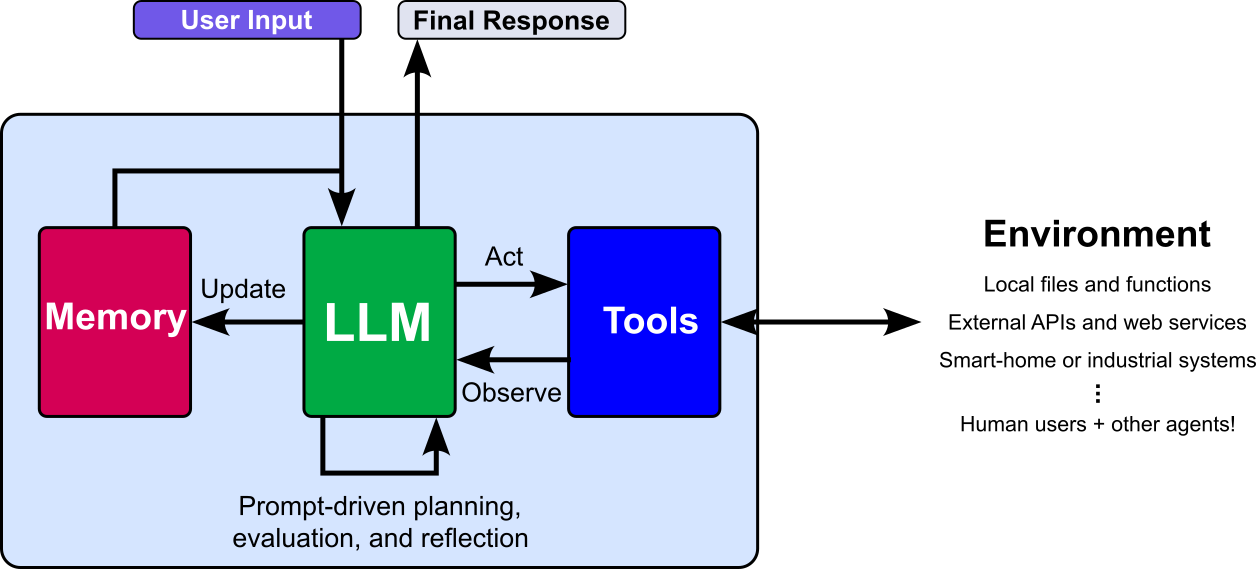
Note that, beyond just the planner, the memory and tools can also range from simple to highly sophisticated. Memory might store only the current conversation or retrieve information from a large knowledge base, while tools might perform basic calculations or interact with complex external services. In this notebook, we use basic versions of both so their implementation and purpose are easy to follow.
Agentic Loop
The previous figure of basic architecture of an AI agent shows the core components as well as indicates how they interact. However, to properly understand how all components work together, the following figures shows the general workflow of steps an agent is performing when solving a task; this workflow is also called the agentic loop to iterate the solving at task, particularly a complex one, is often an iterative process.
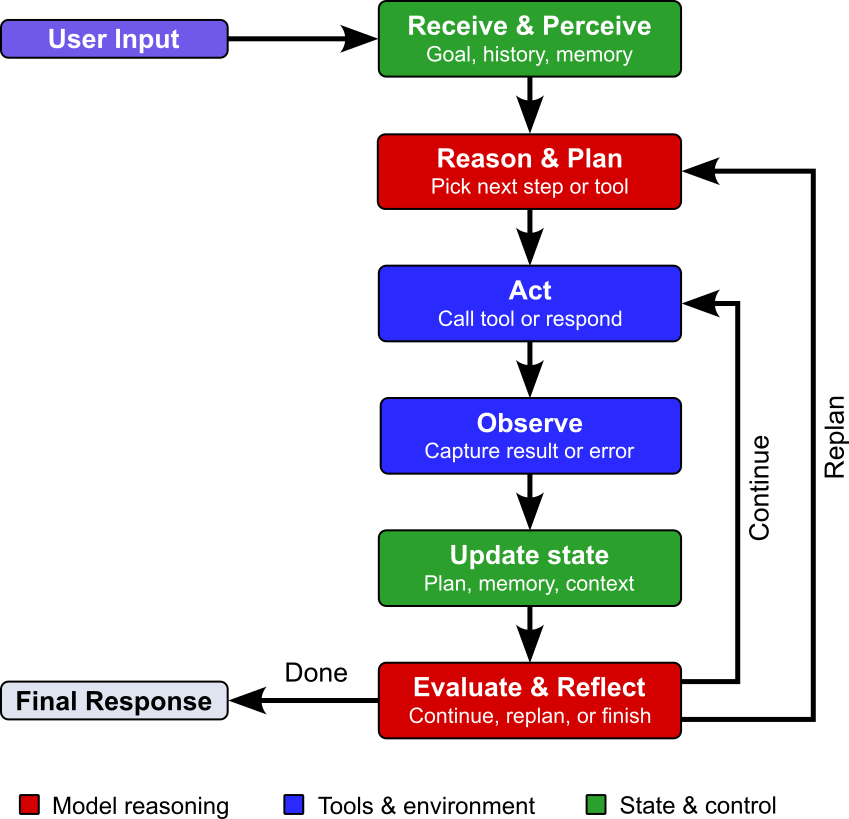
To elaborate more, the step of the agentic loop serve the following purpose:
Receive & Perceive: The agent receives a request or new information from its environment. It interprets the input and identifies the goal, relevant details, and any constraints.
Reason & Plan: The agent decides how to approach the task. It may break the goal into smaller steps and choose which information or tools it needs.
Act: The agent carries out the next step, such as responding to the user or calling a tool. If the task needs several steps, it may act more than once.
Observe: The agent receives the result of its action, such as a tool's output or the user's reply. It checks what happened and whether the result provides useful information.
Update State: The agent updates its working context with the new information. This can include recording progress, storing a relevant result, or revising the current plan.
Evaluate & Reflect: The agent checks whether it has achieved the goal and whether its response or action is adequate. If more work is needed, it can use what it has learned to continue the loop or adjust its approach.
To sum up, implementing an AI agent from scratch involves building both its core components and the loop that connects them. Building them provides a practical way to understand how an agent functions and how its parts work together.
Implementation of Components
Memory
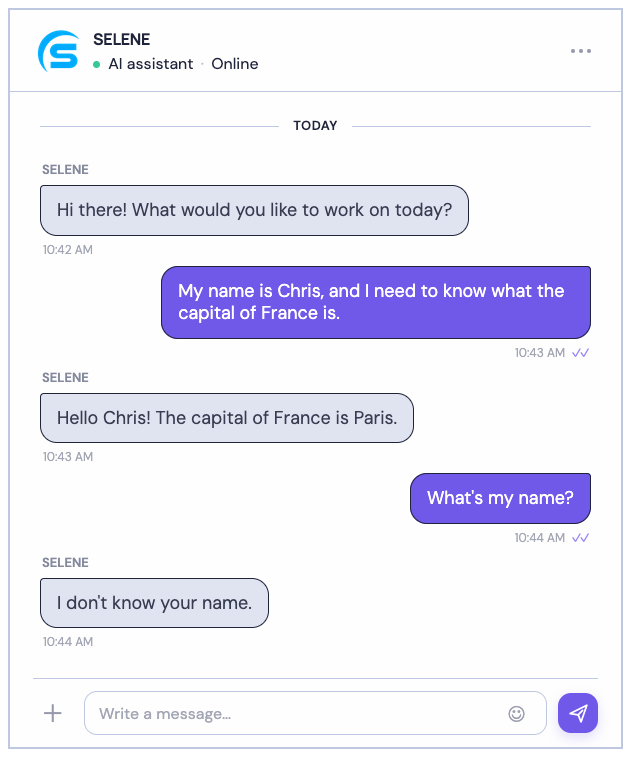
An LLM produces its output based only on the text it receives in the prompt. It does not have a built-in memory of past exchanges; everything it "knows" about the current conversation has to be present in that input. This means that if the prompt contains only the most recent user message, the model has no access to anything said before it. Earlier questions, answers, names, or instructions simply do not exist from its point of view, so it cannot refer back to them; the screenshot illustrates this issue using a basic example.
To work around this, basically all modern LLM-based chatbots resend the earlier conversation (or a summary of it) along with the user's most recent message. The sense of continuity comes from that reassembled prompt, not from the model remembering anything between turns. AI agents generalize this idea of combining current and past messages — or more generally, past information — to the concept of memory, which is typically implemented in two forms: short-term memory and long-term memory.
Short-Term Memory
An agent's short-term memory is the working record of the current chat session. It typically holds the messages submitted by the user and the messages generated by the agent (and often tool calls and their results; see below), kept in order. On each turn, this record is included in the prompt, which is what lets the agent follow the thread, resolve references (e.g., "Explain this more.") and stay consistent with what it already said.
The example below shows a possible representation of the short-term memory for the conversation shown in the previous screenshot. Note that it uses the commonly used role-based format in which each message is labeled by its speaker (e.g., "system", "user", or "assistant") as well as the actual content of the message. The role tells the model how to interpret the message; for example, as an instruction ("system"), a user request ("user"), or a previous response generated by the LLM ("assistant"). Some formats also include roles for tools, so the model can distinguish tool results from messages written by people.
[
    {"role": "sytem", "content": "You are useful assistant helping users as best as possible."}
    {"role": "user", "content": "My name is Chris, and I need to know what the capital of France is."}
    {"role": "assistant", "content": "Hello Chris! The capital of France is Paris"}
    {"role": "user", "content": "What is my name?"}
]
This memory is "short-term" because it is tied to the session: when the session ends, or when the conversation grows beyond the model's context window and older parts are trimmed or summarized, that information is no longer available unless it has been saved elsewhere, such as in a long-term memory store. For our implementation, we keep the short-term memory quite straightforward: store the last k role-based messages in a list. This list of messages is then added to the current user prompt and passed the LLM.
Long-Term Memory
In contrast to the short term memory, an agent's long-term memory is a persistent store of useful information collected across many conversations, not just the current one. Long-term memory can reach arbitrarily far into the past, because it lives outside the model's context window, typically in a database, a vector store, or a set of files.
In principle, long-term memory could be implemented very simply: keep a list of all past messages from all conversations, just like the short-term memory does for the current session, and store it persistently so it survives across sessions. In practice, this is rarely a good idea, because chat conversations contain a lot of material that is unlikely to ever be useful again:
- Transient information, such as "I'm running late today" or a question about the weather this morning
- Noise, such as greetings, small talk, typos, corrections, and false starts
- Redundancy, since the same fact may be repeated or restated many times
- Outdated details, which may even contradict newer information
Storing everything verbatim makes the memory grow without bound, makes retrieval harder because relevant items are buried among irrelevant ones, and wastes prompt space and cost when retrieved text is added to the context. For this reason, long-term memory usually involves some form of selection and condensation: the agent extracts and stores only what seems durable and useful, such as stable facts, preferences, and key decisions, often in summarized or structured form, rather than keeping the raw message log.
For our implementation, we follow the common but simple approach: after each chat session (or after a certain amount of time or messages), we pass the short-term memory to the LLM with the request to extract useful facts from the last conversation. The response is again a simple list but this time of strings (hopefully) containing relevant facts or other information that are likely to be useful for future conversations. For example, for our toy example above, the LLM might extract the following list of facts:
[
    "The user's name is Chris"
    "The user is interested in geography."
]
Another key difference is scale. Short-term memory is bounded by a single session and usually fits in the prompt, while long-term memory accumulates over time and can grow very large, far beyond what the context window can hold. At the same time, only a small fraction of it is relevant to any given new user prompt. If someone asks about countries and cities, their coding preferences or last month's meeting notes are mostly beside the point. Adding the entire memory to the prompt would be impossible once it is large, and wasteful even when it is possible, since irrelevant text costs money and can distract the model.
This is why long-term memory must be easily searchable. Before responding, the agent queries the store to find the few facts or details that matter for the current request, and adds only those to the prompt. Common approaches include:
- Keyword search, for exact terms, names, or identifiers
- Semantic search, where entries are stored as embeddings in a vector database and retrieved by similarity of meaning
- Structured lookup, where facts are stored with fields or tags (e.g., user preferences by category) and queried directly
- Hybrid approaches, combining these with filtering by recency or importance
The quality of this retrieval largely determines how useful the memory is: if the right information is not found, the agent behaves as if it had never learned it. For our implementation here, we rely on semantic search. To this end, we use a pretrained embedding model to embed and index each fact. If the user submits a new prompt, we embed this prompt using the same model and perform a vector similarity search to find the most relevant facts. Only those are added to the prompt and passed to the LLM.
The Memory Class
The Memory class implements both the short-term and long-term memory. As discussed above, short-term memory is very straightforward as it is implemented as a simple list where the recent messages of a conversation get added to until a maximum number of messages is reached. At this point, the oldest message gets dropped from the list before the most recent messages get added. This functionality is implemented by the add_message() method.
The implementation of the long-term memory requires a bit more consideration since memories need to be kept permanently and be searchable. For our implementation, we are using Chroma, an open-source vector database for storing and searching embeddings (numeric representations of text, images, or other data). For text, an embedding model converts each piece of text into a vector that captures aspects of its meaning. Chroma stores these vectors and retrieves the ones most similar to a query, making it useful for semantic search and retrieval-augmented generation (RAG).
Side note: In the class implementation below, by default, we only store all memories and their imbeddings in memory but not on disk using the EphemeralClient() class. Our goal here is not to build a full-fludged agent but to implement and describe its core components and workflow. However, you can store memories permanently on disk by simply switching to the PersistentClient() class.
For the embedding model itself, we are using all-MiniLM-L6-v2 by default. This is a pretrained, lightweight Sentence Transformer model that converts text into 384-dimensional vectors, often used for semantic search and similarity. Using the SentenceTransformer class of the sentence-transformers library we can easily load the model in the constructor of our Memory class. Once loaded, we can create mappings with model.encode(memories). Note that we could also use the OpenAI API to generate these embeddings, but our local approach avoids these additional calls to the respective endpoints.
The last missing piece of the long-term memory is the actual generation of the memories by extracting facts from a conversation. For this, we do use the LLM and pass it the current conversation, i.e., the list of messages representing the short-term memory, to extract relevant facts or information likely to be useful for future conversation. More specifically, we use the following system prompt w pass together with the short-term memory to the LLM:
SYSTEM_PROMPT__EXTRACT_FACTS = """
Extract concise facts that may be useful in future conversations.
Prefer ongoing projects, stable preferences, and decisions.
Do not include temporary details, guesses, or information that is
already obvious from the conversation. Return only a JSON object
with a "facts" key containing a list of strings. If there are no
useful facts, return an empty list.
""".strip()
With these general design decisions covered, we look at the actual implementation of the Memory class. We include some additional and more detailed explanation after the code cell below.
class Memory:
    def __init__(self,
        openai_client: openai.OpenAI,
        extractor_model: str="gpt-4o-mini",
        embedding_model_id: str="sentence-transformers/all-MiniLM-L6-v2",
        max_short_term_messages: int=20
    ):

        self.openai_client = openai_client
        self.extractor_model = extractor_model
        self.embedding_model = SentenceTransformer(embedding_model_id)
        self.max_short_term_messages = max_short_term_messages

        # Short-term memory: conversation history for the current session.
        self.short_term_memory = []

        # Long-term memory: Chrome in-memory vector database.
        self.init_long_term_memory()


    def init_long_term_memory(self):
        chromadb_client = chromadb.EphemeralClient()  # in-memory only, nothing written to disk
        #chromadb_client.PersistentClient(path="./agent_memory.chromadb")

        try:
            chromadb_client.delete_collection("agent_memory")
        except:
            pass

        self.long_term_memory = chromadb_client.get_or_create_collection(
            name="agent_memory",
            metadata={"hnsw:space": "cosine"},
        )


    def add_message(self, role: str, content: str):
        # Add role and message to short term memory
        self.short_term_memory.append({"role": role, "content": content})

        # Keep only the most recent messages.
        self.short_term_memory = self.short_term_memory[-self.max_short_term_messages :]


    def extract_facts(self, messages: list[dict]) -> list[str]:
        """Extract useful long-term facts from a conversation."""
        response = self.openai_client.chat.completions.create(
            model=self.extractor_model,
            messages=[
                { "role": "system", "content": SYSTEM_PROMPT__EXTRACT_FACTS },
                *messages,
                { "role": "user", "content": "Extract the useful long-term facts from the conversation above." },
            ],
            response_format={"type": "json_object"},
        )

        result = json.loads(response.choices[0].message.content)
        facts = result.get("facts", [])

        # Keep only non-empty strings in case the response is malformed.
        return [fact.strip() for fact in facts if isinstance(fact, str) and fact.strip()]


    def remember(self, memories: [str]):
        """Add a memories to long-term memory."""

        # Generate unique IDs using a simple counter
        start = self.long_term_memory.count()
        ids = [f"mem_{start + i}" for i in range(len(memories))]

        # Embed and add memories to long-term memory
        self.long_term_memory.add(
            ids=ids,
            documents=memories,
            embeddings=self.embedding_model.encode(memories).tolist(),
        )


    def retrieve(self, queries: [str], k: int = 3):
        """Return the k long-term memories most similar to the query."""
        results = self.long_term_memory.query(
            query_embeddings=self.embedding_model.encode(queries).tolist(),
            n_results=k,
        )

        # Return list of retrieved facts
        return results["documents"][0]
Overall, the Memory class directly implements the short-term and long-term memory as described above. Here are just some additional comments to detail about specific snippets in the code:
When creating an instance of
Memoryand initializing the long-term memory, we first delete any existing Chroma vector database with this name. This is simply to ensure consistency in case we create multipleMemoryinstances when running the same or different cells in this notebook.Also when creating the Chrome vector database as the long-term memory,
{"hnsw:space": "cosine"}configures the database to use cosine distance as its similarity metric for the underlying Hierarchical Navigable Small World (HNSW) approximate nearest-neighbor index.In the
remember()method which adds memories to the long-term memory, Chrome requires to pass unique IDs to theadd()method of the vector database. For our implementation, we use a simple counter approach to generate these IDs, i.e., the IDs have the following form:mem_0,mem_1,mem_2, and so on.
Let's test implementation by first creating an instance of the Memory class.
memory = Memory(openai_client)
Loading weights: 0%| | 0/103 [00:00<?, ?it/s]
Warning: You are sending unauthenticated requests to the HF Hub. Please set a HF_TOKEN to enable higher rate limits and faster downloads.
Testing the short-term memory is quite straightforward since it only involves adding messages (together with the roles) to the list that represents the short-term memory. Note that, in the code cell below, we first delete all messages to avoid adding the same message multiple times in case you are running the code cell multiple times.
memory.short_term_memory = []
memory.add_message("user", "I am building a reinforcement learning notebook.")
memory.add_message("assistant", "We can organize it around the agent-environment loop.")

for message in memory.short_term_memory:
    print(message)
{'role': 'user', 'content': 'I am building a reinforcement learning notebook.'}
{'role': 'assistant', 'content': 'We can organize it around the agent-environment loop.'}
Assuming that we already have a list of facts, adding them to long-term memory is equally straightforward. Of course, the heavy lifting is done by the Chrome collection and the embedding model. Since the long-term memory is a Chroma collection and not just a list, retrieving all facts to print them is now also a bit more involved. Again, note that we first clear the long-term memory in the code example below to ensure consistent outputs.
memory.init_long_term_memory()
memory.remember([
    "The user's name is Chris.",
    "The user is creating an educational notebook about reinforcement learning."
])

facts = memory.long_term_memory.get()

for id_, fact in zip(facts["ids"], facts["documents"]):
    print(f"{id_}: {fact}")
mem_0: The user's name is Chris.
mem_1: The user is creating an educational notebook about reinforcement learning.
Of course, within the workflow of the agent, we generally do not want to retrieve all the facts but only the ones relevant to a new prompt (or multiple prompts, if needed). For this, the Memory class has the retrieve() method which utilizes the vector search capabilities of the Chroma collection to find and return all facts (hopefully) relevant for a given input prompt. The code cell below shows an example.
relevant_facts = memory.retrieve(["What is my name?"], k=2)

for fact in relevant_facts:
    print(fact)
The user's name is Chris.
The user is creating an educational notebook about reinforcement learning.
In the previous code example we assume that we already have a list of facts. In practice, of course, we first have to collect these facts. This is done by the extract_facts() method that passes the current short-term memory to the LLM with the task to extract any information worth keep long-term; see the code cell below.
facts = memory.extract_facts(memory.short_term_memory)

for fact in facts:
    print(fact)
User is building a reinforcement learning notebook.
The notebook will be organized around the agent-environment loop.
Naturally, this process assumes that the LLM is doing a good job of finding and extracting useful facts from a conversation.
This completes the consideration and implementation of the memory for our agent. It is purposefully kept very simple and intuition — but still practical — to fully understand each individual design decision and line of code. Of course, practical implementation of an agent's memory may be much more sophisticated, and we outline some more advanced strategies at the end of the notebook.
Tools
An LLM's knowledge and abilities come from the data it saw during training. Whatever was not in that data, or as only thinly represented, the model knows little or nothing about. Because of these limits, an LLM on its own performs poorly or fails on many kinds of user prompts — for example: recent events, private or proprietary documents, highly specialized topics, exact computations, precise counting, live data, running code, etc.
This is the motivation for extending LLMs with outside components (i.e., tools). More specifically, the LLM is provided with the information about the existence of such tools and how to use them as part of the system prompt. When receiving a new user prompt, the LLM can then decide if calling a tool is needed and request this cool tool as part of its response. The agent then calls the tool, gets the results, and passes them back to the LLM to generate the final answer.
For our agent implementation in this notebook, we consider tools in the form of simple methods. Note that we do not need a proper implementation of each method but can return mock results to illustrate the calling of tools and the handling of any results from tool calls. More specifically, we implement the following methods to cover three types of questions or task basic LLMs are not suitable for:
Exact computations: LLMs generate text by predicting likely next tokens based on patterns learned during training. They do not inherently execute arithmetic, so exact calculations can be error-prone. Thus, the first tool we provide is the method
add_numbers()for adding two numbers provided as its arguments.Live data: LLMs generate responses from the information in their prompt and what they learned during training; that knowledge may be outdated. Live information such as today's weather requires access to a current data source, so without a suitable tool or service. We therefore provide the method
get_temperature()to fetch the current temperature for a given city. Again, for our demonstrations, the method returns just random values. In practice, the method would call some public weather API.Performing actions: An LLM by itself generates text; it cannot directly perform real-world actions such as buying shares. To carry out an action, it needs to be connected to an external tool or service that can do it. To this end, we provide the method
buy_sharesthat buys a certain amount of shares for a certain price per share for a given ticker symbol. Again, this method merely returns a mock response
We implement all three methods as part of the Tools class in the code cell below.
class Tools:

    def add_numbers(self, a: float, b: float) -> float:
        """Add two numbers."""
        return a + b

    def get_temperature(self, city: str) -> str:
        """Fetch the live weather data (temperature only) data for a given city."""
        temperature = random.uniform(-15, 35)
        # Return temperature, if available
        return f"{temperature:.1f}°C" if temperature is not None else "Temperature unavailable."

    def buy_shares(self, symbol: str, amount: int, price: float) -> str:
        """Place a buy order for a certain amount of share for a certain price."""
        return f"Order for {amount} {symbol} shares for {price} per share successfully placed"
As mentioned above, the LLM itself cannot call any tools but tells the agent that a tool should be called as part of the LLMs response. As part of the system prompt — discussed in a bit — the LLM will specify which tool should be called by its name. We therefore need a mapping from a tool's name (as a simple string) to its actual method. This is accomplished by the dictionary tool_functions in the code cell below.
tools = Tools()

tool_functions = {
    "add_numbers": tools.add_numbers,
    "get_temperature": tools.get_temperature,
    "buy_shares": tools.buy_shares
}
An LLM's response is determined by the prompt it receives (plus the fixed knowledge in its weights). It has no hidden awareness of the software around it, so it cannot know what tools exist unless the prompt says so. For tool calling, this means the available tools must be described explicitly as part of the prompt. Each tool description typically includes:
- Name: how the tool is identified, e.g.
get_weather - Description: a short description of what the tool does and when to use it
- Input arguments: the parameter names, their types, and (optionally) which are required
Because the model only knows what the prompt tells it, clear names, precise descriptions, and well-defined arguments directly affect how reliably it chooses and uses the right tool.
There is generally no specific format for how the prompt needs to be formulated. For a small set of simple tools, a short, plain text overview to the available tools is generally sufficient — as long as it contains all the important information (i.e., tool name, description, input arguments). In a real system, tool requests are often represented in a structured format, such as JSON, so the application can reliably identify the requested tool and its arguments, run it, and provide the result to the LLM.
Since we only have three tools, with distinct purposes, and a rather small number of arguments, we define a simple plain text prompt in the code cell below. Apart from the list of available tools, we also include:
- Examples for the expected output formats
- A Request that only available tools can be called
- A Requesting that only a single tool may be called at one time
- In the case of missing arguments, the LLM should prompt the user to provide the missing arguments.
SYSTEM_PROMPT__TOOLS = """
The following tools are available for you to use:

Name: add_numbers
Description: Perform a given addition of two numbers.
Input: {{"a": number, "b": number}}
Example output: {{"type": "tool_call", "name": "add_numbers", "arguments": {"a": "42", "b": "101"}}

Name: get_temperature
Description: returns the current temperature for a given city.
Input: {{"city": "name of the city"}}
Example output: {{"type": "tool_call", "name": "get_temperature", "arguments": {{"city": "Singapore"}} }}

Name: buy_shares
Description: buys a certain amount  shares for a certain price for share for a given ticker symbol.
Input: {{"symbol": "stock ticker symbol", "amount": "amount of shares to buy", "price": "price per share"}}
Example output: {{"type": "tool_call", "name": "buy_shares", "arguments": {{"symbol": "AAPL", "amount": 100", "price": 350.0}} }}

For each turn, return exactly one JSON object. If a tool should be called,
the JSON object should match the format of the example output for that tool.

If no tool is called, the JSON object should match the format
{{"type": "final_answer", "answer": "<your answer>", ...}}

Make sure the request require to call an available tool.
Only request tools listed above. Do not invent tool results. Request only 1 tool at once.
If an argument is missing, prompt the user to provide the missing argument.
""".strip()
Because an LLM's behavior depends only on the prompt, the prompt is the main way to make tool calling reliable, and it can grow arbitrarily complex and detailed. Beyond a bare tool name, a thorough prompt may include precise descriptions of when to use (and not use) each tool, exact argument types and formats, behavioral rules such as asking for missing information or confirming destructive actions, required output formats, example calls, and instructions for handling results and errors. Each addition narrows the ways the model can go wrong, but none guarantees correct behavior because generation is probabilistic, so prompts are usually refined through testing and applications still validate tool calls before executing them.
To test calling, the code cell below implements the auxiliary method submit_prompt(). This method takes in a user message (i.e., user prompt), combines it with the system prompt for tool calling, and passes the final prompt to the LLM. The method looks a bit complex since it has to handle several cases:
- If the response by the LLM is invalid (i.e., it cannot automatically be processed), report an error
- If the response requests an unknown action, report an error
- If the response should be shown to the user (i.e., action is
"final"), print the response; note that this may include a request from the LLM to the user to provide any missing input arguments required to correctly call a tool. - If the response requests a tool call but the tool does not exist, report an error
- If the response requests an existing tool, extract the input arguments, and simply print this information; we do not actually call the function for this example here.
def submit_prompt(user_message):
    # list of messages (system prompt + user message)
    messages = [
        {"role": "system", "content": SYSTEM_PROMPT__TOOLS},
        {"role": "user", "content": user_message},
    ]

    # Submit list of messages to LLM via API endpoint
    response = openai_client.chat.completions.create(
        model="gpt-4o-mini",
        messages=messages,
        response_format={"type": "json_object"},
    )

    # Check if the response is in a valid format
    try:
        action = json.loads(response.choices[0].message.content)
    except:
        print("[Error] Invalid output received from LLM.")

    # Check if the "action" is a known one
    if action.get("type").lower() not in ["final_answer", "tool_call"]:
        print("The model returned an unrecognized action.")
        return

    # If "final" (i.e., no tool call), just print the generates response
    if action.get("type").lower() == "final_answer":
        print(action["answer"])
        return

    # ...otherwise, identify tool and corresponding arguments
    if action.get("type").lower() == "tool_call":
        # Get name of the function to be called
        tool_name = action.get("name")
        # Try to get function given the name
        function = tool_functions.get(tool_name)
        # Check if the tool name referred to an existing function
        if function is None:
            print(f"Unknown tool: {tool_name}")
            return
        # Retrieve arguments for function call
        args = (action.get("arguments", {}))
        print(f"Call function '{tool_name}' with arguments: {args}")
Important: Notice that the method submit_prompt() always performs only a single LLM request. If the response requires the need to call a tool, the method only shows this information but does not actually execute the corresponding method. Of course, in practice, the agent would execute the method, receive the result, and pass it with the initial prompt back to the LLM (and so on if more tool calls are requested). You can see how this requires an iterative process which forms the core idea of the agentic loop, which we will implement properly later.
Let's run some tests by calling this method. We start with a simple question that arguably does not require any tool calling as it can be reliably answered by the LLM "as is", because this information was very likely to be part of the training data.
Important: In this notebook, we use the Cloud API of OpenAI to submit prompts to an LLM. This means that the responses generated by the LLM depend on the chosen model as well as any other updates made to the API endpoints. At the time of writing this notebook and using the default model "gpt-4o-mini", all following examples work as expected. However, there is no guarantee that this will be true for other models or at any other point in time.
submit_prompt("What is the capital of France?")
The capital of France is Paris.
Now let's ask for real-time information such as the current temperature in Paris. For this prompt, the LLM should respond with a request to call the appropriate function get_temperature() with the correct city as the input argument (here: Paris).
submit_prompt("What is the temperature in Paris right now?")
Call function 'get_temperature' with arguments: {'city': 'Paris'}
Next, we can try asking the agent — well, right now, we are mainly asking just the LLM $mdash; to add two numbers. Again, we should expect as output the LLMs request to call the function add_numbers() with the two numbers extracted from the initial prompt.
submit_prompt("What is 1002 + 4002?")
Call function 'add_numbers' with arguments: {'a': 1002, 'b': 4002}
The third tool was our method that places a buy order for a certain amount of shares of a company for a certain price per share. Let's first consider a prompt that contains all required input arguments to call this method. Notice that the prompt only mentioned the company name instead of the ticker symbol which is one of the required input arguments of the method.
submit_prompt("Buy 100 shares of Microsoft for 50 USD per share!")
Call function 'buy_shares' with arguments: {'symbol': 'MSFT', 'amount': '100', 'price': '50'}
As the output shows, the LLM has correctly identified the ticker symbol of Microsoft. This is not surprising since this information was very likely covered by the training data.
In contrast to this successful tool call, consider the prompt below, which also asks to buy some shares but lacks the information about the price per share. This means that we have only incomplete information, and the LLM should ideally prompt the user to provide this missing information.
submit_prompt("Buy 100 shares of Apple stocks!")
Please provide the price per share for Apple stocks.
As expected, the LLM now asks to provide the price per share required to call buy_shares. Of course, as mentioned before, the method submit_prompt makes only a one-time call to the LLM and does not actually implement any meaningful agentic loop that would allow it to iteratively submit messages towards completing the initial task.
We can also consider other "special" cases. For example, the prompt in the code cell below requires the use of two calls — functions get_temperature() and add_numbers(). However, as stated in the system prompt, the LLM can only request a single tool call within a generated response.
submit_prompt("What is the temperature in Paris right nown and what is 1002 + 4002?")
Call function 'get_temperature' with arguments: {'city': 'Paris'}
Allowing only one tool call per LLM request keeps an agent simpler, more predictable, and easier to control. Later steps may depend on the results of earlier ones, so requesting several calls at once forces the model to guess arguments it does not have yet. A single call is also easier for the model to generate correctly, keeps the loop straightforward (request, execute, add the result to the prompt, decide the next step), and makes each action easier to validate, confirm, log, and debug. The trade-off is that tasks with many independent calls take more iterations, which is why some systems permit parallel calls when they are clearly independent, but one call per iteration is the more robust default.
Let's try again asking for live weather information, but this time not for the current temperature, the only information our tools can provide. Instead the prompt in the code cell below asks if it is currently raining in Paris. As such, none of the available tools are applicable, and the LLM should respond appropriately.
submit_prompt("Does it rain in Paris right now?")
I can check the current temperature, but I don't have the capability to directly check if it is raining in Paris. Would you like to know the temperature instead?
Clearly stating that this question cannot be properly answered is arguably an appropriate response.
Important: Again, the exact response depends on the used model and may also change over time, even for the same model, depending on any changes to the API endpoints done by OpenAI.
Agents
Having implemented and tested the Memory and the Tools class, we have the two main components to actually build an AI agent — recall that we do not implement the planner as a distinct component but favor prompt-driven planning in this notebook for simplicity. This means now that implementing an agent mainly comes down to implementing the agentic loop. So let's have another look at the corresponding figure, but know with the knowledge how memory and tools work.
In the following, we present two implementations of an agent class
Simple agent: The
SimpleAgentclass uses memory and tools to complete a task, but does not involve any explicit planning. For simple, well-defined tasks, the LLM can often choose the next action directly from the prompt, keeping the agent easier to build and understand. Explicit planning becomes more useful when a task has many dependent steps, requires coordination, or may need revision as new information arrives.ReAct agent: The
ReActAgentclass extends the idea of a simple agent by adding an explicit Reasoning to the Acting within the agentic loop. Instead of choosing an action once and then responding, it can use a tool, inspect the result, and choose its next action based on what it learned. This supports multi-step tasks without requiring a complete plan upfront.
Keep in mind that the purpose of both implementations are for education and therefore intentionally kept as simple. Basic from-scratch agent implementations are useful for learning because they make the core components and interaction loop easy to see. However, they are not suitable for production use: they often lack robust error and exception handling, input validation, security controls, and safeguards for tool use. Production systems also need monitoring, logging, testing, and reliable ways to handle failures and unexpected model outputs. These features require careful design beyond the basic agent loop, so an educational implementation should be treated as a starting point rather than a deployable system.
With that being said, let's check out the agents — after all, they do perform fairly well in our example tasks.
Simple Agent
A simple AI agent without explicit planning has only two things to work with: its memory and its tools. There is no separate planning steps that sets out a sequence of steps in advance, so any plan exists only implicitly in the model's next-step decisions. This keeps the design simple and works well for short, straightforward tasks, where the next action is usually obvious from the conversation so far. This also means that we can define a very simple template for the initial system prompt, for example:
SYSTEM_PROMPT__SIMPLE_AGENT = """
You are a helpful assistant. Use the conversation and relevant memories below.

Relevant long-term memories:
{FACTS}

{TOOLS}'
""".strip()
When executing a task, the agent replaces the FACTS and the TOOLS placeholders with the retrieved facts (i.e., long-term memories) and the information of available tools, respectively. How both these steps work, we have already seen as part of the implementation and testing of the Memory and Tools classes.
The class SimpleAgent below shows the complete implementation of a simple agent with no explicit planning phase. Naturally, this class has an instance of the Memory class and the Tools class as attributes. In simple terms, the main method run() is quite simial to the standalone method submit_prompt() we have seen previously, however, with several important additions
- Integration of facts. The first step method
run()retrieves the most relevant facts from the long-term memory for a given user message and, together with the information about available tools, generates the system prompt using the template; see above. - Integration of conversation. The current user message is added to the short-term memory (i.e., the current conversation) and combined with the system prompt (containing the facts and tools) to form the final prompt that is passed to the LLM.
- Agentic loop. Compared to
submit_prompt(), therun()method actually executes any function in case of tool calling, and adds the result(s) to the current conversation to be passed again to the LLM. This makes processing a task truly an iterative process, if needed (i.e., when tools need to be used). The loop ends when the LLM can respond with the final answer — or when the maximum number of iterations has been reached (standard failsafe).
Apart from the main run() method, the class also features the method make_query(). This methods combines the las k messages in the short-term memory and the current user message into a single string. This string is then used as the query to retrieve the most relevant facts from the long-term memory. This represents a basic solution to the situation that the current user message on its own might not contain useful information to retrieve relevant facts. For example, consider the agent asking for confirmation, and the user simple submits "Yes.", which does not carry meaning without some context. The k most recent messages in short-term memory aim to provide this context.
class SimpleAgent:

    def __init__(self, client: openai.OpenAI, memory, tools, model="gpt-4o-mini"):
        self.client = client
        self.memory = memory
        self.tools = tools
        self.model = model

        # Only expose methods in this registry.
        self.tool_functions = {
            "add_numbers": self.tools.add_numbers,
            "get_temperature": self.tools.get_temperature,
            "buy_shares": tools.buy_shares
        }


    def make_query(self, user_message, k=3):
        # Fetch the last n messages from the short-term memory
        recent = self.memory.short_term_memory[-k:]
        # Concatenate recent messages to a single string => context
        context = " ".join(m["content"] for m in recent)
        # Combine and return context and current user message
        return f"{context} {user_message}"


    def run(self, user_message: str, max_steps: int = 6, verbose=False) -> str:
        # Create query for retieving facts
        query = self.make_query(user_message)
        # Retrieve relevant facts for current user message
        facts = self.memory.retrieve(query, k=3)

        # Add user message to short-term memory
        self.memory.add_message("user", user_message)

        # Convert list of facts into a single string (bullet point list)
        facts_list = "\n".join(f"\t- {fact}" for fact in facts)

        if verbose == True:
            print(f"[MEMORY] Retrieved facts from long-term memory\n{facts_list}")

        # Construct system prompt by "added" facts and available tools
        system_prompt = SYSTEM_PROMPT__SIMPLE_AGENT.format(
                            FACTS=facts_list if facts_list else "(none)",
                            TOOLS=SYSTEM_PROMPT__TOOLS,
                        ).strip()

        # Generate initial message list: system prompt (incl. facts and tools) + short-term memory
        messages = [
            {"role": "system", "content": system_prompt},
            *self.memory.short_term_memory,
        ]

        # Start agentic loop
        for _ in range(max_steps):
            response = self.client.chat.completions.create(
                model=self.model,
                messages=messages,
                response_format={"type": "json_object"},
            )

            # Check if the response is in a valid format
            try:
                content = response.choices[0].message.content
                action = json.loads(content)
            except:
                print("[Error] Invalid output received from LLM.")


            # Extract action type and heck if it is a known one
            action_type = action.get("type").lower()
            if action_type not in ["tool_call", "final_answer"]:
                return f"The model returned an unrecognized action {action_type}."

            # Add current
            messages.append({"role": "assistant", "content": content})

            if action_type == "tool_call":
                # Get name of the function to be called
                tool_name = action.get("name")
                # Try to get function given the name
                function = self.tool_functions.get(tool_name)
                # Check if the tool name referred to an existing function
                if function is None:
                    return f"Unknown tool: {tool_name}"
                else:
                    try:
                        # Extract arguments from LLM response
                        args = (action.get("arguments", {}))
                        if verbose == True: print(f"[TOOLS] Call '{tool_name}' with arguments: {args}")
                        # Execute functions with parameters and observe result
                        tool_result = function(**args)
                    except (TypeError, ValueError) as error:
                        tool_result = f"Tool call failed: {error}"

                # Add information about tool call to list of messages
                messages.append({
                    "role": "user",
                    "content": (
                        f"Tool result from {tool_name}: {tool_result}\n"
                        "Continue the task. Call another relevant tool if needed, or return the final answer."
                    ),
                })

            # If "final_answer" (i.e., no tool call), just print the generates response
            if action_type == "final_answer":
                answer = action.get("answer", "")
                self.memory.add_message("assistant", answer)
                return str(answer)

        return "I could not complete the request within the allowed number of steps."
Important: If you check the code, you will notice that this agent implementation only stores the user messages and the final responses in the short-term memory but not any messages about tool calls. Of course, we need to keep track of all messages including the tool calls within a single call of run using the messages variable. What to keep in the short-term memory, however, is a separate design decision; there are typically three basic alternatives:
- Drop tool results (used here). The information about the use of tools and their results are not kept in the short-term memory.
- Keep (raw) tool results. Tool use and (raw) results are kept in the form of messages in the short-term memory. This allows the agent to refer back to earlier parts of the current conversation, but the prompt may grow very quickly (e.g., the response might be a translated document).
- Keep (summarized) tool results. To keep the tool results but avoid the rapid growth of the short-term memory, the result may first be truncated, aggregated, or summarized before added to the short-term memory.
Again, for simplicity, we only add user messages and the final LLM responses to the short-term memory. To show that our agent can still perform reasonably well, let's run a few example prompts. To this end, we first need to create a Memory and Tools instance, which we then pass as input arguments to create a SimpleAgent instance.
Note that in the code cell below, we also add a few example facts to the long-term memory. In the context of this notebook, it would be a bit difficult to appropriately set up multiple independent conversations just to see that long-term memory works. However, keeping the code and the examples clean is preferable, and we already tested the workings of the long-term memory above.
memory = Memory(openai_client)
tools = Tools()

simple_agent = SimpleAgent(openai_client, memory, tools)

simple_agent.memory.remember([
    "The user's name is Christian, but he prefers to be called just Chris.",
    "The user works as a lecturer at a large university.",
    "The user is learning how to build AI agents from scratch in Python.",
    "The user lives in Singapore and works in the Asia/Singapore time zone.",
    "The user always wants temperatures in Celsius and distances in kilometers.",
    "The user prefers flights with at most one layover and an aisle seat.",
    "The user wants all code examples written in Python 3.12 with type hints.",
    "The user has recently created a brokerage account for buying stocks.",
    "The user of travels acorss South-East Asia but also to Europe.",
    "The user is currently working on creating Jupyter notebooks about AI agents.",
    "The fiscal year of the university the user works starts on April 1."
])
Loading weights: 0%| | 0/103 [00:00<?, ?it/s]
To test the agent, we run through the same example before, starting with a simple question that does not require any tool calling and can be answered directly by the LLM. In other words, the agentic loop performs only a single iteration.
response = simple_agent.run("What is the capital of France?", verbose=True)

print(f"[ANSWER]: {response}")
[MEMORY] Retrieved facts from long-term memory
	- The user of travels acorss South-East Asia but also to Europe.
	- The user always wants temperatures in Celsius and distances in kilometers.
	- The fiscal year of the university the user works starts on April 1.
[ANSWER]: The capital of France is Paris.
Apart from the fact that the answer is correct, we can also see that the agent retrieves the most useful facts from the long-term memory; at least the top fact is most relevant (keep in mind that the agent will always return three facts by default).
The next question requires the use of a tool since the LLM has no access to real-time information. Compared to the example using the auxiliary method submit_prompt(), the agent not only let's use know that a tool needs be called but actually executes the corresponding function and uses the result to form the final answer — recall the the method get_temperature just returns a random value, so you might see unexpected values.
response = simple_agent.run("What is the temperature in Paris right now?", verbose=True)

print(f"[ANSWER]: {response}")
[MEMORY] Retrieved facts from long-term memory
	- The user always wants temperatures in Celsius and distances in kilometers.
	- The user wants all code examples written in Python 3.12 with type hints.
	- The user lives in Singapore and works in the Asia/Singapore time zone.
[TOOLS] Call 'get_temperature' with arguments: {'city': 'Paris'}
[ANSWER]: The current temperature in Paris is -7.1°C.
Again, the retrieved facts are generally relevant to this question.
The second tool we test is the function add_numbers() by asking the agent to add two numbers. Depending on the complexity of the addition, the agent may not even use the function but answer the questions through the LLM alone.
response = simple_agent.run("What is 1002 + 4002?", verbose=True)

print(f"[ANSWER]: {response}")
[MEMORY] Retrieved facts from long-term memory
	- The user always wants temperatures in Celsius and distances in kilometers.
	- The user wants all code examples written in Python 3.12 with type hints.
	- The user lives in Singapore and works in the Asia/Singapore time zone.
[TOOLS] Call 'add_numbers' with arguments: {'a': 1002, 'b': 4002}
[ANSWER]: 1002 + 4002 equals 5004.
Here, one can argue, the retrieved facts are not relevant. But again, this basic agent will always retrieve the three most relevant even if the absolute vector similarities between the user message and the facts are not high.
The last tool we can test is the function buy_shares. In fact, let's consider the case again, where the user messages does not include all the provided information to actually execute the function. As such, the LLM will request from the user to provide all missing values.
response = simple_agent.run("Buy a few Microsoft shares for 100 dollar per share.", verbose=True)

print(f"[ANSWER]: {response}")
[MEMORY] Retrieved facts from long-term memory
	- The user always wants temperatures in Celsius and distances in kilometers.
	- The user has recently created a brokerage account for buying stocks.
	- The user lives in Singapore and works in the Asia/Singapore time zone.
[ANSWER]: Please provide the amount of Microsoft shares you would like to buy.
We, as the user, can now directly reply to this message so the agent can continue completing the task of buying shares.
response = simple_agent.run("100.", verbose=True)

print(f"[ANSWER]: {response}")
[MEMORY] Retrieved facts from long-term memory
	- The user has recently created a brokerage account for buying stocks.
	- The user works as a lecturer at a large university.
	- The user always wants temperatures in Celsius and distances in kilometers.
[TOOLS] Call 'buy_shares' with arguments: {'symbol': 'MSFT', 'amount': '100', 'price': '100'}
[ANSWER]: The order for 100 Microsoft (MSFT) shares at $100 per share has been successfully placed.
Notice how the retrieved facts are still relevant, even though the last user message was just "100.". This clearly shows why we consider the last $k=3$ (by default) messages to form the query we use to find the most relevant facts. While a simple heuristic, it often works well enough in practice for basic tasks or questions.
Lastly, just to quickly test the memory alone, we can ask for the user's name.
response = simple_agent.run("What's my name?", verbose=True)

print(f"[ANSWER]: {response}")
[MEMORY] Retrieved facts from long-term memory
	- The user has recently created a brokerage account for buying stocks.
	- The user works as a lecturer at a large university.
	- The user's name is Christian, but he prefers to be called just Chris.
[ANSWER]: Your name is Christian, but you prefer to be called Chris.
Overall, the simple agent seems to work fine. Of course, all the examples were arguably quite simple in nature, which is perfectly fine in the context of this notebook. However, if you run the same example above multiple times, you may occasionally see unexpected or even wrong behavior. After, the agent fully relies on the quality of the responses generated by the LLM.
ReAct Agent
Our SimpleAgent follows the same basic loop: the model sees the conversation, decides whether to call a tool, the tool runs, the result is appended to memory, and the model is called again. It stops when the model replies without requesting a tool. The difference is that the model goes straight from context to action. Whatever reasoning it does happens implicitly inside the model, and nothing about it is written into the context.
In contrast, a ReAct agent is an agent that explicitly interleaves natural-language reasoning with actions. At each step, the model produces a Thought (what it currently believes, what it still needs, and what it plans to do), then an Action (a tool call with arguments), and then the system feeds back an Observation (the tool's result). This Thought$\rightarrow$Action$\rightarrow$Observation cycle repeats until the model decides it has enough information and produces a final answer. The typically advantages of ReAct agents compared to simple agents are:
Explicit reasoning. ReAct forces the model to write down its reasoning before acting. This acts as a scratchpad, similar to Chain-of-Thought prompting, and the thoughts become part of the context that conditions later steps. The simple loop has no such scratchpad (unless the model happens to produce some text alongside its tool call).
Planning and error recovery. Because the model states what it expects and why, it is better placed to notice when an observation does not match its expectation and to adjust its plan. In a plain tool loop, a surprising result is just another message, and the model has to "figure it out" without having articulated a plan.
Interpretability and debugging. A ReAct trace reads like a log of the agent's thinking, which makes it much easier to see why it went wrong, for example whether it misread a result or picked the wrong tool for a sensible-sounding reason. The simple loop shows you the calls and results, but not the rationale.
However, this added complexity also requires additional considerations and challenges, mainly:
Cost and latency. The extra thought tokens make each step longer and the context grow faster, so ReAct is more expensive and slower per step. For simple tasks that need one or two tool calls, the overhead may not pay off.
Faithfulness caveat. The written thoughts are not guaranteed to reflect the model's actual computation, and a model can produce plausible reasoning that leads to a wrong action. They improve behavior on average, but they are not a guarantee of correctness.
In general, for well-defined tasks with a small number of tools and mostly one-shot lookups, a simple tool-calling loop is often sufficient and cheaper. For multi-step problems where the next action depends on what was learned in previous steps, such as research, multi-hop question answering, or troubleshooting, the explicit reasoning of ReAct tends to help, and it makes the agent's behavior far easier to inspect. Within this notebook, both the simple agent and the ReAct agent use the same Memory and Tools class. The main difference between both agents is how the loop structures the model's output, which makes the trade-offs between simplicity, transparency, and cost easy to see side by side.
Since the memory and the tools stay exactly as they are, the first thing we need change is the system prompt. In the basic agent, the prompt tells the model which tools are available and that it must respond with a JSON object naming the tool and its arguments. For the ReAct agent, we extend this instruction so the model must also explain why it is taking each action. Concretely, every response must now contain a thought field alongside the action, so the model commits to a short rationale before it commits to a tool call.
SYSTEM_PROMPT__REACT_AGENT = """
You are a helpful assistant. Use the conversation and relevant memories below.

Relevant long-term memories:
{FACTS}

{TOOLS}

Use the ReAct pattern. At each turn, provide a short rationale for the next
step, then choose exactly one action. Do not reveal private chain-of-thought;
provide only a brief action rationale.

Return exactly one JSON object in one of these formats:
{{"type": "tool_call", "thought": "<your reasoning about what to do next>", "name": "<tool name>", "arguments": {{<arguments>}} }}
{{"type": "final_answer", "thought": "<your reasoning why you can answer now>", "answer": "<your answer>" }}

Rules:
- Request only one tool call per step.
- Always write the "thought" first, before choosing the tool or answer.
- Never invent observations (i.e., tool results).
- If information is missing, ask the user in a final_answer instead of guessing.
""".strip()
This small change matters for several reasons.
The order of the fields matters. Because an LLM generates text token by token, placing the
thoughtbefore the action means the model writes down what it knows, what is missing, and what it plans to do before it selects a tool. The rationale then conditions the action that follows, much like chain-of-thought prompting, rather than being a justification invented after the fact.Requiring the thought inside the same JSON object keeps the output format uniform. We do not need a new parsing routine or a separate "reasoning" call: the existing parser simply reads one more key, and the rest of the loop is unchanged.
The thought is stored in memory together with the action and the resulting observation. On the next iteration, the model therefore sees not only what it did and what happened, but also what it was trying to achieve. This gives it a running record of its own plan, which makes it easier to notice when an observation does not match its expectation and to adjust course, instead of treating each tool result as an isolated message.
But again, it is worth keeping the limitations in mind. The thought is also just generated text, so it can sound convincing and still be wrong or unrelated to the real cause of the action. Each thought also adds tokens, increasing cost, latency, and context growth at every step. The extended prompt is therefore the minimal change that turns our basic tool-calling loop into a ReAct agent, and in the rest of the notebook we can observe how much it helps, and what it costs, compared to the version without it.
With that, we are ready to implement the ReActAgent class. Fundamentally, it is almost identical to the SimpleAgent class. After all, the concept of a thought is added to the structured responses generated by the LLM, and the core benefits stem from (a) "forcing" the LLM to formulate the thought and (b) adding each thought to the memory to preserve them along the conversation. The only "visible" change to the class implementation is that, when requested (verbose=True), the run() method shows each thought.
class ReActAgent:
    def __init__(self, client: openai.OpenAI, memory, tools, model="gpt-4o-mini"):
        self.client = client
        self.memory = memory
        self.tools = tools
        self.model = model

        # Only expose methods in this registry.
        self.tool_functions = {
            "add_numbers": self.tools.add_numbers,
            "get_temperature": self.tools.get_temperature,
            "buy_shares": tools.buy_shares
        }


    def make_query(self, user_message, n=3):
        recent = self.memory.short_term_memory[-n:]
        context = " ".join(m["content"] for m in recent)
        return f"{context} {user_message}"


    def run(self, user_message: str, max_steps: int = 10, verbose=False) -> str:
        # Create query for retieving facts
        query = self.make_query(user_message)
        # Retrieve relevant facts for current user message
        facts = self.memory.retrieve(query, k=3)

        # Add user message to short-term memory
        self.memory.add_message("user", user_message)

        # Convert list of facts into a single string (bullet point list)
        facts_list = "\n".join(f"\t- {fact}" for fact in facts)

        if verbose == True: print(f"[MEMORY] Retrieved facts from long-term memory\n{facts_list}")

        # Construct system prompt by "added" facts and available tools
        system_prompt = SYSTEM_PROMPT__REACT_AGENT.format(
                            FACTS=facts_list if facts_list else "(none)",
                            TOOLS=SYSTEM_PROMPT__TOOLS,
                        ).strip()

        # Generate initial message list: system prompt (incl. facts and tools) + short-term memory
        messages = [
            {"role": "system", "content": system_prompt},
            *self.memory.short_term_memory,
        ]

        # Start agentic loop
        for _ in range(max_steps):
            response = self.client.chat.completions.create(
                model=self.model,
                messages=messages,
                response_format={"type": "json_object"},
            )

            # Check if the response is in a valid format
            try:
                content = response.choices[0].message.content
                action = json.loads(content)
            except:
                print("[Error] Invalid output received from LLM.")

            # Extract action type and heck if it is a known one
            action_type = action.get("type").lower()
            if action_type not in ["tool_call", "final_answer"]:
                return f"The model returned an unrecognized action {action_type}."

            # Add model reply to list of messages
            messages.append({"role": "assistant", "content": content})

            # Extract and print though (if requested)
            thought = action.get("thought", "")
            if verbose == True and thought is not "": print(f"[THOUGHT] {thought}")

            # If requested by the LLM, handle the tool call
            if action_type == "tool_call":
                # Get name of the function to be called
                tool_name = action.get("name")
                # Try to get function given the name
                function = self.tool_functions.get(tool_name)
                # Check if the tool name referred to an existing function
                if function is None:
                    return f"Unknown tool: {tool_name}"
                else:
                    try:
                        # Extract arguments from LLM response
                        args = (action.get("arguments", {}))
                        if verbose == True: print(f"[ACTION] Call {tool_name}({args})")
                        # Execute tool (i.e. function) with arguments and get result
                        tool_result = function(**args)
                        if verbose == True: print(f"[OBSERVATION] {tool_result}")
                    except (TypeError, ValueError) as error:
                        tool_result = f"Tool call failed: {error}"

                # Add information about tool call to list of messages
                messages.append({
                    "role": "user",
                    "content": (
                        f"Tool result from {tool_name}: {tool_result}\n"
                        "Continue the task. Call another relevant tool if needed, "
                        "or return the final answer."
                    ),
                })
                continue

            # If not tool call is required, return the final answer
            if action_type == "final_answer":
                answer = str(action.get("answer", ""))
                self.memory.add_message("assistant", answer)
                return answer

            return f"Unrecognized action type: {action_type}"

        return "I could not complete the request within the allowed number of steps."
To test the ReAct agent, let's create an ReActAgent instance and give it the same memories as the simple agent. And of course, the agent uses the same implementation of the memory and the tools for a direct comparison.
memory = Memory(openai_client)
tools = Tools()

react_agent = ReActAgent(openai_client, memory, tools)

react_agent.memory.remember([
    "The user's name is Christian, but he prefers to be called just Chris.",
    "The user works as a lecturer at a large university.",
    "The user is learning how to build AI agents from scratch in Python.",
    "The user lives in Singapore and works in the Asia/Singapore time zone.",
    "The user always wants temperatures in Celsius and distances in kilometers.",
    "The user prefers flights with at most one layover and an aisle seat.",
    "The user wants all code examples written in Python 3.12 with type hints.",
    "The user has recently created a brokerage account for buying stocks.",
    "The user of travels acorss South-East Asia but also to Europe.",
    "The user is currently working on creating Jupyter notebooks about AI agents.",
    "The fiscal year of the university the user works starts on April 1."
])
Loading weights: 0%| | 0/103 [00:00<?, ?it/s]
We start by going through the same examples as seen before. As we already know, asking for the capital of France does not require any tool call. Still the ReAct agent, i.e., its LLM brain, is asked to provide a thought for each action, even if the action is just the normal reasoning done by the LLM.
response = react_agent.run("What is the capital of France?", verbose=True)

print(f"[ANSWER]: {response}")
[MEMORY] Retrieved facts from long-term memory
	- The user of travels acorss South-East Asia but also to Europe.
	- The user always wants temperatures in Celsius and distances in kilometers.
	- The fiscal year of the university the user works starts on April 1.
[THOUGHT] The user is asking for a general knowledge question that does not require any tool use.
[ANSWER]: The capital of France is Paris.
While obviously a simple question, we can already see how just observing the thought may help inspect the LLMs behavior for multistep tasks. Let's therefore include a tool call by asking for the temperature in Paris again.
response = react_agent.run("What is the temperature in Paris right now?", verbose=True)

print(f"[ANSWER]: {response}")
[MEMORY] Retrieved facts from long-term memory
	- The user always wants temperatures in Celsius and distances in kilometers.
	- The user wants all code examples written in Python 3.12 with type hints.
	- The user lives in Singapore and works in the Asia/Singapore time zone.
[THOUGHT] I need to get the current temperature for Paris.
[ACTION] Call get_temperature({'city': 'Paris'})
[OBSERVATION] 31.2°C
[THOUGHT] I've obtained the current temperature in Paris.
[ANSWER]: The current temperature in Paris is 31.2°C.
Similarly, we can ask the ReAct agent to perform the same addition for the two provided numbers.
response = react_agent.run("What is 1002 + 4002?", verbose=True)

print(f"[ANSWER]: {response}")
[MEMORY] Retrieved facts from long-term memory
	- The user always wants temperatures in Celsius and distances in kilometers.
	- The user wants all code examples written in Python 3.12 with type hints.
	- The user lives in Singapore and works in the Asia/Singapore time zone.
[THOUGHT] I need to perform the addition of 1002 and 4002.
[ACTION] Call add_numbers({'a': 1002, 'b': 4002})
[OBSERVATION] 5004
[THOUGHT] I have the result of the addition, which is 5004.
[ANSWER]: The result of 1002 + 4002 is 5004.
A bit more interesting is the example of buy shares where the initial user message does not contain all the information to call the function buy_shares(). In these kinds of cases, "seeing" the thought of the LLM can be particularly useful when debugging cases where processing a user messages fails.
response = react_agent.run("Buy a few Microsoft shares for 100 dollar per share.", verbose=True)

print(f"[ANSWER]: {response}")
[MEMORY] Retrieved facts from long-term memory
	- The user always wants temperatures in Celsius and distances in kilometers.
	- The user has recently created a brokerage account for buying stocks.
	- The user lives in Singapore and works in the Asia/Singapore time zone.
[THOUGHT] I need the amount of shares you want to buy to complete this request.
[ANSWER]: Please specify how many shares of Microsoft you would like to purchase.
Well, let's answer with some arbitrary amount of shares.
response = react_agent.run("200.", verbose=True)

print(f"[ANSWER]: {response}")
[MEMORY] Retrieved facts from long-term memory
	- The user has recently created a brokerage account for buying stocks.
	- The user works as a lecturer at a large university.
	- The user always wants temperatures in Celsius and distances in kilometers.
[THOUGHT] Next, I'll proceed to buy 200 shares of Microsoft at 100 dollars per share.
[ACTION] Call buy_shares({'symbol': 'MSFT', 'amount': '200', 'price': '100'})
[OBSERVATION] Order for 200 MSFT shares for 100 per share successfully placed
[THOUGHT] The order for 200 shares of Microsoft at 100 dollars each has been successfully placed.
[ANSWER]: Your order for 200 shares of Microsoft has been successfully placed at 100 dollars per share.
For the last example, let's make it a bit more interesting and ask in which of two cities it is currently warmer. This example is a bit more interesting in the sense because (a) we do not explicitly ask for any temperatures, and (b) we need to call the same tool twice just with different arguments (i.e., city names).
response = react_agent.run("Is it currently warmer in Singapore than in Jakarta?", verbose=True)

print(f"[ANSWER]: {response}")
[MEMORY] Retrieved facts from long-term memory
	- The user lives in Singapore and works in the Asia/Singapore time zone.
	- The user always wants temperatures in Celsius and distances in kilometers.
	- The user has recently created a brokerage account for buying stocks.
[THOUGHT] I need to check the current temperatures in both Singapore and Jakarta to determine which is warmer.
[ACTION] Call get_temperature({'city': 'Jakarta'})
[OBSERVATION] 24.3°C
[THOUGHT] Now I will check the temperature in Singapore to compare it with Jakarta's temperature.
[ACTION] Call get_temperature({'city': 'Singapore'})
[OBSERVATION] 9.8°C
[THOUGHT] Since the temperature in Singapore is 9.8°C and in Jakarta it is 24.3°C, it is currently warmer in Jakarta than in Singapore.
[ANSWER]: No, it is not warmer in Singapore than in Jakarta.
All the examples were arguably not difficult as all user messages had a short and straightforward formulation, but also each question and task was arguably easy to solve. Of course, if you actually run this notebook, you are strongly encouraged to add your own examples and observe the results. As could be particularly interesting to see for which kind of questions or tasks (particularly if they required the available tools) the agent will fail — which is probably not very easy to do for our two toy implementations — for example, request a tool that is not available or the wrong response format).
Discussion & What's Next?
While the implementation of both agents are arguably easy to understand, their simplicity naturally comes with a price: Both agents are unlikely to work well and be reliable in practice. This has a wide range of reasons, and here are some of the most obvious and important one:
Near-total reliance on the LLM. Every decision (what to do, which tool to call, when to stop) comes from the model. No external components such as an output parser, schema validator, verifier, or rule-based checker sit between the LLM and the action to catch malformed or wrong output.
No upfront plan and updates. While the ReAct agent interleaves thoughts and actions, but the "plan" lives only implicitly in the running thought trace. There is no structured plan that is created up front, tracked step by step, and revised when new observations invalidate it. This can lead to drift, redundant steps, and difficulty with long-horizon tasks.
No proper error handling or guardrails. The implemented agentic loop does not specify what should happen when the LLM requests a nonexistent tool, produces malformed responses (i.e., responses that do not adhere to the expected JSON format), supplies invalid arguments, or receives an error from a tool. Without defined fallbacks (retry, re-prompt with the error, abort, escalate), the agent may crash, loop, or hallucinate an observation.
No handling of "context rot". Context rot is the gradual decline in an LLM's reliability as its context window fills up. The model becomes worse at finding and using relevant information, getting distracted by irrelevant or outdated content. For agents this is especially problematic, since every thought, tool call, and observation is appended to the history, so long runs and bulky tool outputs steadily degrade accuracy while increasing cost and latency.
Inefficiency. Both agents perform all steps sequentially, even tool could be called in parallel (for example, two LLM calls are needed to fetch the temperature of two cities via tool calling)
In short, a basic from-scratch agent is an excellent way to understand the core idea, but it is still a long way from something you could trust in production. Closing these gaps means building a great deal of surrounding infrastructure: structured output parsing and schema validation, retry and fallback strategies, guardrails, memory and context management, state persistence, cost and iteration limits, tracing and observability, evaluation, and support for human-in-the-loop approval. Each of these is a substantial engineering effort in its own right, and getting them all to work together reliably is harder still.
This is where agent frameworks and libraries such as LangChain/LangGraph, LlamaIndex, CrewAI, AutoGen, or the OpenAI and Anthropic agent SDKs come in. They package proven solutions to these recurring problems into reusable, tested building blocks: standardized tool interfaces with validated schemas, graph- or state-machine-based control flow that makes planning and re-planning explicit, built-in error handling and guardrails, pluggable memory, and tooling for logging, debugging, and evaluation. Instead of reinventing this machinery for every project, developers can focus on what is specific to their application: the tools, the prompts, and the business logic.
Still, even the best agent frameworks only wrap the LLM; they cannot replace it. The model still decides how to interpret the task, which tool to call with which arguments, how to read the results, and when the goal is reached, so the quality of every one of those decisions ultimately depends on the model's reasoning ability. Frameworks can only catch errors that can be detected and defined in advance, whereas an LLM can fail in ways that are subtle, plausible-looking, and different from run to run. Hallucinated facts, misread intent, and flawed plans often pass validation because they are syntactically correct. Frameworks therefore reduce the failure rate and limit the damage, but they cannot eliminate failures, which is why a truly bulletproof AI agent is practically out of reach.
Summary
This notebook looked under the hood of AI agents by implementing them from scratch, using no framework or library beyond the API call to a cloud-based LLM. We started with a simple agent, then added the core components step by step: tools that let the LLM act on the outside world, memory that carries conversation history and intermediate results across steps, and finally the agentic loop that ties everything together. In the loop, the LLM reasons about the task, chooses an action, the tool is executed, and the observation is fed back until the goal is reached or a stopping condition is met. This culminated in a basic ReAct agent.
The main takeaway is that the fundamental implementation of the agentic loop is rather straightforward. The core mechanism fits into a few dozen lines of plain Python. However, as the limitations discussed along the way show, a great deal of engineering is needed to turn such a prototype into a reliable agent for practical applications. A from-scratch agent relies almost entirely on the LLM, has no systematic plan handling, and lacks proper error handling and guardrails, for example for requests to nonexistent tools. Beyond that, production agents must address output validation, context management (including context rot), security and prompt injection, cost and latency control, evaluation, and observability. Even with all of this in place, the quality of the underlying LLM remains the limiting factor, which makes a truly bulletproof agent practically out of reach.
The purpose of this notebook was therefore not to build a production-ready agent, but to understand the core components and how they work together on a fundamental level. In contrast to the abstraction layers of agent frameworks, every line of code here can easily be read and understood. This should provide a solid foundation for exploring frameworks and libraries, and for designing and developing more sophisticated AI agents.