
Disclaimer: This Jupyter Notebook contains content generated with the assistance of AI. While every effort has been made to review and validate the outputs, users should independently verify critical information before relying on it. The SELENE notebook repository is constantly evolving. We recommend downloading or pulling the latest version of this notebook from Github.
Bulding a Plan-then-ReAct AI Agent from Scratch
AI agents are often presented as something almost magical: systems that reason, plan, use tools, and pursue goals on their own. In practice, they are built from a small number of understandable components wrapped around a large language model. This notebook continues our journey of looking "under the hood" of agents by implementing a Plan-then-ReAct agent entirely from scratch. There are no agent frameworks and no helper libraries. The only external dependency is a call to a cloud-based LLM via an API endpoint. Everything else, from the prompts to the control flow, the memory, and the tools, is plain Python that you can read, run, and modify line by line.
This notebook builds directly on the previous one, which covered very basic agent implementations, including a simple ReAct agent. As we saw there, the core agentic loop is surprisingly straightforward, but such naive implementations quickly run into limitations: the plan lives only implicitly in a growing thought trace, the agent drifts from its goal on longer tasks, and almost every failure, from a malformed output to a request for a nonexistent tool, goes unhandled. The implementation here addresses two of these gaps with two main extensions:
- First, we add a dedicated planning phase in which the LLM produces an explicit, structured plan, which the agent then processes systematically step by step and updates when new observations make the remaining steps obsolete.
- Second, we add additional error handling and checks, such as validating the LLM's output, handling unknown tools or invalid arguments, and limiting iterations, to make the agent somewhat more robust than a very naive implementation.
Despite these additions, this agent makes no claim to be production-ready. Real-world applications require much more: sophisticated guardrails, security measures against prompt injection, context management, evaluation, observability, and human oversight. And since the agent still relies heavily on the quality of the underlying LLM, no amount of surrounding code can make it bulletproof. The focus of this notebook remains on understanding and learning, not on building a finished product.
That is also the point. By seeing how little machinery is needed to make an agent work, and how much engineering is needed to make it work reliably, we can demystify the concept of AI agents and develop a realistic view of what they can and cannot do. This understanding helps us recognize their limitations and the challenges that arise when using agents in practice. It also provides a pathway for designing and implementing agents for real-world applications, whether you eventually build on your own code or adopt one of the many frameworks, with a clear idea of what happens beneath the abstractions.
Setting up the Notebook
Make Required Imports
This notebook requires the import of different Python packages but also additional Python modules that are part of the repository. If a package is missing, use your preferred package manager (e.g., conda or pip) to install it. If the code cell below runs with any errors, all required packages and modules have successfully been imported.
import json
import random
import chromadb
from sentence_transformers import SentenceTransformer
Although this notebook implements the agent's components and loop from scratch, its "brain" is a cloud-based LLM accessed through the OpenAI API. This lets us focus on how memory, tools, and the agentic loop work together while relying on a capable model for language understanding and generation. Note that the code cell below loading the openai library and creating a client assumes that you have an API key and this key is stored and made available as an environment variable named OPENAI_API_KEY.
import openai

openai_client = openai.OpenAI()
Preliminaries
- This notebook assumes a basic understanding of LLMs as well as AI agents; but the notebook starts with a brief recap about agents.
- This notebook builds on an existing notebook that covers the implementation of simpler agents; it is therefore recommended to check out this notebook first.
- This notebook is for education purposes; although this agent implementation is more sophisticated, the focus is still understanding and learning instead of building a production-ready AI agent.
Recap: What is an AI Agent?
Core Components
An AI agent is a software system that uses an AI model to pursue a goal on its own: it perceives its environment, decides what to do, takes actions, and adjusts based on the results. A plain chatbot answers one prompt at a time. An agent can break a goal into steps, call external services, check intermediate results, and keep going until the task is done.
Agents matter because many real tasks are multi-step, depend on live data, and require actions in other systems. A LLM alone cannot do these things due to its intrinsic limitations — after all, one can rightfully argue, LLMs are basically just sophisticated next-word predictors. As such a typical AI agents consists of the following core components to enhance the capabilities of an LLM:
Large Language Model (LLM): The LLM is the agent's "brain." It interprets goals, reasons about the situation, and decides what to do next, whether that means answering, calling a tool, or asking for clarification. It also generates text, code, and structured outputs like JSON for tool calls. On its own, though, it lacks fresh data and access to the outside world.
Memory: Memory lets the agent keep and reuse information beyond a single model call. Short-term memory holds the current context, such as recent messages and tool outputs, and is limited by the context window. Long-term memory stores things like user preferences and documents externally (often in a vector database) and retrieves them when relevant, enabling personalization and continuity across sessions.
Tools: Tools let the agent gather information and take actions in the outside world, such as web search, code execution, database queries, or email and calendar APIs. Each tool is described to the LLM so it can pick and call the right one. The results come back as new observations that guide the next step.
Planner: The planner decides what the agent does and in what order. It breaks complex goals into sub-tasks, sequences steps, chooses tools, and re-plans when something fails. Common patterns include ReAct, plan-and-execute, and reflection loops, and in many systems this behavior is driven by the LLM rather than a separate module.
A planner does not have to be a separate software module: its function can be handled by the LLM itself through prompt-driven planning. The prompt asks the model to break a goal into steps, track progress, and decide what to do next, keeping the agent simple while still giving it a way to organize multi-step tasks. In fact, in this foundation notebook, we only consider prompt-driven planning. With that, we can illustrate the overall architectures of an AI agent as shown in the figure below.
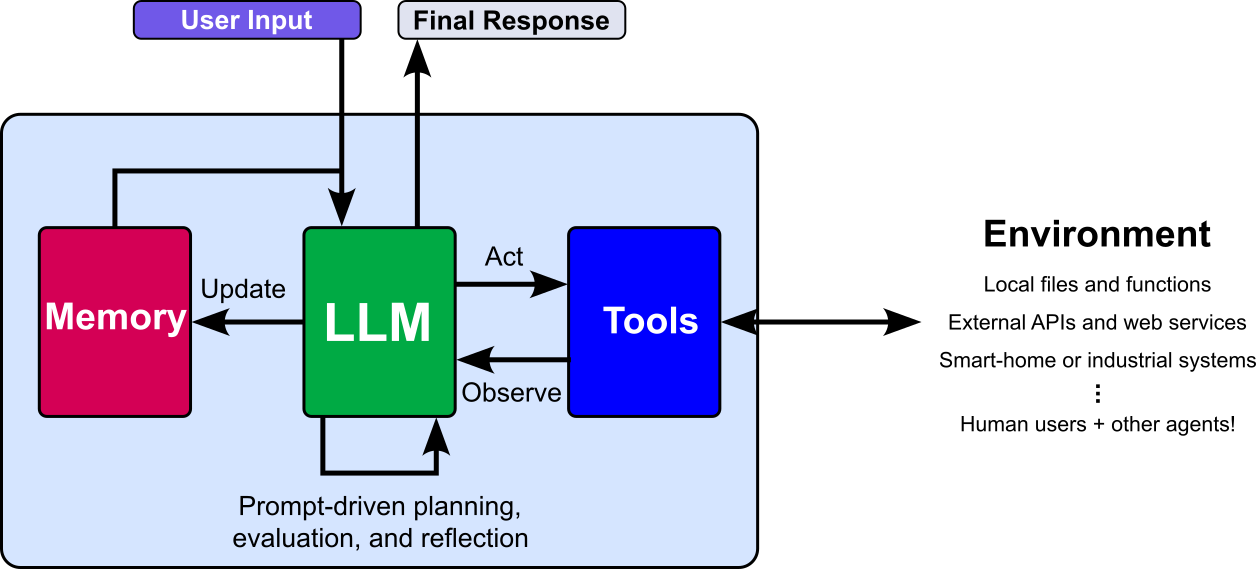
Note that, beyond just the planner, the memory and tools can also range from simple to highly sophisticated. Memory might store only the current conversation or retrieve information from a large knowledge base, while tools might perform basic calculations or interact with complex external services. In this notebook, we use basic versions of both so their implementation and purpose are easy to follow.
Agentic Loop
The previous figure of basic architecture of an AI agent shows the core components as well as indicates how they interact. However, to properly understand how all components work together, the following figures shows the general workflow of steps an agent is performing when solving a task; this workflow is also called the agentic loop to iterate the solving at task, particularly a complex one, is often an iterative process.
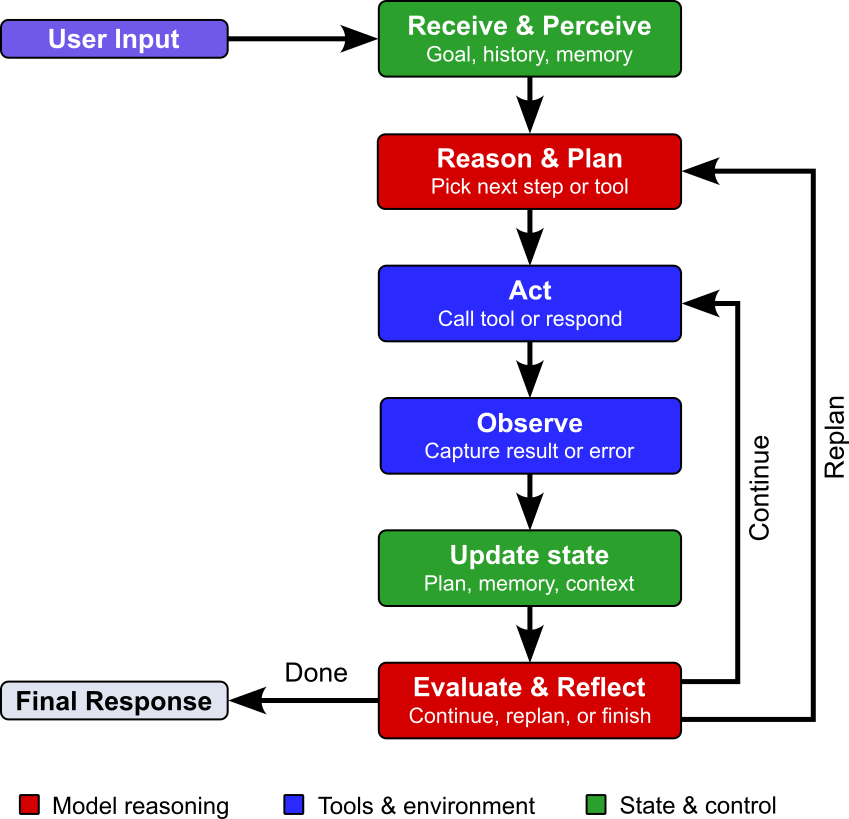
To elaborate more, the step of the agentic loop serve the following purpose:
Receive & Perceive: The agent receives a request or new information from its environment. It interprets the input and identifies the goal, relevant details, and any constraints.
Reason & Plan: The agent decides how to approach the task. It may break the goal into smaller steps and choose which information or tools it needs.
Act: The agent carries out the next step, such as responding to the user or calling a tool. If the task needs several steps, it may act more than once.
Observe: The agent receives the result of its action, such as a tool's output or the user's reply. It checks what happened and whether the result provides useful information.
Update State: The agent updates its working context with the new information. This can include recording progress, storing a relevant result, or revising the current plan.
Evaluate & Reflect: The agent checks whether it has achieved the goal and whether its response or action is adequate. If more work is needed, it can use what it has learned to continue the loop or adjust its approach.
To sum up, implementing an AI agent from scratch involves building both its core components and the loop that connects them. Building them provides a practical way to understand how an agent functions and how its parts work together.
Implementation of Components
In the following, we provide a short overview of the two core components of our agent: the memory and the tools, including their implementations. Both are identical to those in our previous notebook, so we keep the descriptions brief here and omit the individual tests. If you want to see how these components were developed and tested step by step, please refer to the previous notebook.
Memory
An LLM produces its output based only on the text it receives in the prompt. It does not have a built-in memory of past exchanges; everything it "knows" about the current conversation has to be present in that input. To work around this, basically all modern LLM-based chatbots resend the earlier conversation (or a summary of it) along with the user's most recent message. The sense of continuity comes from that reassembled prompt, not from the model remembering anything between turns. AI agents generalize this idea of combining current and past messages — or more generally, past information — to the concept of memory, which is typically implemented in two forms: short-term memory and long-term memory.
Short-Term Memory
An agent's short-term memory is the working record of the current chat session. It typically holds the messages submitted by the user and the messages generated by the agent (and often tool calls and their results; see below), kept in order. The example below shows a possible representation of the short-term memory for a conversation. Note that it uses the commonly used role-based format in which each message is labeled by its speaker (e.g., "system", "user", or "assistant") as well as the actual content of the message.
[
    {"role": "sytem", "content": "You are useful assistant helping users as best as possible."}
    {"role": "user", "content": "My name is Chris, and I need to know what the capital of France is."}
    {"role": "assistant", "content": "Hello Chris! The capital of France is Paris"}
    {"role": "user", "content": "What is my name?"}
]
This memory is "short-term" because it is tied to the session: when the session ends, or when the conversation grows beyond the model's context window and older parts are trimmed or summarized, that information is no longer available unless it has been saved elsewhere, such as in a long-term memory store. For our implementation, we keep the short-term memory quite straightforward: store the last k role-based messages in a list. This last message is then added to the current user prompt and passed the LLM.
Long-Term Memory
An agent's long-term memory is a persistent store of information collected across many conversations. It lives outside the model's context window, typically in a database, vector store, or files, so it can reach arbitrarily far into the past.
Simply saving every past message would be a poor design. Chat logs contain transient information, noise, redundancy, and outdated or contradictory details. Storing them verbatim makes the memory grow without bound, buries relevant items among irrelevant ones, and wastes prompt space and cost. Long-term memory therefore usually involves selection and condensation: only durable and useful information, such as stable facts, preferences, and key decisions, is kept, often in summarized or structured form.
Our implementation follows a common, simple approach. After each chat session (or after a certain amount of time or number of messages), the short-term memory is passed to the LLM with the request to extract useful facts from the conversation. The result is a simple list of strings containing facts likely to be useful in future conversations, as illustrated for our toy example below.
[
    "The user's name is Chris"
    "The user is interested in geography."
]
Long-term memory differs from short-term memory in scale. Short-term memory is bounded by a single session and usually fits in the prompt, whereas long-term memory accumulates over time and can grow far beyond the context window. Only a small fraction of it is relevant to any given prompt, and adding all of it would be impossible at large sizes and wasteful otherwise, since irrelevant text costs money and can distract the model. Long-term memory must therefore be easily searchable. Before responding, the agent queries the store for the few relevant facts and adds only those to the prompt.
Common approaches are keyword search, semantic search with embeddings in a vector database, structured lookup via fields or tags, and hybrid approaches that add filtering by recency or importance. The quality of retrieval largely determines the memory's usefulness: if the right information is not found, the agent behaves as if it had never learned it. Our implementation relies on semantic search. A pretrained embedding model embeds and indexes each fact. When the user submits a new prompt, it is embedded with the same model, a vector similarity search finds the most relevant facts, and only those are added to the prompt passed to the LLM.
The Memory Class
The Memory class implements both short-term and long-term memory. The short-term memory is a simple list to which recent messages are added via the add_message() method. Once a maximum number of messages is reached, the oldest message is dropped before the newest is added. The long-term memory needs more consideration, since memories must be stored permanently and be searchable. We use Chroma, an open-source vector database that stores embeddings (numeric representations of text, images, or other data) and retrieves those most similar to a query, which makes it well suited for semantic search and retrieval-augmented generation (RAG).
For embeddings, we use the pretrained, lightweight Sentence Transformer model all-MiniLM-L6-v2, which converts text into 384-dimensional vectors. It is loaded in the constructor via the SentenceTransformer class of the sentence-transformers library, and embeddings are created with model.encode(memories). Using this local model avoids additional calls to an embedding API such as OpenAI's.
Finally, the memories themselves are generated by the LLM. The current conversation (the short-term memory) is passed to the LLM with a system prompt that asks it to extract facts likely to be useful in future conversations. More specifically, we use the following system prompt and pass it together with the short-term memory to the LLM:
SYSTEM_PROMPT__EXTRACT_FACTS = """
Extract concise facts that may be useful in future conversations.
Prefer ongoing projects, stable preferences, and decisions.
Do not include temporary details, guesses, or information that is
already obvious from the conversation. Return only a JSON object
with a "facts" key containing a list of strings. If there are no
useful facts, return an empty list.
""".strip()

print(SYSTEM_PROMPT__EXTRACT_FACTS)
Extract concise facts that may be useful in future conversations.
Prefer ongoing projects, stable preferences, and decisions.
Do not include temporary details, guesses, or information that is
already obvious from the conversation. Return only a JSON object
with a "facts" key containing a list of strings. If there are no
useful facts, return an empty list.
The Memory class in the code cell below implements short-term and long-term memory as described above. A few code details are worth noting:
- Reset on initialization: When a
Memoryinstance is created, any existing Chroma database with the same name is deleted first. This keeps things consistent when multiple instances are created by running the same or different cells in the notebook. - Cosine distance: The setting
{"hnsw:space": "cosine"}configures the Chroma database to use cosine distance as its similarity metric for the underlying approximate nearest-neighbor index, which is based on Hierarchical Navigable Small World (HNSW). - Unique IDs: Chroma requires unique IDs when adding entries via
add(). Theremember()method therefore uses a simple counter to generate IDs of the formmem_0,mem_1,mem_2, and so on.
class Memory:
    def __init__(self,
        openai_client: openai.OpenAI,
        extractor_model: str="gpt-4o-mini",
        embedding_model_id: str="sentence-transformers/all-MiniLM-L6-v2",
        max_short_term_messages: int=20
    ):

        self.openai_client = openai_client
        self.extractor_model = extractor_model
        self.embedding_model = SentenceTransformer(embedding_model_id)
        self.max_short_term_messages = max_short_term_messages

        # Short-term memory: conversation history for the current session.
        self.short_term_memory = []

        # Long-term memory: Chrome in-memory vector database.
        self.init_long_term_memory()


    def init_long_term_memory(self):
        chromadb_client = chromadb.EphemeralClient()  # in-memory only, nothing written to disk
        #chromadb_client.PersistentClient(path="./agent_memory.chromadb") # for persistent storage

        try:
            chromadb_client.delete_collection("agent_memory")
        except:
            pass

        self.long_term_memory = chromadb_client.get_or_create_collection(
            name="agent_memory",
            metadata={"hnsw:space": "cosine"},
        )


    def add_message(self, role: str, content: str):
        # Add role and message to short term memory
        self.short_term_memory.append({"role": role, "content": content})

        # Keep only the most recent messages.
        self.short_term_memory = self.short_term_memory[-self.max_short_term_messages :]


    def extract_facts(self, messages: list[dict]) -> list[str]:
        """Extract useful long-term facts from a conversation."""
        response = self.openai_client.chat.completions.create(
            model=self.extractor_model,
            messages=[
                { "role": "system", "content": SYSTEM_PROMPT__EXTRACT_FACTS },
                *messages,
                { "role": "user", "content": "Extract the useful long-term facts from the conversation above." },
            ],
            response_format={"type": "json_object"},
        )

        result = json.loads(response.choices[0].message.content)
        facts = result.get("facts", [])

        # Keep only non-empty strings in case the response is malformed.
        return [fact.strip() for fact in facts if isinstance(fact, str) and fact.strip()]


    def remember(self, memories: [str]):
        """Add a memories to long-term memory."""

        # Generate unique IDs using a simple counter
        start = self.long_term_memory.count()
        ids = [f"mem_{start + i}" for i in range(len(memories))]

        # Embed and add memories to long-term memory
        self.long_term_memory.add(
            ids=ids,
            documents=memories,
            embeddings=self.embedding_model.encode(memories).tolist(),
        )


    def retrieve(self, queries: [str], k: int = 3):
        """Return the k long-term memories most similar to the query."""
        results = self.long_term_memory.query(
            query_embeddings=self.embedding_model.encode(queries).tolist(),
            n_results=k,
        )

        # Return list of retrieved facts
        return results["documents"][0]
Tools
An LLM's knowledge and abilities come from its training data, so it knows little or nothing about topics that were missing or thinly represented there. On its own, it performs poorly on many kinds of prompts, such as recent events, private documents, specialized topics, exact computations, precise counting, live data, and running code.
This motivates extending LLMs with outside components, i.e., tools. The system prompt tells the LLM which tools exist and how to use them. For a new user prompt, the LLM decides whether a tool is needed and requests it in its response. The agent then calls the tool and passes the result back to the LLM, which generates the final answer.
In our implementation, tools are simple methods that return mock results, which is enough to illustrate how tool calls and their results are handled. The three methods cover task types that basic LLMs are not suited for:
- Exact computations: LLMs predict likely next tokens rather than execute arithmetic, so exact calculations can be error-prone.
add_numbers()adds two given numbers. - Live data: An LLM's knowledge may be outdated, so current information such as today's weather requires a live data source.
get_temperature()returns the current temperature for a given city; here it returns a random value, whereas in practice it would call a public weather API. - Performing actions: An LLM only generates text and cannot directly act in the real world.
buy_shares()buys a given number of shares of a ticker symbol at a given price per share, and here merely returns a mock response.
All three methods are implemented as part of the Tools class in the code cell below. All three methods are implemented as part of the Tools class in the code cell below. For a more flexible and extensible implementation, the code tool decorator is a simple marker: it sets the attribute _is_tool = True on the function it decorates and returns the function unchanged. It does not wrap or modify the behavior of the method in any way. Its only purpose is to flag which methods of the Tools class are allowed to be called by the LLM. The three tool methods (add_numbers, get_temperature, and buy_shares) are decorated this way and implemented with mock logic.
The get_registry() method then builds the tool whitelist automatically. The result is a dictionary that maps tool names to bound methods. The system_prompt() method returns the system prompt to describe all available tools, i.e., their names, descriptions, and input arguments. This information is needed since the LLM has no awareness of the surrounding software. There is no mandatory prompt format, but in real systems, tool requests are often represented in a structured format such as JSON, so the application can reliably identify the requested tool and its arguments, run it, and return the result to the LLM.
def tool(func):
    """Mark a method as a tool that may be called by the LLM."""
    func._is_tool = True
    return func

class Tools:

    @tool
    def add_numbers(self, a: float, b: float) -> float:
        """Add two numbers."""
        return a + b
    @tool
    def get_temperature(self, city: str) -> str:
        """Fetch the live weather data (temperature only) data for a given city."""
        temperature = random.uniform(-15, 35)
        # Return temperature, if available
        return f"{temperature:.1f}°C" if temperature is not None else "Temperature unavailable."

    @tool
    def buy_shares(self, symbol: str, amount: int, price: float) -> str:
        """Place a buy order for a certain amount of share for a certain price."""
        return f"Order for {amount} {symbol} shares for {price} per share successfully placed"

    def get_registry(self) -> dict:
        """Collect all methods marked with @tool."""
        return {
            name: method
            for name in dir(self)
            if callable(method := getattr(self, name))
            and getattr(method, "_is_tool", False)
        }

    def system_prompt(self):
        return """
The following tools are available for you to use:

Name: add_numbers
Description: Perform a given addition of two numbers.
Input: {{"a": number, "b": number}}
Example output: {{"type": "tool_call", "name": "add_numbers", "arguments": {"a": "42", "b": "101"}}

Name: get_temperature
Description: returns the current temperature for a given city.
Input: {{"city": "name of the city"}}
Example output: {{"type": "tool_call", "name": "get_temperature", "arguments": {{"city": "Singapore"}} }}

Name: buy_shares
Description: buys a certain amount  shares for a certain price for share for a given ticker symbol.
Input: {{"symbol": "stock ticker symbol", "amount": "amount of shares to buy", "price": "price per share"}}
Example output: {{"type": "tool_call", "name": "buy_shares", "arguments": {{"symbol": "AAPL", "amount": 100", "price": 350.0}} }}

For each turn, return exactly one JSON object. If a tool should be called,
the JSON object should match the format of the example output for that tool.

If no tool is called, the JSON object should match the format
{{"type": "final_answer", "answer": "<your answer>", ...}}

Make sure the request require to call an available tool.
Only request tools listed above. Do not invent tool results. Request only 1 tool at once.
If an argument is missing, prompt the user to provide the missing argument.
""".strip()
Since an LLM's behavior depends only on the prompt, the prompt is the main lever for making tool calling reliable, and it can grow arbitrarily complex. Beyond a bare tool name, a thorough prompt may include precise descriptions of when to use (and not use) each tool, exact argument types and formats, behavioral rules (such as asking for missing information or confirming destructive actions), required output formats, example calls, and instructions for handling results and errors. Each addition narrows the ways the model can go wrong, but none guarantees correct behavior, because generation is probabilistic. Prompts are therefore refined through testing, and applications still validate tool calls before executing them.
Implementation of the AI Agent
Having implemented and tested the Memory and the Tools class, we have the two main components to actually build an AI agent — recall that we do not implement the planner as a distinct component but favor prompt-driven planning in this notebook for simplicity. This means now that implementing an agent mainly comes down to implementing the agentic loop. So let's have another look at the corresponding figure, but know with the knowledge how memory and tools work.
System Prompt for Plan-then-ReAct
A Plan-then-ReAct AI agent first asks the LLM to turn the user's goal into an explicit, ordered list of steps, and then executes that plan step by step using the ReAct loop (thought, action, observation) for each step. Each step sees the overall goal, the plan, and the results of earlier steps, and can call tools as needed within a small iteration budget. After a step is completed, the agent can optionally re-plan, i.e., ask the LLM whether the remaining steps still make sense given what was learned and revise them if necessary. Once all steps are done, the LLM composes the final answer from the collected results.
- Pros: Compared to plain ReAct, where the plan stays implicit in a growing thought trace, the plan here is a structured object that can be tracked, validated, and updated, which reduces goal drift and keeps contexts smaller.
- Cons: The price is extra LLM calls for planning and re-planning, and the agent can still follow a flawed plan if the LLM plans poorly.
In our implementation, planning is prompt-driven: instead of building a dedicated planning component (such as a symbolic planner or a search algorithm over possible action sequences), we simply ask the LLM to create and update the plan. The LLM already understands the task, knows which tools exist, and can break a goal into sensible steps in natural language, so a well-crafted prompt gets us a surprisingly capable planner with very little code. This keeps the implementation short, transparent, and flexible, since changing the planning behavior only means changing the prompt rather than rewriting program logic. It also fits the goal of this notebook: to understand the core mechanics without hiding anything behind additional machinery.
However, this means that we have to guide the LLM carefully. Because the plan is processed by ordinary Python code, the LLM must not only produce a good plan but also return it in a precise, machine-readable format, for example a numbered list or JSON with a fixed structure. The prompt therefore needs to spell out what the plan should contain, how it must be formatted, and what to do when a step fails or the plan needs to be revised. Since generation is probabilistic, the model may still deviate from these instructions. This is why the notebook adds checks that validate the LLM's output before it is used. Prompt-driven planning is thus simple and flexible, but it shifts part of the reliability burden to prompt design and validation.
Concretely, we use the system prompt shown in the code cell below. It turns the LLM into a Plan-then-ReAct agent by dictating a strict JSON protocol. It forces the first message to always be a create_plan (with at least two pending steps), injects the known facts ({FACTS}) and available tools ({TOOLS}), and defines six message types the LLM may return each turn: create_plan, update_plan, tool_call, reasoning_step, ask_user, and final_answer. Every message must carry the full current plan, so the plan acts as the agent's persistent, machine-readable state.
Additionally, a set of plan rules governs how it is processed: steps have fixed statuses (pending, in_progress, done, blocked), are worked on strictly in order, and completed steps are never changed. The rules also cover edge cases for robustness: missing arguments trigger ask_user rather than guesses, nonexistent tools must not be invented, blocked is reserved for steps that truly cannot be done, and final_answer is allowed only once no step remains open. Finally, the prompt separates internal working state from what the user sees (only the final answer) and tells the LLM never to write the observations or user replies itself, which keeps the surrounding Python code in control of the loop.
SYSTEM_PROMPT__PLAN_THE_REACT = """
You are an agent that solves tasks by planning first, then executing the plan step by step.

CRITICAL: Your FIRST message must ALWAYS be of type "create_plan", even for trivial requests.
Never answer directly in your first message. Put the steps in the "plan" field, not only in "thought".
For a trivial request, still split the work into at least 2 steps (e.g. "compute the result", then "compose the answer").

Known facts:
{FACTS}

Tools:
{TOOLS}

Return exactly one JSON object per turn, in one of these formats:
- First message only, to create the plan (at least 2 steps, all "pending"): {{"type": "create_plan", "thought": "<why these steps>", "plan": [{{"step": "<description>", "status": "pending", "result": null}}]}}
- To change the plan: {{"type": "update_plan", "thought": "<why, citing the observation that motivated it>", "plan": [{{"step": "<description>", "status": "<status>", "result": "<outcome or null>"}}]}}
- To call a tool: {{"type": "tool_call", "thought": "<what to do next and why>", "name": "<tool name>", "arguments": {{<arguments>}}, "plan": [{{"step": "<description>", "status": "<status>", "result": "<outcome or null>"}}]}}
- To complete a step WITHOUT a tool (reasoning, computation, synthesis, drafting): {{"type": "reasoning_step", "thought": "<do the work for the current step here>", "plan": [{{"step": "<description>", "status": "<status>", "result": "<outcome or null>"}}]}}
- To ask the user for missing information: {{"type": "ask_user", "thought": "<what is missing and why you need it>", "question": "<one clear question for the user>", "plan": [...]}}
- To give the final answer: {{"type": "final_answer", "thought": "<why you can answer now>", "answer": "<your answer>", "plan": [{{"step": "<description>", "status": "<status>", "result": "<outcome>"}}]}}

Plan rules:
- Allowed statuses: pending, in_progress, done, blocked.
- Work on steps strictly in order. Exactly one step is "in_progress" while you work on it.
- Every message must contain the full current plan, with a "result" for every done or blocked step.
- After a tool result arrives, mark that step "done" and record the outcome in "result" in your next message.
- Steps that need no tool use "reasoning_step": do the work in "thought" and store the conclusion in "result".
- Never change a step that is already "done".
- If a required tool argument is missing and only the user can provide it, use ask_user and keep the step "in_progress". Never guess missing values.
- Never mark a step "blocked" just because user input is missing. Use "blocked" only when a step cannot be done at all (e.g. no suitable tool exists).
- A step like "ask the user for X" is completed with ask_user. When the user's reply arrives, mark that step "done" and put the reply in "result".
- Never invent tools. If no tool fits, use reasoning_step, or mark the step "blocked" and explain why in "result".
- Keep results concise (facts, numbers, decisions), not full reasoning.
- Use final_answer only when no step is pending or in_progress.
- Only final_answer is shown to the user. Everything else is internal working state.
- After each message I reply with an observation or the user's reply. Never write these yourself.
""".strip()
Although this system prompt looks reasonable, with a clear protocol, well-defined message types, and rules for edge cases, there is no objective means to assess its quality. Prompt design is closer to craft than to engineering: the prompt reads well to a human, but whether it actually makes the LLM behave as intended can only be judged by testing. Even then, a handful of successful examples proves little, because LLM outputs are probabilistic and may differ between runs, models, and API updates. A rule that works today with gpt-4o-mini may be ignored by another model or fail on an unusual input.
There is also no formal way to verify that the rules are complete, consistent, or free of unintended side effects, for instance, whether the demand for at least two steps leads to artificial plans for trivial requests. Improving such a prompt is therefore an iterative, largely trial-and-error process of observing failures and adding or rewording rules, which can make the prompt longer and more complex without any guarantee that it gets better. This is one more reason why the checks in the surrounding Python code matter, and why a systematic evaluation on a representative set of test cases is needed before relying on such an agent.
Important Constants
This code defines the constants that the agent's Python logic uses to validate and process the LLM's responses, mirroring the rules in the system prompt.
ALLOWED_STATUSlists the only valid statuses for a plan step. Any other value the LLM returns (e.g."finished"or"todo") can be detected and rejected.CLOSED_STATUSandOPEN_STATUSsplit these statuses into two groups: steps that are finished (done,blocked) and steps that still need work (pending,in_progress). The agent can use them for simple checks, for example to verify thatfinal_answeris only used when no step is open, or to find the next step to work on.VALID_TYPESlists the six message types the LLM is allowed to return. A response with an unknown type can be caught and handled instead of crashing the loop or being silently ignored.CREATE_PLAN_EXAMPLEis a ready-made example of a validcreate_planmessage, stored as a string. It is most likely used to correct the LLM when its first message has the wrong type: the agent can show the model exactly what is expected, for instance in a re-prompt such as "Your first message must look like this: ...". Having the example as a constant keeps the correction message consistent and avoids repeating the JSON in several places.
ALLOWED_STATUS = {"pending", "in_progress", "done", "blocked"}
CLOSED_STATUS = {"done", "blocked"}      # finished, no more work on them
OPEN_STATUS = {"pending", "in_progress"}  # still to be worked on
VALID_TYPES = {"create_plan", "update_plan", "tool_call", "reasoning_step", "ask_user", "final_answer"}

CREATE_PLAN_EXAMPLE = (
    '{"type": "create_plan", "thought": "<why these steps>", "plan": '
    '[{"step": "<first step>", "status": "pending", "result": null}, '
    '{"step": "<second step>", "status": "pending", "result": null}]}'
)
Together, these constants move the rules that the prompt only requests into code that enforces them. Since the LLM may ignore the prompt, this is one of the additional checks that make the agent somewhat more robust than a naive implementation.
Class Constructor
The code cell below defines the PlanThenReActAgent class with its constructor, which wires together the agent's dependencies and configures its robustness settings. Its main features are:
- Dependency injection. The LLM client (
client), thememory, and thetoolsobject are passed in rather than created inside the class. This keeps the agent decoupled from specific implementations, so you can swap the memory, the tools, or the client (e.g., for testing with a mock) without touching the agent logic. - Configurable model .
modeldefines the pretrained and available OpenAI model; it defaults to"gpt-4o-mini". min_plan_steps=2. This is the threshold that code-side validation can use to enforce the rule from the prompt that a plan needs at least two steps. The prompt only requests this; the parameter lets the agent actually check it.max_rejections=3. This limits how many consecutive invalid LLM messages (wrong type, bad status, malformed JSON, etc.) the agent tolerates, re-prompting the LLM with a correction each time. After that, it can give up instead of looping forever, which acts as a termination safeguard._pending. This attribute stores the saved state (messagesandplan) while the agent waits for the user to answer anask_userquestion. It lets the agent pause and resume the same task across turns instead of starting over. It isNonewhen nothing is waiting.- Tool registry (
tool_functions). This dictionary maps tool names to the actual bound methods and acts as a whitelist. Only the three registered methods can ever be executed, so a request for a nonexistent or unintended tool can be detected with a simple lookup, rather than calling arbitrary attributes via something likegetattr. This is a basic guardrail and directly addresses the "LLM requests a tool that doesn't exist" problem.
Note that the registry is hard-coded to the three tools of this notebook. A more general version could build it automatically from the tools object, but the explicit version is simpler and safer for learning purposes.
class PlanThenReActAgent:

    def __init__(
        self,
        client: openai.OpenAI,
        memory,
        tools,
        model="gpt-4o-mini",
        min_plan_steps=2,
        max_rejections=3,
    ):
        self.client = client                  # LLM API client (here: OpenAI)
        self.memory = memory                  # Memory component
        self.tools = tools                    # Tools component
        self.model = model                    # Name of LLM model (default: "gpt-4o-mini")
        self.min_plan_steps = min_plan_steps  # Minimum number of steps for initial plan
        self.max_rejections = max_rejections  # Maximum number of allowed consecutive invalid messages
        self._pending = None                  # saved {"messages", "plan"} while waiting for the user

        # Only expose methods in this registry.
        self.tool_functions = self.tools.get_registry()
The attribute _pending also comes with two small helper methods to manage the agent's pause-and-resume state. When the agent ends a run with an "ask_user" message, it saves its messages and the plan in _pending so that it can continue the same task once the user replies.
The
awaiting_user()property exposes this state as a simple boolean, so that the calling code (e.g., a chat loop in the notebook) can tell whether the next user input is the answer to the agent's question and should resume the task, or a new request that should start a fresh run. Because it is a read-only property, the outside code can inspect the state without being able to modify it accidentally.The
reset()method is the counterpart that clears this state explicitly. It is useful when the user ignores the question and wants to do something else, or when a task should be abandoned, since otherwise the agent would keep treating every new message as a reply to the old question.
@property
def awaiting_user(self):
    """True if the last run() ended with a question to the user."""
    return self._pending is not None

def reset(self):
    """Discard a pending question; the next run() starts a fresh task."""
    self._pending = None

PlanThenReActAgent.awaiting_user = awaiting_user
PlanThenReActAgent.reset = reset
Message Helpers
The agent is only as dependable as the messages the LLM returns. The content matters, since a poor plan or a wrong tool choice leads the agent astray. But the format matters just as much, because ordinary Python code consumes these messages: it reads the type field, extracts the plan, and decides what to do next. The expected JSON structure is spelled out in the system prompt, yet this is only a request. Generation is probabilistic, so the model may wrap the JSON in extra text, produce a syntax error, return a list instead of an object, or deviate in some other small way. If the agent assumed well-formed output, a single deviation could crash the loop or send it down a wrong path.
The _parse method implements the first line of defense against this. It tries to decode the response with json.loads, and if that fails (invalid syntax, or None or another non-string input), it returns an error message instead of raising an exception. It then checks that the top-level value is a JSON object (a dictionary), since valid JSON such as a list, string, or number would break all later field access. Finally, it normalizes the type field by stripping whitespace and converting it to lowercase, so harmless variations like " Tool_Call " are tolerated rather than rejected. The method always returns a pair (action, error), where exactly one of the two is None, so the caller never has to deal with an undefined action. When there is an error, the message is phrased as an instruction to the LLM, which suggests it is meant to be fed back to the model as a correction, with the rejection counter (max_rejections) limiting how often this can happen in a row.
def _parse(self, content):
    """Return (action, error). Never leaves `action` undefined."""
    try:
        action = json.loads(content)
    except (TypeError, ValueError) as e:
        return None, f"Invalid JSON: {e}. Return exactly one JSON object."
    if not isinstance(action, dict):
        return None, "The top-level JSON value must be an object."
    action_type = action.get("type")
    if isinstance(action_type, str):
        action["type"] = action_type.strip().lower()
    return action, None

PlanThenReActAgent._parse = _parse
Note that _parse only checks syntax and basic structure. Whether type is actually one of the valid types, whether the plan is well-formed, or whether the statuses are allowed is left to further checks, presumably using the constants defined earlier.
Plan Helpers
The central concept of the Plan-then-ReAct agent is, as the name suggests, the plan. In short, a plan is a list of steps that the LLM deems necessary to reach the goal defined by the user. Everything else in the agent revolves around it: the plan determines which step is worked on next, which tools are called, what has already been achieved, and when the agent may finally give its answer. It is also the agent's persistent, machine-readable state, since every message carries the full current plan.
But the plan is itself generated by the LLM, and so it inherits all the uncertainty that comes with LLM output. The model may return too few steps, use a status that does not exist, leave out a result for a finished step, alter a step that was already marked as done, or mark several steps as in progress at once. Because the rest of the agent relies on the plan being consistent, an invalid plan could silently derail the whole run. We therefore cannot simply trust it and must make sure that it is correct before acting on it. This is the job of the method _validate_plan() in the code cell below, which checks the plan against the rules that the system prompt only requests and returns an error if one of them is violated.
def _validate_plan(self, new_plan, old_plan=None, creating=False, min_steps=2):
    """Return an error string, or None if the plan is valid."""
    if not isinstance(new_plan, list) or not new_plan:
        return "'plan' must be a non-empty list of steps."

    for i, s in enumerate(new_plan, 1):
        if not isinstance(s, dict) or not isinstance(s.get("step"), str) or not s["step"].strip():
            return f"Plan step {i} must be an object with a non-empty 'step' string."
        if s.get("status") not in ALLOWED_STATUS:
            return (f"Plan step {i} has invalid status {s.get('status')!r}. "
                    f"Allowed: {sorted(ALLOWED_STATUS)}.")
        if s["status"] in CLOSED_STATUS and s.get("result") in (None, ""):
            return (f"Plan step {i} is '{s['status']}' but has no 'result'. "
                    "Record the outcome (or the reason it is blocked).")

    if creating:
        if len(new_plan) < min_steps:
            return f"The plan needs at least {min_steps} steps."
        if any(s["status"] != "pending" for s in new_plan):
            return "A newly created plan must have all steps 'pending'."

    # Order: closed* , then open steps with at most one in_progress, listed first.
    seen_open = False
    for i, s in enumerate(new_plan, 1):
        if s["status"] in OPEN_STATUS:
            seen_open = True
        elif seen_open:
            return (f"Step {i} is '{s['status']}' but an earlier step is still open. "
                    "Work strictly in order.")
    open_statuses = [s["status"] for s in new_plan if s["status"] in OPEN_STATUS]
    if open_statuses.count("in_progress") > 1:
        return "Only one step may be 'in_progress' at a time."
    if "in_progress" in open_statuses and open_statuses[0] != "in_progress":
        return "The 'in_progress' step must be the first unfinished step."

    # Completed work must not be silently rewritten.
    if old_plan:
        for i, old in enumerate(old_plan):
            if old["status"] != "done":
                continue
            if i >= len(new_plan):
                return "You removed completed steps from the plan."
            new = new_plan[i]
            if (new["status"] != "done"
                    or new["step"] != old["step"]
                    or new.get("result") != old.get("result")):
                return (f"Completed step {old['step']!r} must be copied unchanged "
                        "(same text, status 'done', same result).")
    return None

PlanThenReActAgent._validate_plan = _validate_plan
Apart from the _validate_plan(), the agent class features additional plan-related helper methods to keep the main agent loop short and readable by wrapping operations on the plan that are needed in several places:
_remaining()returns all steps that are still open (pendingorin_progress), using theOPEN_STATUSconstant defined earlier. This is the basis for the agent's most important control question: is there still work to do? It lets the agent check, for example, thatfinal_answeris only accepted once no open step remains, which enforces a rule the system prompt merely requests._next_step()builds on it and returns the description of the first open step, orNoneif the plan is complete. Since the agent works on the steps strictly in order, this is the step the LLM should currently be working on. The agent uses it to remind the LLM of its current task in an observation message, or to check that the LLM is not skipping ahead._plan_summary()turns the plan into a compact, human-readable string with one line per step and its status, omitting the results. It is useful for logging and for displaying progress in the notebook so that you can follow how the plan evolves.
def _remaining(self, plan):
    return [s for s in plan if s["status"] in OPEN_STATUS]

def _next_step(self, plan):
    remaining = self._remaining(plan)
    return remaining[0]["step"] if remaining else None

def _plan_summary(self, plan):
    return "\n".join(f"\t- {s['step']} ({s['status']}) " for s in plan)

PlanThenReActAgent._remaining = _remaining
PlanThenReActAgent._next_step = _plan_summary
PlanThenReActAgent._plan_summary = _plan_summary
Action Helpers
Each response by the agent invokes some form of action by the agent. _check_action() is the agent's central gatekeeper. It takes a message that has already been parsed as JSON, together with the current plan, and decides whether the message may be processed. It returns None if everything is fine and otherwise an error string, written as an instruction to the LLM so it can be fed back as a correction (with max_rejections limiting how often this may happen in a row). The checks follow the order of the agent's protocol. First, the message type must be one of the valid types. Second, the message must fit the current state: the first message must be create_plan, and once a plan exists, create_plan is no longer allowed and update_plan must be used instead. Third, the plan carried by the message is validated via _validate_plan().
The remaining checks tie the message type to the plan's progress and to the type's own requirements. Actions that continue the work (tool_call, reasoning_step, ask_user) are rejected if no open step remains, while final_answer is rejected as long as open steps remain, so the agent can only finish when the plan is truly complete or the unfinished steps are explicitly blocked. In addition, an ask_user message needs a non-empty question, and a tool_call must name a tool that exists in the registry and supply its arguments as a JSON object. This is where the "nonexistent tool" problem is handled: instead of crashing, the agent tells the LLM which tools are available and suggests alternatives. Overall, the method turns rules that the system prompt merely requests into rules the code enforces, though it can only check the structure and consistency of a message, not whether its content (the plan, the chosen tool, the arguments) is actually sensible.
def _check_action(self, action, plan):
    """Return an error string, or None if the action may be processed."""
    action_type = action.get("type")
    if action_type not in VALID_TYPES:
        return f"Unknown type {action_type!r}. Valid types: {sorted(VALID_TYPES)}."

    if plan is None and action_type != "create_plan":
        return ("Your first message must be of type 'create_plan'. Do not answer yet, "
                "even if the task is simple. Put the steps in the 'plan' field (at least "
                f"{self.min_plan_steps}), not only in 'thought'. Exact format: "
                + CREATE_PLAN_EXAMPLE)
    if plan is not None and action_type == "create_plan":
        return "A plan already exists. Use 'update_plan' to change it."

    new_plan = action.get("plan")
    error = self._validate_plan(
        new_plan, plan,
        creating=(action_type == "create_plan"),
        min_steps=self.min_plan_steps,
    )
    if error:
        return error

    remaining = self._remaining(new_plan)

    if action_type in ("tool_call", "reasoning_step", "ask_user") and not remaining:
        return "All steps are complete. Return 'final_answer'."
    if action_type == "final_answer" and remaining:
        return (f"{len(remaining)} step(s) are still unfinished. Complete them first, "
                "or mark them 'blocked' (with a reason in 'result') via update_plan.")

    if action_type == "ask_user":
        question = action.get("question")
        if not isinstance(question, str) or not question.strip():
            return "'ask_user' needs a non-empty 'question' string."

    if action_type == "tool_call":
        name = action.get("name")
        if name not in self.tool_functions:
            return (f"Tool {name!r} does not exist. Available tools: "
                    f"{list(self.tool_functions)}. Use one of them, complete the step "
                    "with a reasoning_step, or mark it 'blocked' via update_plan.")
        if not isinstance(action.get("arguments", {}), dict):
            return "'arguments' must be a JSON object."

    # If there are no errors, return None
    return None

PlanThenReActAgent._check_action = _check_action
Memory Helpers
The method make_query() combines the las k messages in the short-term memory and the current user message into a single string. This string is then used as the query to retrieve the most relevant facts from the long-term memory. This represents a basic solution to the situation that the current user message on its own might not contain useful information to retrieve relevant facts. For example, consider the agent asking for confirmation, and the user simple submits "Yes.", which does not carry meaning without some context. The k most recent messages in short-term memory aim to provide this context.
def _make_query(self, user_message, n=3):
    # Consider only the last n messages
    recent = self.memory.short_term_memory[-n:]
    # Concatenate recent messages in to single string
    context = " ".join(m["content"] for m in recent)
    # Return recent messages and current user message as single string
    return f"{context} {user_message}"

PlanThenReActAgent._make_query = _make_query
In practice, other approaches to add context to the last user message are possible. A more robust option is to have the LLM rewrite the message into a self-contained query, or to generate search queries itself. Other approaches use a running conversation summary as the query, merge results from several recent messages, skip retrieval for trivial replies and keep earlier retrieved memories, or expose memory search as a tool so the agent decides when and what to search. In practice, a combination of recent turns and a skip rule for trivial replies gives most of the benefit with little complexity, with query rewriting as the natural next step.
Tool Helpers
A core functionality of agents is there ability call call external tools to perform action the LLM is not capable of. The method _execute_tool() is the "act" part of the ReAct loop: it takes a tool call that has already passed _check_action(), looks the tool up in the registry, runs it with the arguments supplied by the LLM, and wraps the outcome in an observation message that is sent back to the LLM. Because the name was validated beforehand, the lookup in tool_functions is safe. On success, the observation has the status ok, contains the tool's result, and includes an instruction that reminds the LLM to mark the step as done and record the outcome in its next message. This nudges the LLM to keep the plan up to date, which the plan rules otherwise only request.
def _execute_tool(self, name, args, verbose):
    function = self.tool_functions[name]
    try:
        if verbose:
            print(f"[ACTION] Call {name}({args})")
        result = function(**args)
        if verbose:
            print(f"[OBSERVATION] {result}")
        return {
            "type": "observation", "status": "ok", "tool": name, "result": result,
            "instruction": "Mark this step 'done' and record the outcome in 'result' in your next message.",
        }
    except Exception as e:  # tools can raise anything; never crash the agent
        if verbose:
            print(f"[OBSERVATION - ERROR] {type(e).__name__}: {e}")
        return {
            "type": "observation", "status": "error", "tool": name,
            "message": f"{type(e).__name__}: {e}",
            "instruction": ("Retry with corrected arguments. If a required value is missing and "
                            "only the user can provide it, use ask_user. Otherwise use a "
                            "reasoning_step or mark the step 'blocked' via update_plan."),
        }

PlanThenReActAgent._execute_tool = _execute_tool
The method's main robustness feature is its error handling. Tools can fail in many ways, for example when the LLM passes missing, extra, or wrongly typed arguments (which raises a TypeError when unpacking **args) or when the tool itself raises an exception. Instead of crashing the agent, a broad except Exception catches any failure and converts it into an observation with the status error, the exception type and message, and an instruction on how to recover: retry with corrected arguments, ask the user if a value is missing, or fall back to a reasoning step or mark the step as blocked. The error is thus treated as information that the LLM can react to, rather than a fatal event. Note that the method only checks that arguments can be passed to the tool, not whether their values are sensible, and that a tool which hangs rather than raises would still block the agent, since there is no timeout.
Feedback Helpers
The two help methods in the code cell below handle how the agent "talks back" to the LLM:
_add_observation()appends a message to the conversation, serializing the observation dictionary as JSON in ausermessage. This matches the system prompt's promise that every turn is answered with an observation or the user's reply, which keeps the dialogue in a consistent, machine-readable format._reject()builds on this to implement the correction mechanism: when a message fails parsing or_check_action(), the error is not raised as an exception but sent back to the LLM as an observation with statuserror, together with the instruction to fix the problem and return one corrected JSON object.
Together, the helpers give the agent a simple, uniform way to give feedback, so mistakes by the LLM become information it can react to, while the rejection counter (max_rejections) ensures this cannot continue forever.
def _add_observation(self, messages, observation):
    messages.append({"role": "user", "content": json.dumps(observation, default=str)})

def _reject(self, messages, error, verbose):
    if verbose:
        print(f"[REJECTED] {error}")
    self._add_observation(messages, {
        "type": "observation",
        "status": "error",
        "message": error,
        "instruction": "Fix the problem and return one corrected JSON object.",
    })

PlanThenReActAgent._add_observation = _add_observation
PlanThenReActAgent._reject = _reject
Agentic Loop
The method _loop() is the heart of the agent: it repeatedly asks the LLM for the next message, validates it, acts on it, and feeds the outcome back, until the agent has an answer for the user, has to ask a question, or runs out of budget. In each iteration, it calls the LLM (with JSON output mode enabled) and appends the reply to the message history. The reply then passes through the two gatekeepers, _parse() and _check_action(). If either reports a problem, the error is sent back via _reject() and the loop continues, giving the LLM a chance to correct itself. A counter of consecutive rejections is reset after every valid message and aborts the run with an apology once max_rejections is exceeded, so a misbehaving model cannot cause an endless correction cycle. The loop is also bounded by max_steps, which acts as a second termination safeguard.
Once a message is valid, its plan is committed as the new source of truth, and the next action depends on the message type. For create_plan and update_plan, the plan is merely recorded and the LLM is told which step to work on next. For reasoning_step, the conclusion is acknowledged and the LLM is told to continue. For tool_call, the tool is executed via _execute_tool() and the result (or error) is returned as an observation, which closes the classic ReAct cycle of thought, action, and observation. Two types end the loop: ask_user stores the current messages and the plan in _pending so the run can be resumed after the user replies, and returns the question; final_answer records the answer in memory and returns it. If the step budget is exhausted without either, the loop gives up with a fallback message. Overall, the loop itself is short and simple, while most of the robustness comes from the validation and feedback mechanisms around it.
def _loop(self, messages, plan, max_steps, verbose):
    rejections = 0  # consecutive invalid messages

    for _ in range(max_steps):
        response = self.client.chat.completions.create(
            model=self.model,
            messages=messages,
            response_format={"type": "json_object"},
        )
        content = response.choices[0].message.content or ""
        messages.append({"role": "assistant", "content": content})

        # --- parse and validate; on any problem, give feedback and continue ---
        action, error = self._parse(content)
        if error is None:
            error = self._check_action(action, plan)
        if error:
            rejections += 1
            if rejections > self.max_rejections:
                return ("I could not produce a valid plan or action "
                        f"after {self.max_rejections} attempts. Last problem: {error}")
            self._reject(messages, error, verbose)
            continue
        rejections = 0

        action_type = action["type"]
        thought = action.get("thought", "")

        if verbose and thought:
            print(f"[THOUGHT] {thought}")

        # Commit the validated plan as the source of truth
        plan = action["plan"]
        if verbose:
            print(f"[PLAN] Current plan and progress:\n{self._plan_summary(plan)}")

        if action_type in ("create_plan", "update_plan"):
            self._add_observation(messages, {
                "type": "observation", "status": "ok",
                "message": "Plan recorded.",
                "next_step": self._next_step(plan),
                "instruction": "Work on the next step. Mark it 'in_progress' in your message.",
            })
            continue

        if action_type == "reasoning_step":
            self._add_observation(messages, {
                "type": "observation", "status": "ok",
                "message": "Reasoning step recorded.",
                "next_step": self._next_step(plan),
                "instruction": "Continue with the next step, or return final_answer if none remain.",
            })
            continue

        if action_type == "tool_call":
            observation = self._execute_tool(
                action["name"], action.get("arguments", {}), verbose
            )
            self._add_observation(messages, observation)
            continue

        # --- pause the loop and hand the question to the user ---
        if action_type == "ask_user":
            question = action["question"].strip()
            if verbose:
                print(f"[ASK USER] {question}")
            self.memory.add_message("assistant", question)
            self._pending = {"messages": messages, "plan": plan}
            return question

        # --- final answer (only reachable when no steps remain) ---
        if action_type == "final_answer":
            answer = str(action.get("answer", ""))
            self.memory.add_message("assistant", answer)
            return answer

    return "I could not complete the request within the allowed number of steps."

PlanThenReActAgent._loop = _loop
Main Method
The main entry point of the PlanThenReActAgent class is the run() method. It does all the preparation that must happen before the agentic loop starts, and it distinguishes two cases: resuming a paused task or starting a new one.
Resume. If
_pendingis set, the agent previously ended with anask_userquestion, so the new input is treated as the answer. The reply is stored in short-term memory, the savedmessagesandplanare restored, and_pendingis cleared. The reply is then appended to the message history as auser_replyobservation, with an instruction to use it for the current step and mark the step done once completed. The loop continues exactly where it paused, without a new plan, memory retrieval, or system prompt.Fresh task. Otherwise, the agent sets up everything the loop needs. It first builds a query via
_make_query()and retrieves the top three matching facts from long-term memory. The query is built before the new message is added to short-term memory, which keeps the retrieval logic in one place. The user message is then stored in short-term memory, and the retrieved facts are formatted as a bullet list (or "(none)" if empty). These facts and the tool descriptions fromself.tools.system_prompt()are inserted into the placeholders of the plan-then-ReAct system prompt. The initial message list consists of this system prompt, the short-term memory (the conversation so far, including the new user message), and a kickoff message asking explicitly for acreate_planresponse with at leastmin_plan_stepssteps. This kickoff exists only inmessagesand is never written to memory, so it does not pollute the conversation history. It reinforces the system prompt's rule that the first message must be a plan, which makes it more likely that the LLM starts correctly. The loop is then called withplan=None, which is what makes_check_action()enforce that the first accepted message is acreate_plan.
In both cases, run() returns whatever _loop() returns: either the final answer, a question for the user, or a fallback message when the agent gives up.
def run(self, user_message: str, max_steps: int = 15, verbose=False) -> str:
    # Always record the user's message in short-term memory
    if self._pending is not None:
        # --- Resume: the user is answering our question ---
        self.memory.add_message("user", user_message)
        messages = self._pending["messages"]
        plan = self._pending["plan"]
        self._pending = None
        if verbose:
            print(f"[RESUME] User replied: {user_message}")
        self._add_observation(messages, {
            "type": "user_reply",
            "message": user_message,
            "instruction": ("Use this to continue the current step. Mark the step "
                            "'done' with the outcome in 'result' once it is completed."),
        })
        return self._loop(messages, plan, max_steps, verbose)

    # --- Fresh task ---
    query = self._make_query(user_message)
    facts = self.memory.retrieve(query, k=3)
    self.memory.add_message("user", user_message)

    facts_list = "\n".join(f"\t- {fact}" for fact in facts)
    if verbose:
        print(f"[MEMORY] Retrieved facts from long-term memory\n{facts_list}")

    system_prompt = SYSTEM_PROMPT__PLAN_THE_REACT.format(
        FACTS=facts_list if facts_list else "(none)",
        TOOLS=self.tools.system_prompt(),
    ).strip()

    messages = [
        {"role": "system", "content": system_prompt},
        *self.memory.short_term_memory,
        # Kickoff: only in `messages`, never stored in memory.
        {"role": "user", "content": (
            "Respond now with a 'create_plan' message containing at least "
            f"{self.min_plan_steps} steps. Do not answer the request yet."
        )},
    ]
    return self._loop(messages, None, max_steps, verbose)


PlanThenReActAgent.run = run
Compared to the very basic agents from the previous notebook, this implementation is considerably more involved. It adds an explicit planning phase in which the LLM creates a structured plan that the agent then processes step by step and updates when new observations require it. It also adds a layer of error handling and validation around the LLM: responses are parsed and checked against the rules of the protocol, plans are validated, nonexistent tools and invalid arguments are caught, tool failures are returned to the LLM as observations instead of crashing the agent, and limits on rejections and steps prevent endless loops. Together, these additions make the agent reasonably robust for a from-scratch implementation. At the same time, they show how quickly the amount of code and engineering effort grows beyond the simple agentic loop. And since the agent still depends on the quality of the LLM, it remains a learning tool rather than a production-ready system.
Basic Experiments
Now that we have the implementation of our Plan-then-ReAct agent, let's see how it performs. To this end, we first create a Memory and Tools instance to be passed to the constructor of the PlanThenReActAgent class. Note that in the code cell below, we also add a few example facts to the long-term memory. In the context of this notebook, it would be a bit difficult to appropriately set up multiple independent conversations just to see that long-term memory works. However, keeping the code and the examples clean is preferable, and we already tested the workings of the long-term memory above.
memory = Memory(openai_client)
tools = Tools()

agent = PlanThenReActAgent(openai_client, memory, tools)

agent.memory.remember([
    "The user's name is Christian, but he prefers to be called just Chris.",
    "The user works as a lecturer at a large university.",
    "The user is learning how to build AI agents from scratch in Python.",
    "The user lives in Singapore and works in the Asia/Singapore time zone.",
    "The user always wants temperatures in Celsius and distances in kilometers.",
    "The user prefers flights with at most one layover and an aisle seat.",
    "The user wants all code examples written in Python 3.12 with type hints.",
    "The user has recently created a brokerage account for buying stocks.",
    "The user of travels acorss South-East Asia but also to Europe.",
    "The user is currently working on creating Jupyter notebooks about AI agents.",
    "The fiscal year of the university the user works starts on April 1."
])
Loading weights: 0%| | 0/103 [00:00<?, ?it/s]
Warning: You are sending unauthenticated requests to the HF Hub. Please set a HF_TOKEN to enable higher rate limits and faster downloads.
Simple Questions (No Tools)
Despite the added machinery, the agent is not limited to tasks that need tools. A simple question, such as asking for a fact the LLM already knows or for a short explanation, can be answered without any tool call, and the agent should handle such requests gracefully rather than fail or overcomplicate them. The code cell below shows an example for a simple questions.
agent.reset()

response = agent.run("What is the capital of France?", verbose=True)

print(f"[ANSWER]: {response}")
[MEMORY] Retrieved facts from long-term memory
	- The user of travels acorss South-East Asia but also to Europe.
	- The user always wants temperatures in Celsius and distances in kilometers.
	- The fiscal year of the university the user works starts on April 1.
[THOUGHT] I need to create a plan to first confirm the capital of France and then compose the answer for the user.
[PLAN] Current plan and progress:
	- confirm the capital of France (pending)
	- compose the answer for the user (pending)
[THOUGHT] I will now work on confirming the capital of France, which is the first step in the plan.
[PLAN] Current plan and progress:
	- confirm the capital of France (in_progress)
	- compose the answer for the user (pending)
[THOUGHT] The capital of France is Paris.
[PLAN] Current plan and progress:
	- confirm the capital of France (done)
	- compose the answer for the user (pending)
[THOUGHT] Now I will compose the answer that the capital of France is Paris.
[PLAN] Current plan and progress:
	- confirm the capital of France (done)
	- compose the answer for the user (in_progress)
[THOUGHT] I have completed all steps, confirming the capital of France as Paris and composing the answer.
[PLAN] Current plan and progress:
	- confirm the capital of France (done)
	- compose the answer for the user (done)
[ANSWER]: The capital of France is Paris.
Because the protocol requires every run to start with a plan, even a trivial request is split into at least two steps, for example "work out the answer" followed by "compose the reply". These steps are completed with reasoning_step messages, and the agent then returns a final_answer. This shows that tool use is optional in the plan-then-ReAct design: the LLM decides for each step whether a tool is needed. It also reveals a trade-off, since the planning overhead means a few extra LLM calls even for questions that a single call could have answered, which is the price of a uniform and well-validated workflow.
Simple Tool Use
The real strength of an agent lies in its ability to use tools. The agent's job is to decide when a tool is needed, call it correctly, and incorporate the result into its reasoning and plan. This is what turns a text generator into a system that can actually get things done. To show this, the example below asks for the current temperature in a city.
agent.reset()

response = agent.run("How warm is it in Paris right now?", verbose=True)

print(f"[ANSWER]: {response}")
[MEMORY] Retrieved facts from long-term memory
	- The user always wants temperatures in Celsius and distances in kilometers.
	- The user wants all code examples written in Python 3.12 with type hints.
	- The user lives in Singapore and works in the Asia/Singapore time zone.
[THOUGHT] To find the current temperature in Paris, I need to first call the temperature fetching tool and then provide the answer based on that result.
[PLAN] Current plan and progress:
	- Get the current temperature for Paris. (pending)
	- Compose the answer with the temperature result. (pending)
[THOUGHT] I will now call the temperature fetching tool to get the current temperature in Paris.
[PLAN] Current plan and progress:
	- Get the current temperature for Paris. (in_progress)
	- Compose the answer with the temperature result. (pending)
[ACTION] Call get_temperature({'city': 'Paris'})
[OBSERVATION] 6.2°C
[THOUGHT] The temperature in Paris has been retrieved successfully.
[PLAN] Current plan and progress:
	- Get the current temperature for Paris. (done)
	- Compose the answer with the temperature result. (pending)
[THOUGHT] The current temperature in Paris is 6.2°C, so I will now compose the answer.
[PLAN] Current plan and progress:
	- Get the current temperature for Paris. (done)
	- Compose the answer with the temperature result. (in_progress)
[THOUGHT] All steps are completed, and I can now provide the answer.
[PLAN] Current plan and progress:
	- Get the current temperature for Paris. (done)
	- Compose the answer with the temperature result. (done)
[ANSWER]: The current temperature in Paris is 6.2°C.
Side note: Recall that the method get_temperature() has only mock implementation and returns random values. As such, you are likely to see "unexpected values" (e.g., negative temperatures in summer). However, simply for testing tool calls, this does not matter.
Multi-Step Tool Use
Let's extend the previous example to one that cannot be answered with a single tool call. To decide whether it is currently warmer in Singapore than in Jakarta, the agent needs the live temperature of both cities, and get_temperature() returns only one city per call. The agent must therefore call the tool twice, once for Singapore and once for Jakarta, and then compare the two results. The comparison itself needs no tool and can be done in a reasoning_step.
agent.reset()

response = agent.run("Is it currently warmer in Singapore, Jakarta, or Paris?", verbose=True)

print(f"[ANSWER]: {response}")
[MEMORY] Retrieved facts from long-term memory
	- The user always wants temperatures in Celsius and distances in kilometers.
	- The user lives in Singapore and works in the Asia/Singapore time zone.
	- The user of travels acorss South-East Asia but also to Europe.
[THOUGHT] To determine which city is warmer, I need to get the current temperature for each city and then compare them.
[PLAN] Current plan and progress:
	- Get the current temperature in Singapore (pending)
	- Get the current temperature in Jakarta (pending)
	- Get the current temperature in Paris (pending)
	- Compare the temperatures of Singapore, Jakarta, and Paris to determine which is warmer (pending)
[THOUGHT] I will first get the current temperature in Singapore to start the comparison.
[PLAN] Current plan and progress:
	- Get the current temperature in Singapore (in_progress)
	- Get the current temperature in Jakarta (pending)
	- Get the current temperature in Paris (pending)
	- Compare the temperatures of Singapore, Jakarta, and Paris to determine which is warmer (pending)
[ACTION] Call get_temperature({'city': 'Singapore'})
[OBSERVATION] 12.0°C
[THOUGHT] The temperature in Singapore has been retrieved. Now I will proceed to get the temperature in Jakarta.
[PLAN] Current plan and progress:
	- Get the current temperature in Singapore (done)
	- Get the current temperature in Jakarta (pending)
	- Get the current temperature in Paris (pending)
	- Compare the temperatures of Singapore, Jakarta, and Paris to determine which is warmer (pending)
[THOUGHT] I will now get the current temperature in Jakarta to continue with the comparison.
[PLAN] Current plan and progress:
	- Get the current temperature in Singapore (done)
	- Get the current temperature in Jakarta (in_progress)
	- Get the current temperature in Paris (pending)
	- Compare the temperatures of Singapore, Jakarta, and Paris to determine which is warmer (pending)
[ACTION] Call get_temperature({'city': 'Jakarta'})
[OBSERVATION] -10.4°C
[THOUGHT] The temperature in Jakarta has been retrieved. Next, I will get the current temperature in Paris.
[PLAN] Current plan and progress:
	- Get the current temperature in Singapore (done)
	- Get the current temperature in Jakarta (done)
	- Get the current temperature in Paris (pending)
	- Compare the temperatures of Singapore, Jakarta, and Paris to determine which is warmer (pending)
[THOUGHT] I will now get the current temperature in Paris to complete the temperature retrieval process.
[PLAN] Current plan and progress:
	- Get the current temperature in Singapore (done)
	- Get the current temperature in Jakarta (done)
	- Get the current temperature in Paris (in_progress)
	- Compare the temperatures of Singapore, Jakarta, and Paris to determine which is warmer (pending)
[ACTION] Call get_temperature({'city': 'Paris'})
[OBSERVATION] 0.3°C
[THOUGHT] The temperature in Paris has been retrieved. Now I can compare the temperatures of Singapore, Jakarta, and Paris to determine which is warmer.
[PLAN] Current plan and progress:
	- Get the current temperature in Singapore (done)
	- Get the current temperature in Jakarta (done)
	- Get the current temperature in Paris (done)
	- Compare the temperatures of Singapore, Jakarta, and Paris to determine which is warmer (pending)
[THOUGHT] Now, I will compare the temperatures to find out which city is warmer. The temperatures are: Singapore - 12.0°C, Jakarta - -10.4°C, and Paris - 0.3°C. Singapore is the warmest.
[PLAN] Current plan and progress:
	- Get the current temperature in Singapore (done)
	- Get the current temperature in Jakarta (done)
	- Get the current temperature in Paris (done)
	- Compare the temperatures of Singapore, Jakarta, and Paris to determine which is warmer (in_progress)
[THOUGHT] I have completed all steps, and now I can provide the answer on which city is the warmest.
[PLAN] Current plan and progress:
	- Get the current temperature in Singapore (done)
	- Get the current temperature in Jakarta (done)
	- Get the current temperature in Paris (done)
	- Compare the temperatures of Singapore, Jakarta, and Paris to determine which is warmer (done)
[ANSWER]: Singapore is currently the warmest among Singapore, Jakarta, and Paris with a temperature of 12.0°C.
Unsurprisingly, the plan now consists of several steps: get the temperature for Singapore, get the temperature for Jakarta, get the temperature for Paris, compare the two values, and compose the answer. This makes it a good test of the Plan-then-ReAct design, since the agent has to work through the steps in order, carry the result of the first call forward while performing the second, and combine both results at the end. A plain LLM without tools could only guess, and a single-shot tool call would be insufficient.
Await-Resume Example
As the last example, we consider a use case where the agent has to request more information from the user before it can complete the tasks. More specifically, we look at the tool buy_shares() to buy a certain amount of shares for a certain price per share for a company (specified by its stock ticker symbol). All three arguments are needed for the agent to call the buy_shares() method. In the code cell below, the user only vaguely describes buying Microsoft shares, without saying how many and for how much.
agent.reset()

response = agent.run("Buy a few Microsoft shares.", verbose=True)

print(f"RESPONSE: {response}")
[MEMORY] Retrieved facts from long-term memory
	- The user always wants temperatures in Celsius and distances in kilometers.
	- The user lives in Singapore and works in the Asia/Singapore time zone.
	- The user of travels acorss South-East Asia but also to Europe.
[THOUGHT] I need to create a plan to buy Microsoft shares. First, I should gather the number of shares and the price per share before executing the purchase.
[PLAN] Current plan and progress:
	- Ask the user for the number of Microsoft shares they want to buy and the price per share. (pending)
	- Execute the purchase of Microsoft shares once the required information is obtained. (pending)
[THOUGHT] I need to know how many shares the user wants to buy and the price per share to proceed with the purchase.
[PLAN] Current plan and progress:
	- Ask the user for the number of Microsoft shares they want to buy and the price per share. (in_progress)
	- Execute the purchase of Microsoft shares once the required information is obtained. (pending)
[ASK USER] How many Microsoft shares would you like to buy and what is the price per share?
RESPONSE: How many Microsoft shares would you like to buy and what is the price per share?
The agent, more specifically the LLM, correctly identifies that more information is needed and therefore the agent asks the user to provide the information. While not guaranteed, the agent is most likely to ask for one piece of information at the time. While we could reply with all missing information, let's actually do it step by step. Notice that we cannot call reset() now since we continue our conversation instead of starting a new one.
response = agent.run("200 shares.", verbose=True)

print(f"[ANSWER]: {response}")
[RESUME] User replied: 200 shares.
[THOUGHT] Now that I have the number of shares, I still need the price per share to proceed with the purchase.
[PLAN] Current plan and progress:
	- Ask the user for the number of Microsoft shares they want to buy and the price per share. (done)
	- Execute the purchase of Microsoft shares once the required information is obtained. (pending)
[ASK USER] What is the price per share for Microsoft?
[ANSWER]: What is the price per share for Microsoft?
Of course, since the information is still incomplete, the agent will ask again to provide anything thats missing (here: the price per share). So once more, we reply with that respective value. With that, the agent then has all the required information to call buy_shared() time complete the task and reply to the user about the successful placement of a buy order.
response = agent.run("56.30 USD.", verbose=True)

print(f"[ANSWER]: {response}")
[RESUME] User replied: 56.30 USD.
[THOUGHT] Now that I have the number of shares (200) and the price per share (56.30 USD), I can proceed to execute the purchase of Microsoft shares.
[PLAN] Current plan and progress:
	- Ask the user for the number of Microsoft shares they want to buy and the price per share. (done)
	- Execute the purchase of Microsoft shares once the required information is obtained. (in_progress)
[ACTION] Call buy_shares({'symbol': 'MSFT', 'amount': 200, 'price': 56.3})
[OBSERVATION] Order for 200 MSFT shares for 56.3 per share successfully placed
[THOUGHT] The purchase of Microsoft shares was successfully completed.
[PLAN] Current plan and progress:
	- Ask the user for the number of Microsoft shares they want to buy and the price per share. (done)
	- Execute the purchase of Microsoft shares once the required information is obtained. (done)
[ANSWER]: Order for 200 MSFT shares at $56.30 per share has been successfully placed.
Of course, you are welcome and encouraged to come up with your own example. A meaningful challenge is often to create examples where the agent is likely to fail to behave correctly. Finding questions or tasks where the agent fails is at least as valuable as showing examples where it succeeds. Successful runs only confirm that the implementation works under favorable conditions, whereas failures reveal where its assumptions break down: a rule in the system prompt that the LLM ignores, a validation check that is missing or too strict, a tool description that is ambiguous, or a situation the design never anticipated, such as a tool that hangs, a plan that is flawed from the start, or a request that needs capabilities the agent lacks.
Each failure points to a concrete weakness and often suggests a concrete improvement, for example a refined prompt, an additional check, a better error message, or a new tool. Deliberately probing the agent with difficult, ambiguous, or adversarial inputs is therefore a simple but effective form of testing. It also builds a realistic understanding of the agent's limits, which fits the goal of this notebook: not to present a flawless system, but to understand why even a reasonably robust agent can still fail, and what it takes to make it better.
Discussion. The experiments suggest that our agent works well: it creates sensible plans, calls the right tools in the right order, handles errors gracefully, and produces correct answers. But this robustness comes at a price. Even for a simple request, the agent needs one LLM call to create the plan, further calls to work through each step, and a final call to give the answer, whereas a direct LLM call needs just one and a basic ReAct agent often needs only a few. Since every call incurs cost and latency, the overhead can add up quickly, especially with longer prompts that repeat the system prompt, the plan, and the message history on every turn. For simple questions and tasks that a single LLM call or a basic agent can handle just as well, the Plan-then-ReAct approach is therefore likely overkill. Its benefits, such as explicit planning, better control, and more robustness, pay off mainly for complex, multi-step tasks where a naive agent is likely to drift or fail. As is so often the case, the right choice is a trade-off: the simplest approach that reliably solves the task is usually the best one.
Summary
This notebook walked through a from-scratch implementation of a Plan-then-ReAct agent, with the goal of looking under the hood of AI agents without the internals being hidden behind frameworks or libraries. Apart from the API call to a cloud-based LLM, everything is plain Python. Building on the previous notebook, we reused the memory (short-term and long-term) and the tools, and focused on two main extensions: a dedicated planning phase in which the LLM creates an explicit plan that the agent processes systematically and updates when new observations require it, and additional error handling and validation to make the agent more robust than a naive implementation. Planning is prompt-driven: a system prompt defines a strict JSON protocol with six message types, a set of plan rules, and the injected facts and tool descriptions.
Since the agent depends entirely on what the LLM returns, much of the code is dedicated to checking it. We implemented parsing of the JSON output, validation of the plan, and a central gatekeeper that checks each message against the protocol: valid types, a plan as the first message, no early final answer, and only existing tools. Errors are not raised as exceptions but sent back to the LLM as observations so it can correct itself, while limits on consecutive rejections and on the number of steps prevent endless loops. Tool failures are likewise turned into observations rather than crashing the agent. These pieces come together in a short agentic loop that handles each message type, can pause to ask the user for missing information, and resumes later via the run() method, which also prepares memory retrieval and the system prompt before the loop starts.
The experiments showed that the agent works well, from simple questions without tools to tasks needing several tool calls, but also that this robustness comes with more LLM calls, cost, and latency, which makes it overkill for simple tasks. The main takeaway is that the core mechanics are easy to understand, yet a considerable amount of engineering is needed even for a reasonably robust agent, and it still depends on the quality of the LLM. The implementation makes no claim to be production-ready. Instead, it demystifies how agents work, shows their limitations, and provides a solid starting point for designing real-world agents, with or without a framework.