
Disclaimer: This Jupyter Notebook contains content generated with the assistance of AI. While every effort has been made to review and validate the outputs, users should independently verify critical information before relying on it. The SELENE notebook repository is constantly evolving. We recommend downloading or pulling the latest version of this notebook from Github.
AI Agents — An Introduction
AI agents have become an important practical approach for building systems that can do more than generate isolated responses. Instead of merely answering a question, an agent can interpret a goal, plan a sequence of actions, use external tools, retrieve information, interact with software, and adapt its behavior based on intermediate results. This makes AI agents particularly useful for tasks that are dynamic, multi-step, and difficult to solve with a single model call.
At the center of an AI agent is typically a Large Language Model (LLM). However, an LLM on its own is limited to the information and capabilities available within its current context. To turn it into a more capable agent, we can provide it with additional components that resemble human abilities: memory allows it to retain and retrieve relevant information, hands allow it to perform actions through tools and external systems, and senses allow it to observe its environment and receive feedback. The LLM can then coordinate these capabilities to pursue a goal.
This notebook first introduces the main components of an AI agent, including the LLM, memory, tools, observations, and planning mechanisms. It then explains how these components interact in the agentic loop: the agent receives a goal, reasons about what to do, takes an action, observes the result, evaluates its progress, and decides on the next step. This loop enables the agent to respond dynamically rather than following only a fixed sequence of predefined operations.
Finally, the notebook briefly considers how the same ideas can be extended from a single agent to a multi-agent system. In such systems, multiple specialized agents can collaborate, divide a complex task into subtasks, exchange information, and review one another's work. This can improve flexibility and scalability, but it also introduces additional challenges related to coordination, communication, and task allocation.
By the end, you should have a clear mental model of what AI agents are, how they work, and why more complex systems are often built from several cooperating agents rather than one.
Setting up the Notebook
This notebook does not contain any code, so there is no need to import any libraries or other external code
Preliminaries
The purpose of this notebook is to provide a introduction and overview to AI agents. The content is therefore on a fairly high level focusing to convey the basic ideas and challenges around the development of AI agents.
Since current AI agents are powered by LLMs, this notebook assume a solid understanding of LLMs, including techniques such as Retrieval-Augmented Generation (RAG).
Motivation
The concept of language modeling is considerably older than today's large language models. Early statistical approaches, such as n-gram language models, estimated the probability of a word based on a limited sequence of preceding words. These were followed by neural language models, commonly based on Recurrent Neural Networks (RNNs) and variants such as Long Short-Term Memory networks (LSTMs) and Gated Recurrent Units (GRUs), which learned more flexible representations and could model longer dependencies.
However, the success and widespread adoption of modern language models truly took off with the introduction of the Transformer architecture. Unlike recurrent models, Transformers can process sequences in parallel and use attention mechanisms to capture relationships between distant tokens more effectively. This made it possible to train much larger models on vastly more data, providing the foundation for today's Large Language Models (LLMs).
LLMs: A Brief History
Since the arrival of Transformer-based large language models, these systems have improved substantially across several generations. Increases in model size, training data, computational resources, and training methods have enabled them to capture increasingly complex patterns in language and the world. As a result, next-word prediction has evolved from a seemingly simple objective into the foundation for solving useful tasks such as answering questions, summarizing documents, generating code, translating languages, and following instructions. The table below provides a simple overview to the main generations of LLMs together with their key innovations.
| Generation | Main idea | Key innovations compared with the previous generation | Popular examples |
|---|---|---|---|
| 1. Transformer-based pretrained models | Pretrain large Transformer networks on vast text collections, usually through next-token prediction or related objectives. | The Transformer introduced efficient attention-based processing and better long-range dependencies. Large-scale self-supervised pretraining enabled models to learn broad linguistic and factual patterns from enormous datasets. | GPT-1, GPT-2, GPT-3, BERT, T5, XLNet |
| 2. Scaling and foundation models | Increase model size, training data, and computational resources to produce general-purpose foundation models. | Scaling laws, larger datasets, improved training infrastructure, and few-shot or zero-shot learning substantially improved generalization across tasks without task-specific training. | GPT-3, PaLM, LaMDA, LLaMA, Falcon, Mistral |
| 3. Instruction-tuned and conversational models | Adapt pretrained models to follow natural-language instructions and conduct dialogue. | Supervised instruction tuning, human-feedback-based alignment, preference optimization, and safety training made models more useful, controllable, and conversational. | InstructGPT, ChatGPT, GPT-4, Claude, Gemini, Llama Instruct |
| 4. Reasoning models | Spend additional computation at inference time to solve complex problems through explicit or implicit multi-step reasoning. | Reinforcement learning for reasoning, deliberate inference, self-verification, search-like strategies, and improved handling of mathematics, coding, planning, and scientific tasks. | OpenAI o1 and o3, DeepSeek-R1, Gemini 2.5 Pro, Claude reasoning models |
Note that the progression is not simply a replacement of one type of model by another. Modern reasoning models, for example, still rely on Transformer architectures, next-token prediction, large-scale pretraining, instruction tuning, and often tool use. Each generation therefore adds capabilities and training strategies that build on the foundations established by earlier generations.
AI Agents: Beyond Text Generation
Modern large language models typically excel at tasks involving natural language understanding and generation. They can summarize and transform text, answer questions, translate between languages, extract structured information, classify documents, and generate content such as reports, explanations, emails, and software code. Because they are trained on broad and diverse datasets, they can also adapt to many tasks from natural-language instructions, often without task-specific programming or training. Reasoning models extend these strengths to multi-step problems in mathematics, science, and planning, where they can work through a problem step by step and check their own work.
To give a simple example, the figure below shows how an LLM can help a user booking a flight.
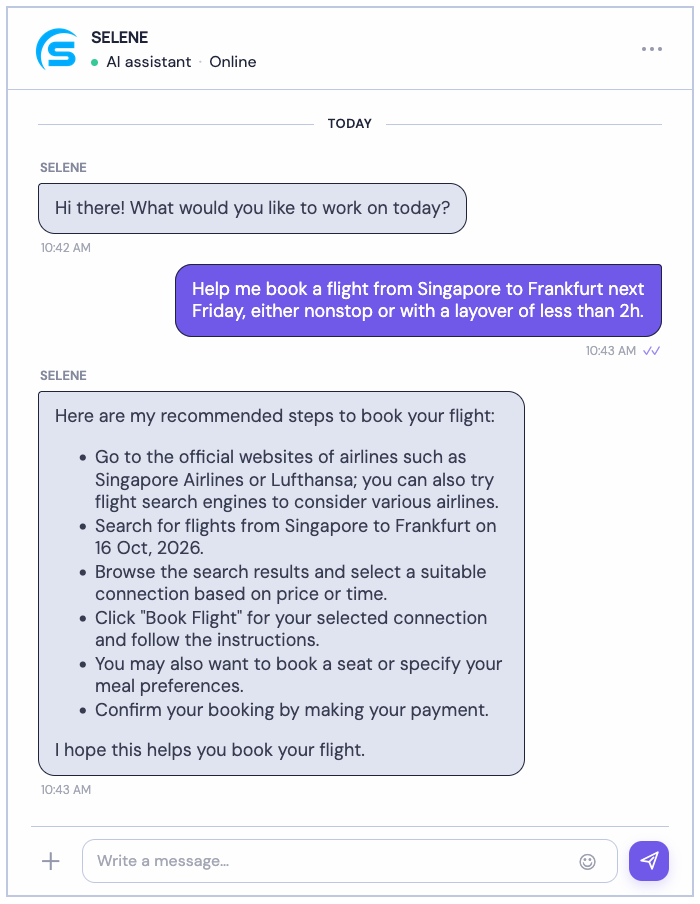
Despite their impressive capabilities, LLMs on their own are still fundamentally limited to processing input and generating text — for most modern LLMs, we can generally assume that the information is correct for common questions or tasks. They can explain how to perform a task, but they cannot directly interact with external systems, access up-to-date information, or carry out actions in the real world unless additional capabilities are provided.
The fundamental idea behind AI agents is therefore to extend an LLM so that it can autonomously perform actions and observe the results of those actions. For example, instead of merely asking an LLM how to book a flight, we can instruct an AI agent to search for suitable flights, compare the available options, request confirmation, and complete the booking on our behalf; see the figure below showing the conversation of a user and a flight-booking agent. The LLM provides the reasoning and coordination, while external tools and system interfaces allow the agent to act.
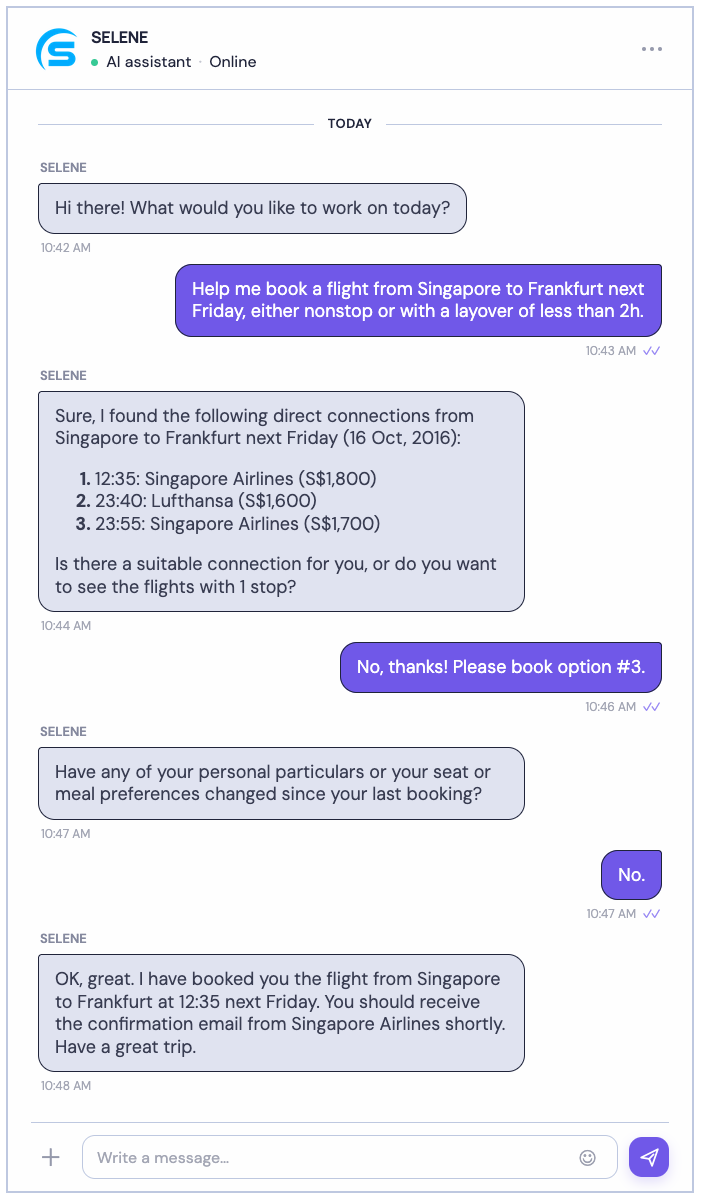
Of course, particularly for such involved tasks like booking a flight, additional interactions with the user might be required (e.g., details about check-in baggage, payment details). However, in in general, to accomplish these types of tasks, AI agents contain the following main components the LLM interacts with:
Memory: Stores and retrieves relevant information from previous interactions or the current task, allowing the agent to maintain context and avoid repeating work.
Tools: Provide access to external capabilities, such as web search, databases, calculators, APIs, or booking systems, enabling the agent to perform actions beyond generating text.
Planner: Decomposes a complex goal into smaller subtasks and determines an appropriate sequence of actions for the agent to follow.
In the next section, we cover these components in more detail.
Core Components of AI Agents
Large Language Model (LLM)
The central component of a modern AI agent is, of course, an LLM. Memory, tools, and the surrounding runtime are important, but they are largely passive: memory stores information, tools execute operations, and the runtime moves data between them. What turns these parts into an agent that pursues goals is the LLM, which interprets the situation and decides what happens next. It handles the main cognitive tasks of the agentic loop:
- Planning: The LLM breaks a goal into subtasks, orders them, and decides which tool or agent should handle each one. It can also revise the plan as new information arrives.
- Reasoning: The LLM interprets the current situation by combining the task, instructions, history, and memory. It then works out what the next step should be, often by reasoning step by step, for example by deciding which tool to call and with what arguments.
- Evaluation: The LLM judges the results of actions, checking whether they are correct and complete, whether errors occurred, and how much progress has been made toward the goal.
- Reflection: The LLM draws lessons from its evaluation, such as why an attempt failed, and decides whether to retry, change its approach, ask for clarification, or stop because the goal has been met.
Because the LLM performs these functions, it is the component that understands the task, decides what to do, and judges whether it worked. This is why it is commonly described as the brain of an AI agent: it is the part that thinks and decides, while memory, tools, and the environment interface act as the agent's knowledge store, hands, and senses, carrying out and supporting the decisions the LLM makes.
Memory
An LLM generates a response based on the prompt it receives. It does not automatically remember earlier conversations: if the prompt contains only the most recent question, the model has no context about what was discussed before. Its answer can reflect only the information available in that prompt. The simple example illustrates this problem.
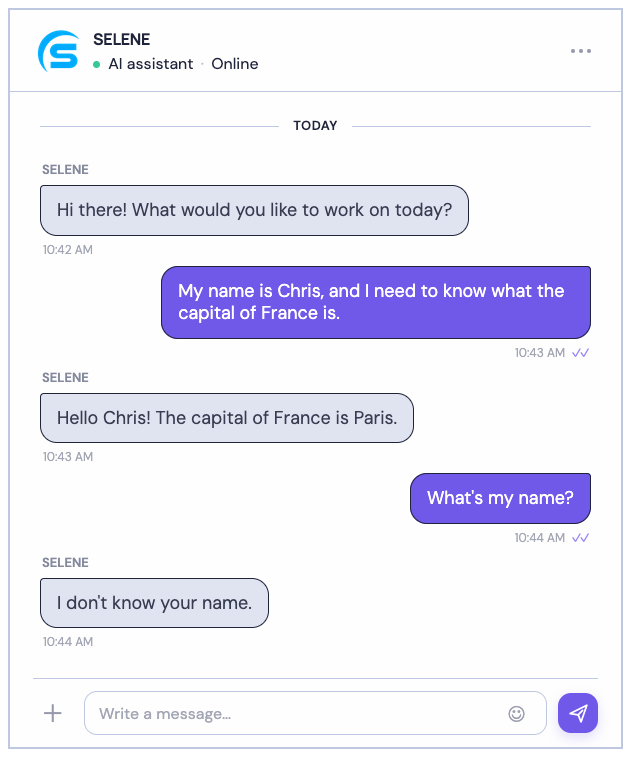
An LLM has no intrinsic memory of past interactions. Its response is determined by the prompt it receives and the information encoded in its trained model parameters. If earlier conversation details are not included in the prompt, the LLM cannot recall them. To make a conversation feel continuous, the system must include relevant earlier messages or other stored information in the prompt.
Including the current message together with earlier messages in the prompt is commonly called short-term memory. Agents typically also implement long-term memory to preserve information across separate sessions. The agent can then retrieve details that may be relevant to a later conversation and include them in a prompt, allowing the LLM to use that information when generating its response. Let's see in a bit more detail how these two forms of memories work and are commonly implemented.
Short-Term Memory
To show how short-term memory works, let's consider our previous example but represent the conversation using the common structure — used by most LLM APIs such as OpenAI, Anthropic, and Google Gemini &mdashl; of an ordered array of message objects. Each object must contain a role and its corresponding content. Regarding the former, the following three roles are standard:
- "system": the developer or application context; sets the persona, behavior, boundaries, and global formatting rules
- "user": the end user (human or automated process); carries the actual questions, commands, or data inputs to be processed
- "assistant": the LLM or AI model; stores past model responses
With that, our initial array of message containing the first user prompt looks as follows (we can typically safely ignore the welcome message); let's include a system prompt to set a persona:
[
    {"role": "sytem", "content": "You are useful assistant helping users as best as possible."}
    {"role": "user", "content": "My name is Chris, and I need to know what the capital of France is."}
]
This array, containing only this single prompt is passed to the LLM which responds with "Hello Chris! The capital of France is Paris". For the next user prompt, the naive approach would be to again just consider this single prompt to be passed the LLM. The array of message objects will have the following format:
[
    {"role": "sytem", "content": "You are useful assistant helping users as best as possible."}
    {"role": "user", "content": "What is my name?"}
]
Again, since the output of the LLM is determined by the prompt and learned weights, the LLM has no longer any information about the user being called "Chris". The idea is therefore to combine the last user prompt with all previous messages, i.e., all previous user prompts (role: "user") and responses by the LLM (role: "assistant"), in chronological order. Thus, the array of message objects passed to the LLM handle the user prompt "What is my name?" has now this format:
[
    {"role": "sytem", "content": "You are useful assistant helping users as best as possible."}
    {"role": "user", "content": "My name is Chris, and I need to know what the capital of France is."}
    {"role": "assistant", "content": "Hello Chris! The capital of France is Paris"}
    {"role": "user", "content": "What is my name?"}
]
In other words, the LLMs always "sees" a complete conversation. Short-term memory is usually straightforward to implement. A conversation can be represented as an array of message objects, with each new user message and assistant response appended to it. When the agent makes its next call to the LLM, it sends the relevant messages from that array as part of the prompt.
Of course, an ever-growing array of message objects creates practical challenges as a conversation continues. For a long conversation, the full history may exceed the model's context limit, i.e., the maximum amount of text it can process at once. This is especially likely when the model has a smaller context window. But even when the conversation fits, processing a longer prompt generally requires more computation and can increase the cost of generating a response. In practice, therefore, not all messages may be preserved. The main challenge is deciding how much of the conversation to include, since prompts have practical length limits; here are just some common approaches:
- Last-k: Keep only the $k$ most recent messages.
- Token budget: Keep as many recent messages as fit within a chosen prompt-size limit.
- Summarization: Replace older parts of the conversation with a concise summary, while retaining recent messages in full.
- Importance-based selection: Preserve key facts, decisions, preferences, or unresolved tasks, and discard less useful exchanges.
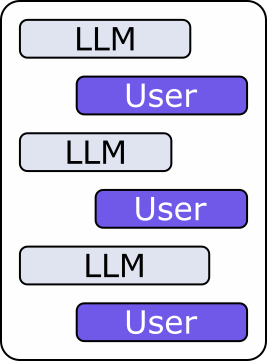
The figure below visualizes the idea of maintaining a short-term memory as a list of raw messages, their the last-k messages, based on some maximum token budget, or any other meaningful method to filter the messages that are kept in the message array to be passed to the LLMs as part of the next user prompt.
Alternatively, the next figure illustrates the idea of reducing the overall size of the input to the LLM by creating a summary of the conversation. This summary is typically generated using an LLM, either the one used for the conversation or a different one — for example, a smaller, locally running model (keep in mind that the summary does not have to be perfect as it is not seen by the user!)
When it comes to the timing, i.e., when the summary is created or updated, there is not standard approach. Most commonly, a summary is created when the conversation approaches a token or context-length threshold. The agent can then replace older messages with a summary while keeping the most recent turns in full. Summarizing after every message is possible, but it adds work and may repeatedly lose detail or distort the conversation. Summarizing after a fixed number of messages is another option, though message lengths vary. In practice, triggering summarization based on prompt size (sometimes with a safety margin) and retaining recent messages verbatim is often more reliable.
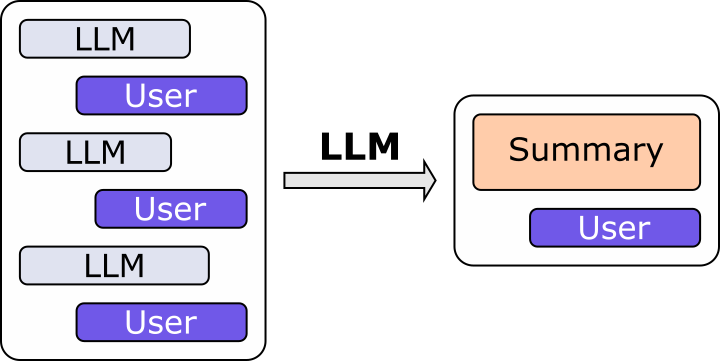
Of course, these basic strategies can be combined to custom variations. In general, these strategies trade off completeness, relevance, and prompt length. A summary or selected subset can keep prompts manageable, but may omit details that later become useful.
Short-term memory is usually maintained only for the duration of a conversation session. It gives the agent recent context to use while responding, but is typically discarded when the session ends. Because this information is temporary, short-term memory is generally kept in the application's active state rather than stored on disk. Information that should persist across sessions is usually handled separately through a long-term memory mechanism.
Long-Term Memory
An LLM agent's short-term memory can provide context within a conversation, but it is usually discarded when the session ends. Long-term memory lets an agent retain useful information across conversations, so users do not have to repeat details that may help shape future responses. For example, an agent might remember a user's
- Tastes and preferences (e.g., their preferred writing style)
- Personal context (e.g., their profession or nationality)
- Long-term goals (learning a new subject or developing a project)
- ...
Ideally, such information should be available to the agent across multiple sessions, which may be over several days or weeks.
Compared to short-term memory, implementing a long-term memory for an agent requires additional considerations. Firstly, long-term memory is meant to persist across sessions. Storing it on disk lets the agent retain useful information after the current session ends and retrieve it when a later conversation makes it relevant. A disk-based store can also hold more information than an agent would keep in its active prompt.
And secondly — exactly because short-term memory will grow much larger than short-term memory — combining a user prompt with the complete long-term memory is generally impractical. Not only might the available memory exceed an model's context window or some token budget, the memory is likely containing a wider variety of information that are not all relevant for a given prompt (with irrelevant information potentially introducing noise).
As such, a common way to implement long-term memory is with a Retrieval-Augmented Generation (RAG) system. Past conversations, or selected information extracted from them, are stored as documents. An embedding model converts each document into a numerical representation that captures aspects of its meaning, and the system indexes these representations for later retrieval. When a new message arrives, the system can embed it and search for stored documents with similar meanings. It then adds the most relevant results to the prompt, giving the LLM useful context from earlier sessions without including the entire conversation archive.
The figure below shows such a RAG setup assuming that we store and index each complete conversation. Note that, in practice, each conversation may yield multiple embedding vectors for a conversation first split into separate chunks.
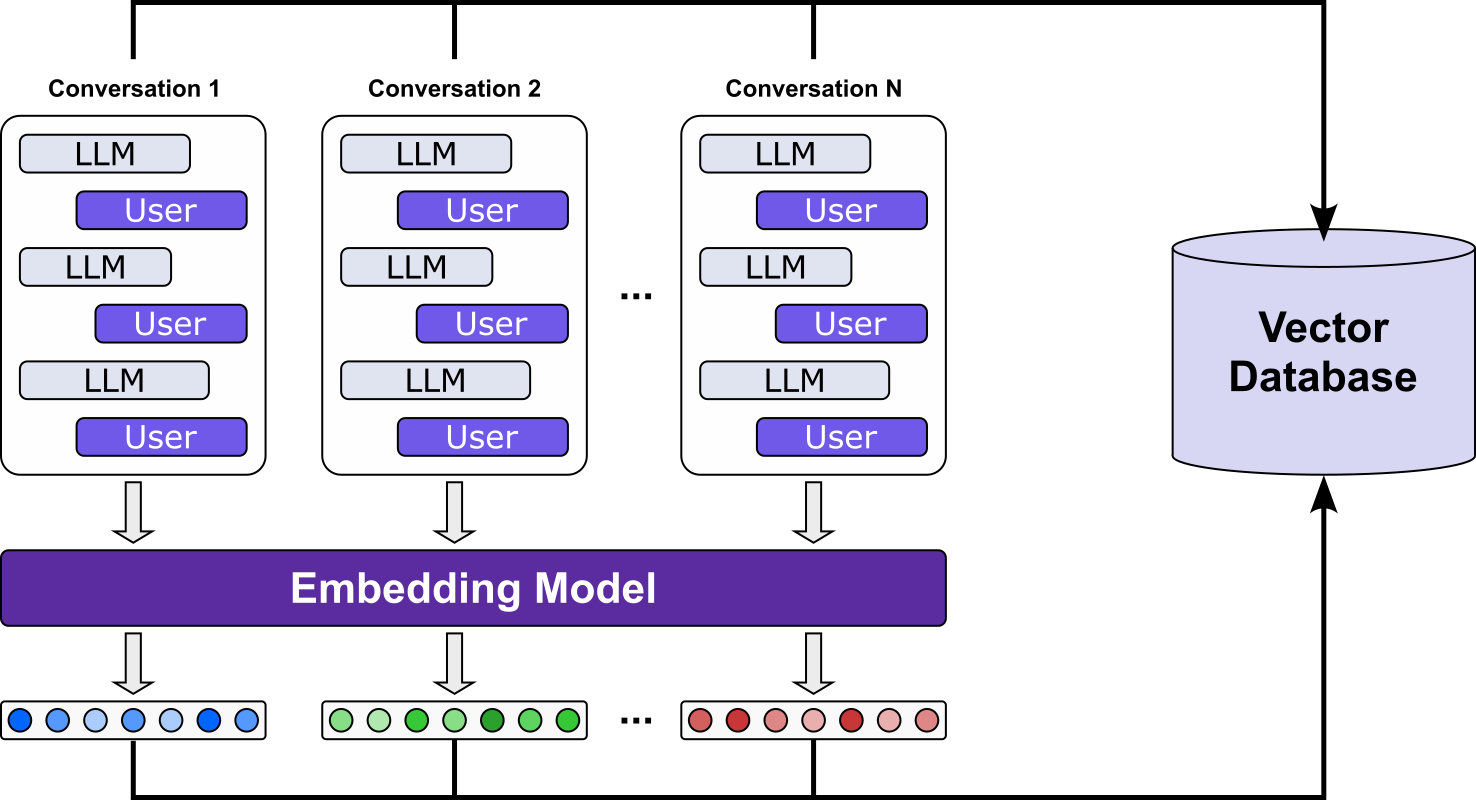
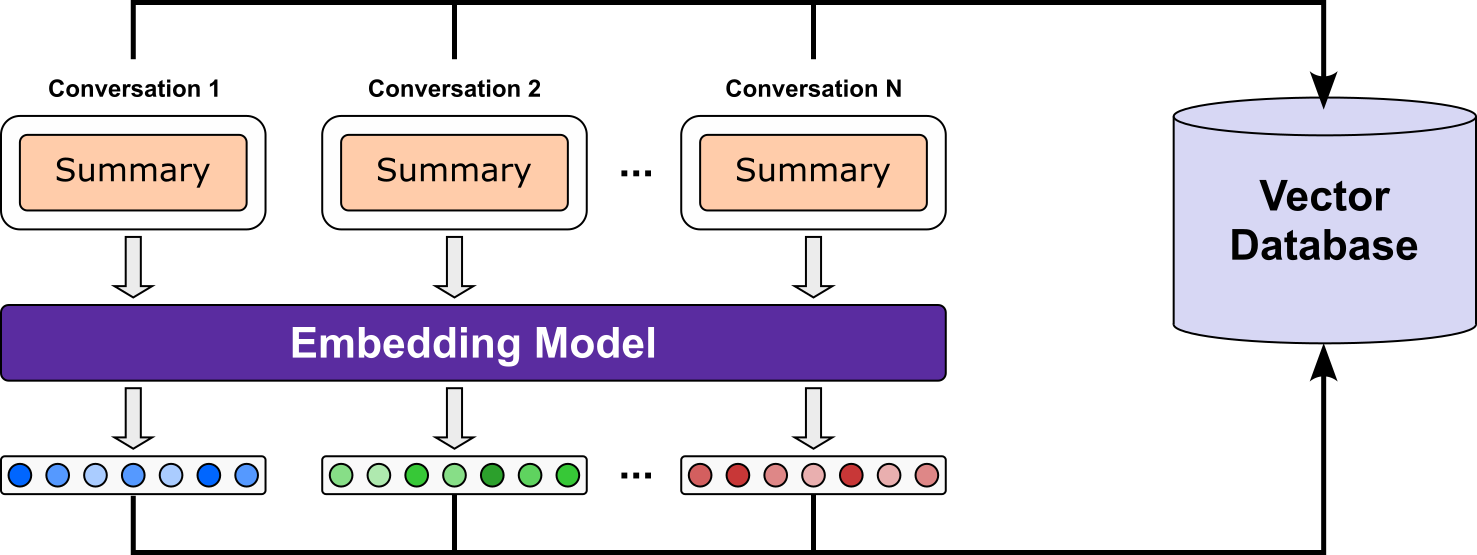
Storing every conversation in long-term memory can preserve a lot of information that will not help in future interactions. Conversations often include passing comments, opinions, repetition, and other noise alongside useful details. Retrieving entire transcripts later may make it harder to find the information that matters and can add unnecessary context to the prompt. Instead, long-term memory often stores selected facts and other important information. Extracting these details makes memory more concise and easier to retrieve when relevant, while reducing the chance that incidental remarks are treated as lasting facts.
The corresponding illustration is shown below. Again, a summary may first be split into chunks, and each chunk is embedded and then indexed into the database. Also, recall that the summaries itself are typically generated by an LLM. The timing for creating a long-term memory summary is relatively straightforward: generate it when the conversation session ends. At that point, the agent can review the full exchange, identify details likely to be useful in future sessions, and store a concise summary for later retrieval.
How memories are retrieved is illustrated in the figure below. In this simplified example, we use the same embedding model to embed the new user prompt — in practice, this maybe be the last few messages of the ongoing conversation — to embed the prompt and perform a similarity search to find the most relevant memories; in the figure below, we assume that we want the top-3 most relevant memories. The retrieved memories and the current user query are then combined to form the final prompt that is passed to the LLM to generate its next response.
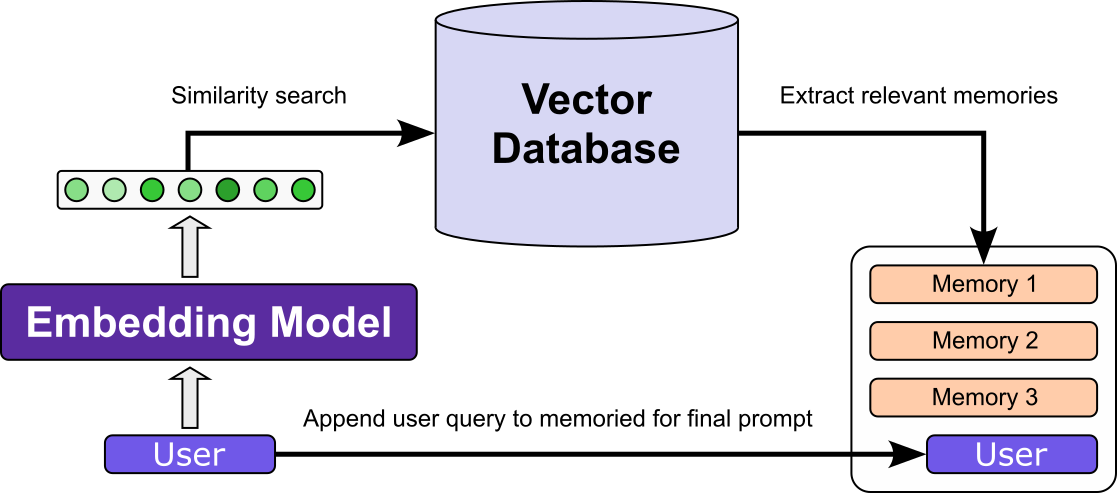
To keep the figure simple, it only shows the retrieved memories as part of the final prompt. In practice, the final prompt will also include the short-term memory, either as a list of previous messages or as some form of summary of the current conversation.
To sum up, both the short-term and long-term memory give an agent context beyond the user's most recent query. Short-term memory carries relevant messages from the current conversation into the next prompt, helping the agent respond consistently as the exchange unfolds.Long-term memory preserves selected information across conversation sessions. By retrieving useful facts, preferences, or goals from earlier interactions, the agent can make later responses more informed and personalized, without relying only on the latest query.
Tools
At their core, LLMs learn to predict the next word — or, more precisely, the next token — given the text that came before it. During training, the model processes a very large collection of text and adjusts its learnable parameters to make those predictions more accurately. In this way, it learns patterns in language and information reflected in its training data.
An LLM does not automatically acquire new information after training. The knowledge it can draw on is encoded in its parameters, which reflect the training data available at the time. This gives the model an inherent knowledge cut-off: events, discoveries, and other information that emerged later are not part of what it learned during training. For example, consider an LLM trained in summer 2026 getting asked about an event that happened in October:
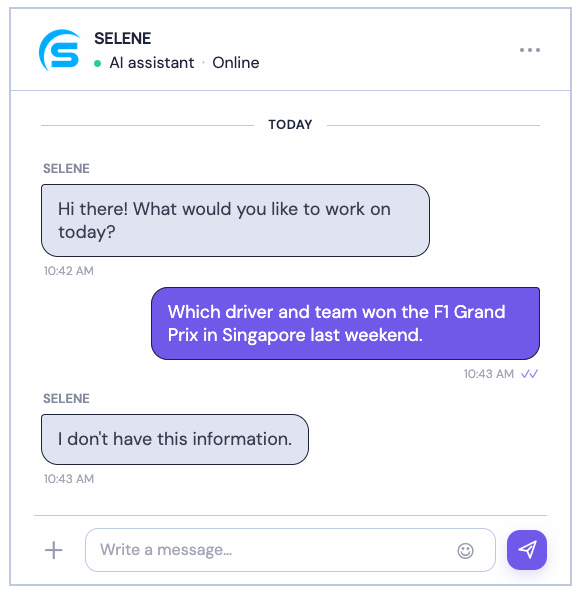
Keep in mind, however, that when questioned about events or information beyond its knowledge cut-off, an "I don't know" is often the best response an LLM can give. It makes the limit visible and gives the user a chance to check a current source. The greater risk is that the model answers confidently anyway, producing a plausible-sounding but incorrect response. Because an LLM is trained to generate likely continuations of text rather than to reliably verify every claim, it may fill gaps in its knowledge instead of recognizing that it lacks the information. Hallucinations are therefore a real risk for questions about post-cut-off events.
Side note: More generally, the model does not "know" anything not covered by the training data, which may include very domain specific information and (hopefully) private information (e.g., company-internal data or sensitive data such as patients' healthcare records). In short, a model's capability to reliably answer questions is not merely a matter of timing but more generally of the characteristics of the training dataset.
A second, more fundamental limitation of LLMs is that, despite often appearing intelligent, they cannot act on their own. An LLM generates text in response to input; it cannot independently open a file, run a program, search the web, or change something in the world. Its apparent ability to reason or make plans does not by itself give it the means to carry them out. In other words, the model may perfectly and comprehensibly describe what should be done, but it cannot actually execute any steps. To illustrate this, consider the short conversation below:
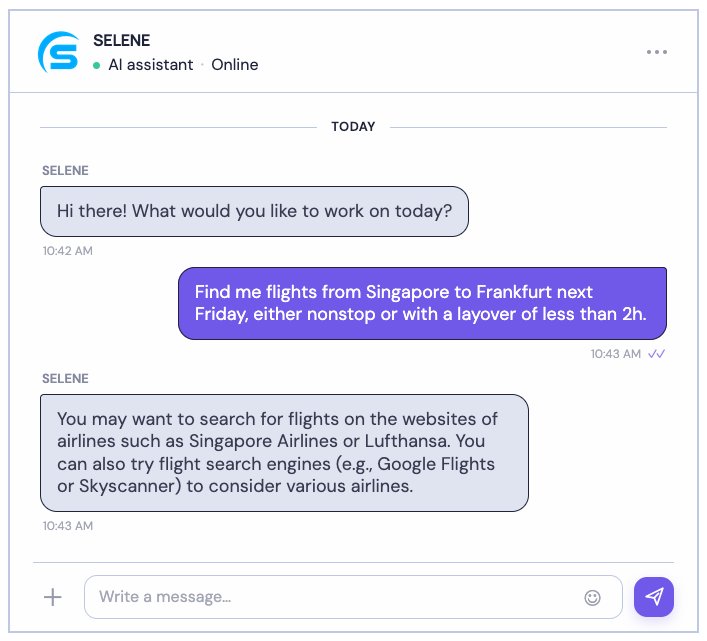
While not necessarily a bad response, what we would really like is for the LLM to actively perform the search for us and provide us with the results.
To overcome these two limitations of basic LLMs — that is, their incapacity to acquire new knowledge (beyond their training data) and performing actions — is the motivation to provide LLMs with tools to extend their capacities. In simple terms, tools are external functions or systems the model can call to retrieve information or perform tasks it cannot do through text generation alone. The model decides when a tool may help and provides the input; the tool carries out the operation and returns a result for the model to use. Let's look at some of the most common types of tools.
Data & Retrieval Tools
Data and retrieval tools extend an LLM's access to information beyond what it learned during training. They let it look up relevant information when answering a question, including current or private information that may not be present in its training data. The tool retrieves the information, and the LLM then uses the result to formulate a response to a user — examples include:
- Public, current information: call a web search API to find recent news, research, or other publicly available webpages.
- Non-public information: call an authorized company search API to retrieve documents or records the user is permitted to access.
- Real-time data: call a weather API for current conditions or a forecast for a specified location.
- User-defined data: call a custom function written by the user to retrieve or process information from their own files, database, or application.
In line with our example conversation above, assume we have a function get_flights(from, to, date) that can call the APIs of various airlines to find flights from a departure airport (from) to an arrival airport (to) on a given date. However, an LLM does not automatically know which tools (here: get_flights()) are available in a particular application. Since its behavior is guided by the prompt, the application must provide the tool's details as part of the prompt or through an equivalent tool interface. When a tool is made available to an LLM, the prompt or tool interface should provide enough information for the model to decide when and how to use it. In particular, it should specify:
- Function name: A clear identifier the model can use to request the tool.
- Description: What the function does and when it is appropriate to call it.
- Input: The arguments the function accepts, including their names, types, and any required values.
- Example output: The kind of result the function returns and its format, so the model can interpret the response correctly.
For example, for our function get_flights(), a system prompt added to a user prompt may read as follows:
You are a helpful assistant. You can use the following tools:

Name: get_flights
Description: Returns all flights from a departure airport to an arrival airport on a given date.
Input: {"from": "IATA code of departure airport", "to": "IATA code of arrival airport", "date": "data of flight"}
Example output: {"type": "tool_call", "name": "get_flights", "arguments": {"from": "ATL", "to": "SFO", date="2026-01-01"}}
Note that the output is typically structured — often as JSON — so the agent can reliably recognize that the LLM is requesting a tool call and extract the function name and its arguments. A defined structure makes the handoff between the model and the system more predictable and less prone to parsing errors. If the LLM requests this tool, the agent will call method get_flights() with the extracted arguments, add its result to the original prompt, and pass everything back to the LLM to generate the final response. For example, our user prompt "Find me flights from Singapore to Frankfurt next Friday, either nonstop or with a layover of less than 2h." may be processed as shown in the figure below note that the two green boxes represent the same LLM:
- The initial user prompt is passed to the LLM.
- The LLM recognizes that calling the function
get_flights()is required; indicated by the structured JSON response with the relevant data (incl. function name and arguments). - The method
get_flights()uses the API endpoints provided by airlines to search for available flights. - The found flights are combined with the initial prompt and passed again the LLM.
- The LLM uses the list of available flights to generate the final response (which may include filtering 1-stop flights with a layover of 2h or more).
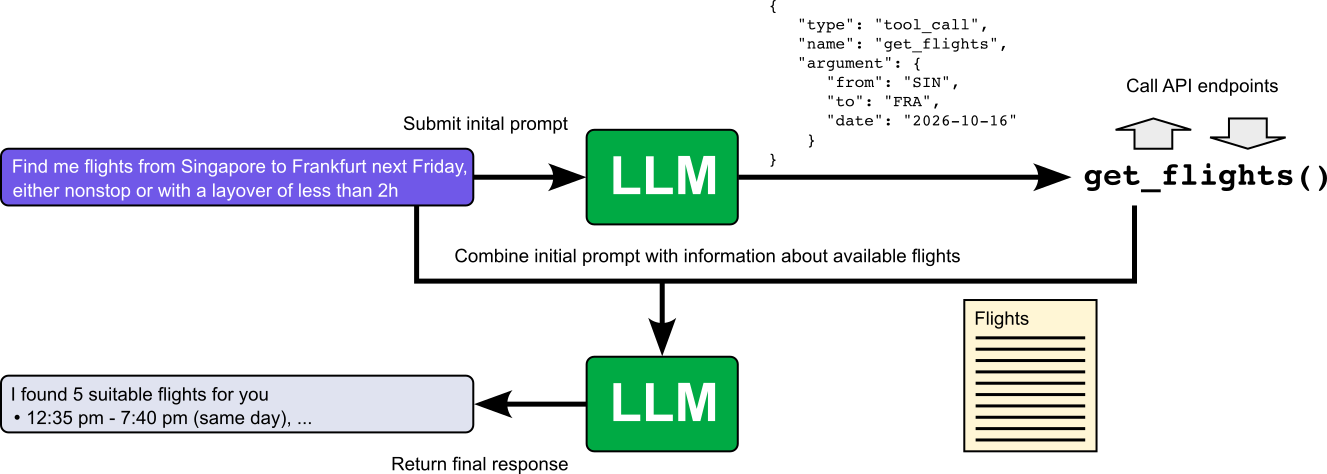
As we will later see, the passing of prompts as well as the handling of the responses (e.g., call a tool or not) is handled by the agent.
Action & Execution Tools
Tools in an LLM agent can do more than retrieve information. An external function can also carry out an action by changing the state of an application or service. This lets an agent move from answering questions to helping complete tasks: for example, it can create a calendar event, update a database record, or submit a form. Other common examples include sending an email or chat message, placing an order, booking an appointment, and controlling a device or software system. To continue our example, consider that we also have a function book_flight() that uses the API of airlines to book a flight. In general, the process works quite similar as before; see figure below:
- The initial user prompt is passed to the LLM.
- The LLM recognizes that calling the function
book_flights()is required; indicated by the structured JSON response with the relevant data (incl. function name and arguments). - The method
book_flights()uses the API endpoints provided by airlines to book the specified flights. - The booking might be successful or fail; this outcome is combined with the initial prompt and passed to the LLM.
- The LLM uses the function results to generate the final response (e.g., the confirmation of the booking).
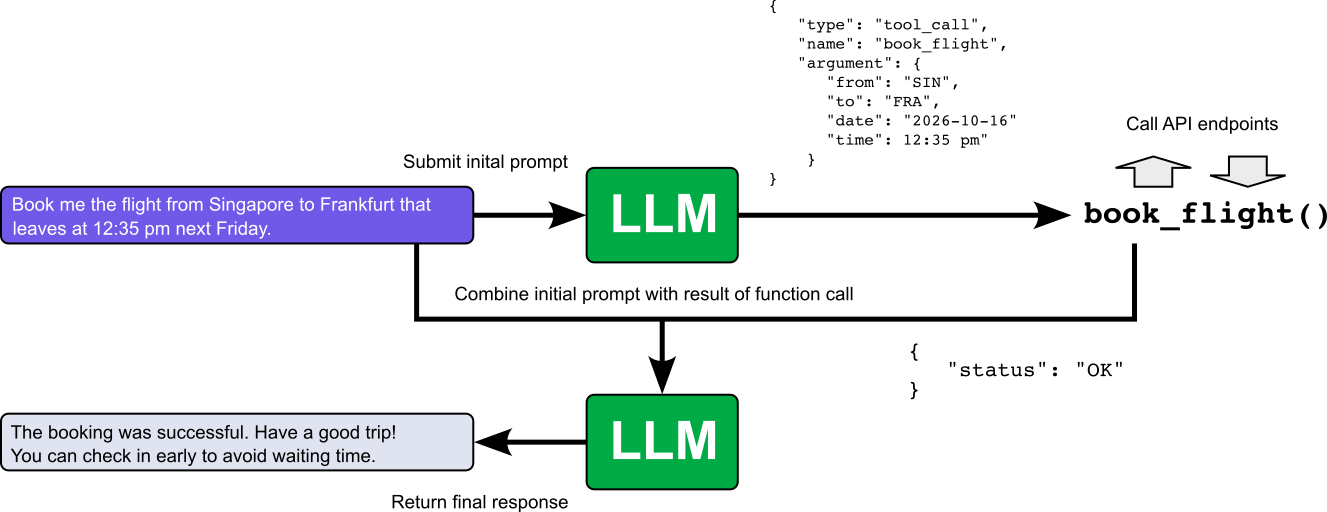
Particularly this example of booking a flight highlights an important issue in practice: Tool calling can become quite complex when a function requires many arguments. Booking a flight involves more than specifying the departure and arrival airports and the travel date/time. The booking may also depend on details such as seat and meal preferences, frequent-flyer programs, baggage requirements, and other constraints. This creates two related challenges:
- As the number of arguments grows, it becomes harder for the LLM to identify each value reliably and map it to the correct argument.
- The conversation may not contain all the information the function requires. The user might omit a preference or detail, or it may not appear in the current prompt or earlier messages.
An agent therefore needs to do more than extract values and call the function. It should check which arguments are required, determine which are missing or ambiguous, and ask the user for the necessary details before proceeding. We discuss this in more detail when later talking about common design patterns for agents which include the human-in-the-loop pattern.
Orchestration & Agent Tools
Orchestration and agent tools help manage how work is carried out, rather than directly providing information or changing an external system. They can break a goal into steps, route a request to a specialist, run steps in sequence or in parallel, track progress, pass results between components, or check whether the task is complete. For example, an orchestration function might send a request to a research agent, pass its findings to a summarization agent, and collect the final result. These tools are especially useful in multi-agent systems, where coordination is needed, but they are not limited to them.
A single-agent system may use orchestration to manage a multi-step workflow, retry a failed tool call, maintain task state, or request human approval before an action. In a simple agent, the LLM and its runtime may handle these responsibilities directly, without a separate orchestration tool. For example, for our flight-booking agent orchestration tools could manage the steps that connect the user's request to a completed booking, e.g.:
- Trip-planning tool: collect and track required details (dates, airports, passenger information, baggage, and preferences, etc.) and identify what is still missing.
- Flight-search workflow: search several providers or airlines, compare the results against the user's constraints, and return suitable options.
- Cancellation coordinator" check the ticket's rules and guide the agent through the permitted steps.
As before, orchestration tools can be exposed to the LLM as a function, just like a search or booking function. For example, a update_trip_plan() function might accept the details the user has provided (e.g., departure and arrival airports, travel dates)and return a structured summary of the plan, including any required details that are still missing (e.g., passenger count and preferences). The orchestration function update_trip_plan() might itself call other functions, such get_flights(), or it might only manage the plan while the agent calls search separately. Either way, "orchestration tool" describes the function's role in coordinating work; it does not require a special technical form — in short, it is no different from retrieval and execution tools.
Planner
For simple requests like fetching the latest weather information, an LLM can typically very easily decide and act how to process this task (e.g., call a single external function). However, when trying to build a flight booking agent, we already saw that a task can consist of multiple non-trivial decisions and actions — as we kind of simplified it in the examples above.
A planner helps an LLM agent turn a goal into steps and decide what to do next. It can identify dependencies, choose which tools to use, track progress, and revise the steps when new information arrives. Like we already mentioned, to book a flight, the agent may need to gather missing preferences, search for options, present them to the user, and only then proceed with booking. A separate planner is most useful when a task has multiple steps, dependencies, or decisions that are hard to manage in one response. It can make the process more reliable and easier to monitor. There are two main approaches to implement a planner, which again depends on the complexity of the tasks:
- Prompt-driven planning: The LLM uses instructions in its prompt to break a goal into steps and decide what to do next, without a separate planning component. It is often sufficient for short, familiar tasks with few steps and clear requirements.
- Distinct Planning Module: A separate component in an agent system that creates, tracks, or updates a plan for completing a task. It may use the LLM to propose or revise steps, then pass the plan to the agent's execution loop, which carries out the steps and returns results to inform further planning. A separate planning component is useful when a task has many steps, dependencies, or constraints that need to be tracked across multiple tool calls. It can also help when the agent must revise its approach after a step fails or new information arrives.
Prompt-Driven Planning
Prompt-driven planning is an approach in which an LLM uses instructions in its prompt to break a user's request into steps and decide how to carry them out. The prompt may ask the agent to identify the goal, outline subgoals, choose tools when needed, and check whether each step has succeeded. The plan is usually created and managed by the LLM itself, rather than by a separate planning component.
Customizing the prompt means tailoring those instructions to the agent's task — for example, giving a flight-booking agent a sequence for gathering travel dates, searching flights, comparing options, and confirming a choice. The core purpose is to make the agent's behavior more organized and reliable, especially for requests that require several steps. The intuition is that LLMs can follow structured instructions and reason about dependencies between steps; making the desired process explicit helps guide that ability. The plan can also be updated as the agent receives new information or tool results.
Because prompt-driven planning relies on instructions written into the prompt, rather than on a dedicated planning module, there is no single, well-defined taxonomy of approaches. The exact planning behavior depends on how the prompt frames the task and guides the LLM. Still, several established concepts offer useful ways to describe the planning phase. In the following, we introduce some popular approaches and illustrate their core ideas with example prompts. These examples show how different instructions can guide an agent to organize and carry out a task.
Important: The purpose of the following outline introduces the basic ideas on a fairly high level. In practice, each method is much more involved and requires various considerations to work (reasonably) reliably. However, in this introductory notebook, the goal is only to provide their basic intuitions.
Chain-of-Thought (CoT) prompting aims to encourage an LLM to work through a problem as a sequence of intermediate reasoning steps before producing its answer or taking an action. In prompt-driven planning, these steps help the agent make its approach explicit—for example, by considering the request, identifying relevant information, and deciding what to do next.
CoT's main goal is to support step-by-step reasoning on tasks where jumping straight to an answer may be unreliable. It does not require a predefined plan or a separate planning module: the reasoning steps are generated in response to the prompt and the task. The sequence may help organize the agent's behavior, but it is not necessarily a formal list of subgoals or a fixed procedure, and the agent may need additional instructions to revise its approach or use tools.
The snippet below shows a simple system prompt matching these ideas of CoT prompting for use case of a flight-booking agent.
You are a flight-booking assistant. Help the user find a suitable flight.
Work through the request carefully:
* identify the travel requirements,
* determine what information is missing,
* and decide what to do next.
Use the available tools when needed, and base your response on their results.
Ask the user for missing or ambiguous details before searching.
Do not book a flight without the user's explicit confirmation.
Plan-&-Solve (or Sub-Goal Decomposition) asks the LLM to make an explicit plan before carrying out the task. It first divides the overall goal into smaller, ordered subgoals, then works through them and combines the results. This structure is especially useful when a task has several dependent steps, because it makes the intended workflow easier to follow and check.
Both this approach and Chain-of-Thought (CoT) use intermediate steps, but they emphasize different things. CoT encourages step-by-step reasoning toward an answer; Plan-and-Solve explicitly separates planning from execution and organizes the work around subgoals. The distinction is one of emphasis rather than a strict boundary: a plan can include reasoning, and CoT can produce steps that look like a plan.
To make this difference more tangible, let's look at a system prompt for our flight-booking agent that is more in line with the Plan-&-Solve approach. Notice how this prompt requires to first come up with a plan, and then process all steps or sub-goals according to that plan.
You are a flight-booking assistant. First, break the user's request into
the sub-goals needed to complete it. A typical task may involve:
1. Collecting the route, dates, passenger count, and relevant preferences.
2. Asking about any required information that is missing or ambiguous.
3. Searching for flights and comparing suitable options.
4. Presenting the options and asking the user which they prefer.
5. Booking only after the user explicitly confirms the selected flight and final price.
Work through the sub-goals in order. Update the plan if new information requires it.
Use available tools and report their results accurately.
The Reasoning and Acting (ReAct) framework interleaves reasoning with actions: the LLM considers what it needs to do, takes an action such as calling a tool, observes the result, and then uses that result to decide what to do next. Rather than producing a complete plan once and following it unchanged, the agent can adapt its next step as new information arrives.
ReAct's goal is to ground the agent's progress in observations from its environment (for example, search results or tool outputs) while keeping actions connected to the task. Its distinctive feature is this ongoing loop of reasoning, acting, and observing, which supports iterative decisions and course corrections. In prompt-driven implementations, the prompt tells the LLM how to alternate these steps and how to use observations when choosing subsequent actions.
Thus, an initial system prompt for our flight-booking agent using ReAct may look as follows:
You are a flight-booking assistant. Help the user find and, if requested, book a suitable flight.
In each turn, decide whether you
* have enough information to answer,
* need to ask the user a question,
* or should call a tool.
After each tool result, use that observation to decide the next step.
Continue until the request is complete or you need more information from the user.
Never book a flight without the user's explicit confirmation of the selected itinerary and final price.
Important: CoT and Plan-&-Solve do not imply that the reasoning or plan is fixed after its initial generation. An LLM can revisit its reasoning or revise its subgoals as the task progresses, especially when new information becomes available. ReAct's distinctive feature is that it makes the ongoing interaction between the agent and its environment central: the agent alternates between reasoning, taking an action, and observing the result, then uses that observation to choose its next step.
In short, prompt-driven planning approaches such as Chain-of-Thought (CoT), Plan-and-Solve, and ReAct are best viewed as related ways of guiding an LLM, rather than as entirely distinct methods. They share the idea of using prompts to structure how the agent approaches a task through intermediate steps — it is their their emphasis differs: CoT encourages step-by-step reasoning, Plan-and-Solve makes subgoals and their order explicit, and ReAct centers on a repeated cycle of reasoning, action, and observation. These ideas can overlap in practice, and a prompt may combine them to suit the task.
Distinct Planning Module
Implementing planning as a structural component means the agent has a separate module or explicit control mechanism for creating and managing plans, rather than relying on prompt instructions alone. The planner may break a goal into steps, track progress, check dependencies, and decide when to revise the plan or call a tool. The LLM can still help propose or update steps, but the agent's software controls how those steps are represented and carried out.
This approach is useful when tasks are long, involve many dependent actions, require reliable progress tracking, or need clear checks and recovery when something fails. A structural planner can make the agent's behavior more consistent, easier to inspect, and less dependent on the LLM following a prompt perfectly. The tradeoff is added implementation complexity: the planner needs rules and state management, and a rigid design may handle unexpected situations less flexibly than an LLM guided by a prompt. For simpler tasks, prompt-based planning may be sufficient and easier to build.
Planners in agents tend to fall into a handful of recurring patterns, which are often combined. The table below provides a brief overview of popular methods — but due to their intrinsic complexity, a more detailed discussion of those distinct planning modules is beyond the scope of this introductory notebook.
| Approach | Basic idea / goals | Suitable use cases |
|---|---|---|
| Plan-then-execute (ReWOO) | A planner produces the full multi-step plan up front; a separate executor carries it out, often with a cheaper model. ReWOO (Reasoning Without Observation) uses placeholder variables so no LLM call is needed between steps. | Stable, well-understood workflows with predictable tool outputs; cases needing human plan approval. |
| Plan, execute, replan | Plan-then-execute plus a feedback loop. A replanner revises the remaining plan after each step, on failure, or on unexpected results. | Multi-step tasks in changing environments: research agents, coding agents, data pipelines. |
| Hierarchical decomposition / orchestrator-worker | A top-level planner breaks the goal into subgoals and delegates each to sub-agents or modules, which may plan on their own. | Large or heterogeneous tasks: multi-agent "manager" setups, task routing across specialized tools or models. |
| Search-based planning (Tree of Thoughts, LATS, RAP) | Explore multiple candidate plans or action sequences, score them with a value function or self-evaluation, and select using BFS, DFS, or MCTS. | Hard reasoning with branching: math, puzzles, some code generation, anywhere mistakes are costly and compute is available. |
| DAG / graph-based planning (LLMCompiler) | The planner emits a dependency graph of tasks instead of a linear list, so independent steps can run in parallel. | Tasks with many independent tool calls: multi-source retrieval, batch API calls, parallel data gathering. |
| LLM + symbolic planner (LLM+P, PDDL, code-as-plan) | The LLM translates the problem into a formal representation (PDDL, constraints, or a program) and a classical solver or interpreter does the planning. | Strict-correctness domains: logistics, scheduling, robotics, constrained optimization, computation-heavy tasks. |
Summary (Planner). Compared with memory and tooling, planning in an LLM agent is a more diverse and nuanced concept. Memory concerns what information the agent retains, while tools give it ways to retrieve information or act on its environment. Planning, by contrast, can shape how the agent approaches a task from start to finish: how it breaks down a goal, chooses actions, tracks progress, and responds when circumstances change.
The broad purpose of planning is to help an agent complete tasks more effectively, but there is no single way to implement it. A useful high-level distinction is between prompt-based planning, where instructions guide the LLM's planning behavior, and a distinct planning module, where software components explicitly represent and manage plans. Yet each category includes many techniques with different strengths and tradeoffs; and deserve their own detailed discussion. The table therefore briefly summaries the main design decision when it comes to prompt-based planning vs. a distinct planning module.
| Dimension | Prompt-Based Planning | Distinct Planning Module |
|---|---|---|
| Where it runs | Inside the LLM's context window | In external orchestration code |
| LLM's Role | Generates the entire plan end-to-end | Proposes candidate steps & evaluates states |
| Backtracking | Difficult / Unreliable | Supported (Tree Search, State Rollbacks) |
| Best For | Short, linear, standard task execution | Complex, multi-step, dynamic, or high-stakes reasoning |
Considering the bigger picture, think of the LLM as the "engine" providing raw reasoning and generation capabilities, while the planner is the transmission and steering system that organizes, tests, backtracks, and guides those capabilities toward a goal.
Agentic Loop & Architecture
In the previous section, we covered the core components of most agents: the LLM, the memory, the tools, and the planner. However, the list of components alone does not detail how they interact with each other. An agent's workflow is often more involved than the simple pattern of "the user asks, the LLM replies". To complete a task, the agent may need to interpret the request, decide what to do, use a tool, inspect the result, and choose the next step. It repeats these actions until it has enough information or has completed the requested task.
This repeated process is known as the agentic loop. The loop gives the agent a way to make progress through multiple steps, respond to new information, and adjust its actions along the way before returning a final answer. The figure below illustrates the basic workflow described by the agentic loop — note that alternative illustration may combine or split certain steps, but the overall idea remains the same.
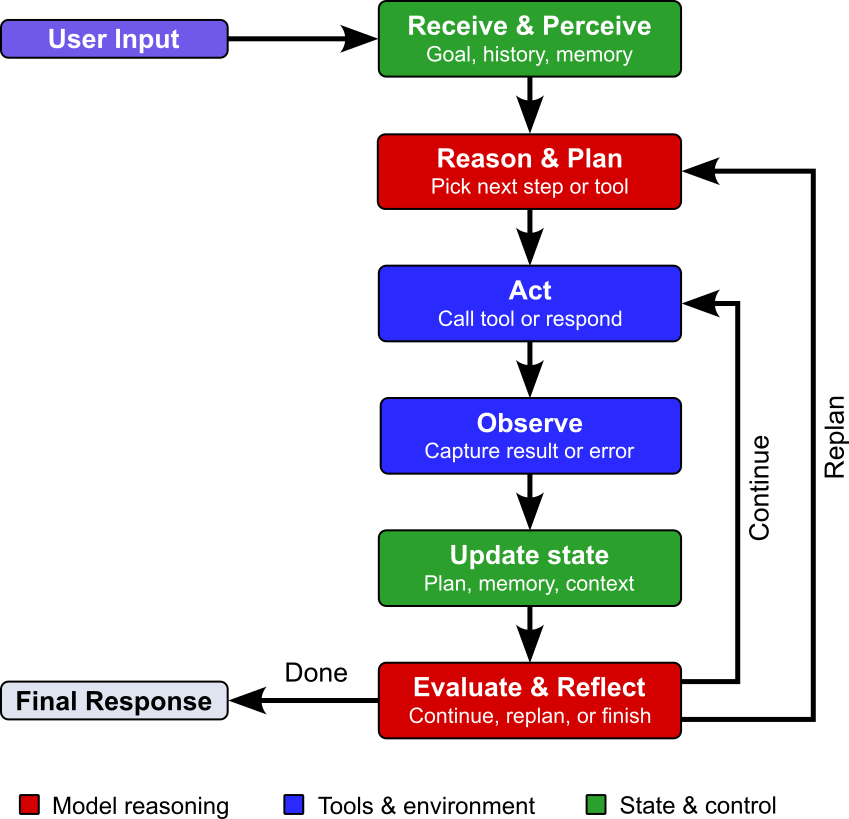
Let's look at the individual steps in a bit more detail.
Receive & Perceive
Receive: In general, an agent is triggered by some user input — note that this is not limited to messages but may also refer to scripts, cron jobs, or any other programmatic invocation. Beyond this input, the agent will also collect all other relevant information, particularly from short-term and long-term memory. These memories include not only conversations but also the outputs of previous actions such as tool outputs (e.g., API responses or error messages).
Perceive: Once all the information relevant to address the current task is available, the agents needs interpret these inputs. This may include the parsing and structuring raw data (e.g., reading a JSON response, extracting text from a document), combining the new inputs with existing context (e.g., conversation history, memory, instructions, and goals) and working out Working out what the situation is: what is being asked, what has already been done, what has changed, and whether anything went wrong.
Receive & Perceive
Receive: In general, an agent is triggered by some user input — note that this is not limited to messages but may also refer to scripts, cron jobs, or any other programmatic invocation. Beyond this input, the agent will also collect all other relevant information, particularly from short-term and long-term memory. These memories include not only conversations but also the outputs of previous actions such as tool outputs (e.g., API responses or error messages).
Perceive: Once all the information relevant to address the current task is available, the agent needs to interpret these inputs. This may include the parsing and structuring raw data (e.g., reading a JSON response, extracting text from a document), combining the new inputs with existing context (e.g., conversation history, memory, instructions, and goals) and working out Working out what the situation is: what is being asked, what has already been done, what has changed, and whether anything went wrong.
Act
The "act" step is where the agent carries out the decision made during planning. Up to this point everything has happened internally, in the agent's understanding and reasoning. Depending on the task, this may simply mean replying to the user. However for complex tasks, acting is where the agent actually affects something outside itself: calling a tool or API, running code, searching the web, reading or writing a file, querying a database, sending a message, or handing a subtask to another agent. It's the point at which the agent stops thinking about the task and does something about it.
This step is what separates an agent from a chatbot that only produces text. It gives the agent a way to gather new information, change the state of the world, and make progress toward its goal. If the agent uses a tool, it sends the required inputs and waits for the result. Whatever the action produces, whether a successful result, an error, or unexpected output, becomes the input to the next step of the loop, where the agent observes the outcome and decides whether to continue, adjust, or finish.
Observe
Observing here means that the agent examines what its action actually produced. After an action runs, the runtime returns a result: data from a search, the output of executed code, a confirmation that a file was written, an error message, or sometimes nothing useful at all. Observation is simply taking in that raw outcome, without yet judging whether it was good or bad.
Beyond collecting results, this step often involves preparing them for the rest of the loop. Raw outputs may be truncated, cleaned up, or formatted, and errors or empty results are captured as they are rather than glossed over. The prepared observation is then added to the agent's context alongside the original goal and prior history, so that it is available for the next stage.
Update State
In the update state step, the agent the agent records what just happened so that the next pass through the loop starts from an accurate picture. The prepared observation, along with the action that produced it, is written into the agent's working context or memory: appended to the conversation history, added to a scratchpad or task list, or saved to a longer-term store. Progress markers are updated too, such as which subtasks are complete, which are pending, and what intermediate results have been gathered.
This step is what gives the loop continuity. Without it, each iteration would begin from scratch and the agent would repeat actions or lose track of its goal. Because context is limited, updating state often involves housekeeping as well: summarizing or trimming older history, discarding stale details, and keeping the most relevant information accessible. Once the state is updated, the loop returns to receive and perceive, where the agent evaluates the new state and decides whether to continue or stop.
Evaluate & Reflect
In this last step of the agentic loop, the agent assesses whether its actions have achieved the user's goal. Having collected the outcome and recorded it in its state, the agent now asks whether the action did what it was meant to, whether the result is correct and complete, and how much progress has been made toward the overall goal. It compares what actually happened against what it expected, and it looks for problems such as errors, gaps, contradictions, or results that don't hold up under scrutiny.
Reflection goes a step further by drawing lessons from that assessment. If something has failed, the agent considers why: a wrong tool, a bad argument, a flawed assumption, or a plan that no longer fits the facts. It may decide to retry, change its approach, revise the plan, or ask the user for clarification. If things went well, it confirms that the next planned step still makes sense. Some agents also store these insights in memory, so that mistakes are not repeated within the same run or in future ones.
Finally, this step is where the agent decides whether to keep going or stop. If the goal has been met, or if further effort is unlikely to help, the loop ends and the agent delivers its result. Otherwise the next iteration begins. If the current plan is "still good", the agent typically returns to the "act" step to continue processing the plan. However, if the agents decide that the plan is flawed, it will return the "reason & plan" step — of course, this time, the agent has more information (updated state, memory, etc.) to hopefully yield a better plan.
Summary (Agentic Loop). The agentic loop describes the general workflow through which an agent and its components interact with the environment to complete a user's task. The agent receives and interprets a request, reasons about what to do, takes an action, observes the result, and updates its understanding of the task. It then evaluates its progress and either continues, adjusts its approach, or responds when the task is complete. Repeating these steps helps an agent handle tasks that require multiple actions or depend on information gathered along the way.
The exact implementation of the loop can vary significantly. A simple agent might collapse several stages together, for instance running a basic reason-act-observe cycle with a single model call per iteration and a small set of tools. A more sophisticated agent may include a dedicated planner that decomposes tasks up front, separate modules for memory management and self-critique, multiple specialized sub-agents, and human approval checkpoints for risky actions. The range of available tools, the size of the context window, the quality of the underlying model, and the complexity of the task all shape how many stages are explicit, how long the loop runs, and how much autonomy the agent has. The stages should therefore be read as a conceptual framework rather than a fixed architecture.
The figure above focused on illustrating the workflow and main steps of the agentic loop. The figure below instead shows the architecture of a basic agent and its interaction with the environment, which more implicitly visualizes the agentic loop. In this figure, while memory and tools are components of the agent, we assume prompt-driven planning (i.e., without the need of a distinct planning module).
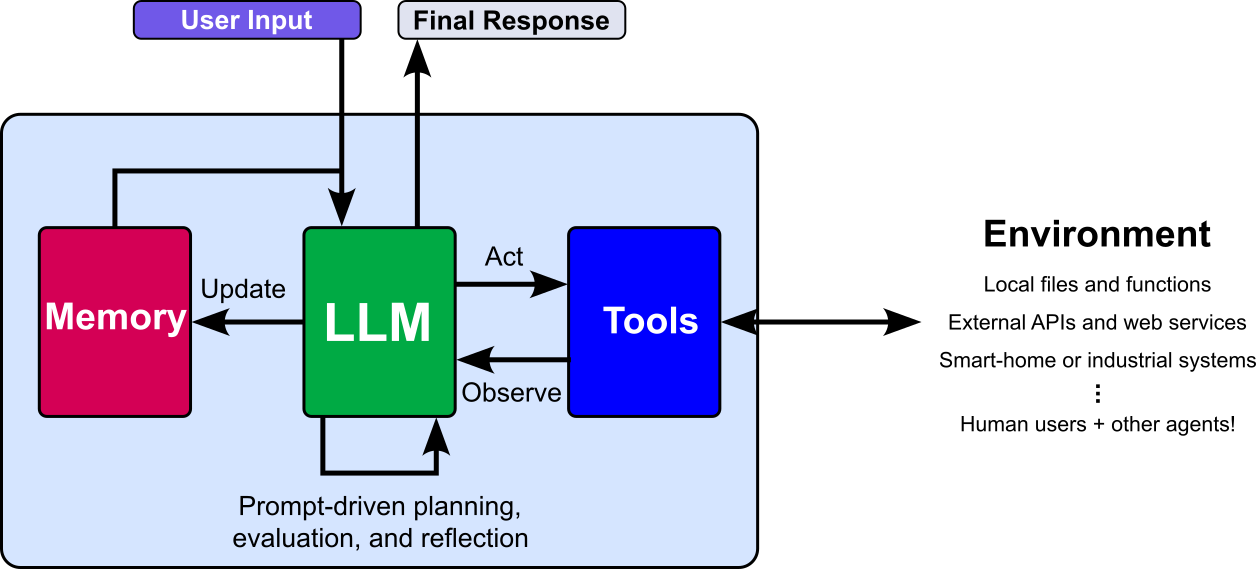
We now know the main core components of an AI agent and how they work together — again, the complexity of an agent in terms of the number and complexity of its components, as well as the exact steps of the agentic loop may differ depending on the purpose and implementation of the agent. So far, however, we only considered single agents. For many types of tasks, multiple agents have to work together to accomplish a goal. So let's briefly look into multi-agent systems next.
Multi-Agent Systems
In principle, an agent can be made more capable by strengthening each of its core components. Giving it more memory lets it retain longer histories, accumulate knowledge across sessions, and draw on richer context. Giving it access to more tools widens what it can do in its environment, from querying databases to running code to controlling a browser. Improving its planning and reasoning, for example by replacing prompt-driven planning with a distinct planning module that decomposes goals, orders subtasks, and revises plans, lets it tackle tasks that are longer, more interdependent, and less well defined. Taken together, these upgrades suggest a straightforward path toward handling ever more complex user tasks: keep enlarging a single, general-purpose agent.
In practice, however, this approach runs into diminishing returns, because each added capability brings its own challenges. The more memory an agent has, the more likely it is to contain noise: outdated facts, irrelevant details, and redundant or contradictory entries compete for attention, making it harder to retrieve what actually matters and easier for the agent to be distracted or misled. Likewise, the more tools an agent can choose from, the harder it becomes to select the right one, since tool descriptions overlap, arguments are easy to confuse, and every additional option enlarges the space in which the agent can make a wrong choice. Larger context, bigger toolsets, and more elaborate planning also raise cost and latency, and make the agent's behavior harder to predict, debug, and control.
An alternative is therefore to stop scaling up a single agent and instead divide the work. A complex task is not only split into subtasks, but those subtasks are handed to other, specialized agents, each with a focused role, a limited toolset, and a small, relevant memory. A research agent, a coding agent, and a review agent, for instance, can each operate within a narrow scope where noise is low and tool selection is easy, while their combined effort covers the full task. This is where multi-agent systems come in: specialization keeps each individual agent simple and reliable, and coordination between them provides the capability that no single agent could manage well on its own. When it comes to implementing multi-agent systems, there are two main, closely related, aspects: task decomposition ("How is the work divided?") and coordination ("How do the different agents collaborate with each other?").
Task Decomposition
Task decomposition in a multi-agent system is a natural extension of the planning phase in a single agent. A single agent already breaks a goal into steps, orders them, and chooses a tool for each one. Decomposition applies the same idea one level up: instead of choosing tools for each step, the planner chooses which agent should handle each subtask. The problem is considerably harder, however, for two main reasons:
- Tasks that call for multiple agents are by definition more complex, so the plan must cover longer chains of interdependent subtasks, with more room for things to go wrong.
- The planner can no longer reason about a single agent whose capabilities it knows; it must also account for which agents exist (and are available) and what each is specialized in.
These two challenges make task decomposition a complex and multi-faceted problem on its own. In the following, we therefore briefly outline the most important dimensions based on which popular strategies can be grouped:
WHO performs the decomposition? In manual decomposition, developers define the subtasks and agent roles in advance, as in a fixed research-write-review pipeline, which is predictable and easy to debug but inflexible when tasks vary. In LLM-driven decomposition, a planner or orchestrator agent uses a language model to generate subtasks on the fly, which adapts well to new tasks but can yield inconsistent or poorly scoped plans. Symbolic or classical planning, such as HTN or PDDL-style planners, derives subtasks from an explicit model of actions, preconditions, and goals, offering correctness guarantees but requiring a well-defined domain model. Hybrid approaches combine the last two, with an LLM proposing a plan that rules or a symbolic planner then validate, structure, or constrain.
HOW is decomposition done? Task decomposition can also be classified by the principle used to split the work. Functional decomposition assigns subtasks according to the specialized agents available, such as a researcher, coder, and reviewer. Data-parallel decomposition divides identical work across chunks of input, for example one agent per document or file. Sequential decomposition organizes the task as a pipeline of ordered stages, each consuming the output of the previous one. Hierarchical decomposition splits a goal recursively into major parts and then finer subtasks until each is small enough for a single agent. Perspective-based decomposition has several agents attempt the same task from different angles, with their outputs compared or merged, as in debate and ensemble setups.
WHAT is the result of the decomposition? A good decomposition produces more than a list of pieces: it specifies each subtask's goal, its inputs and expected outputs, and its dependencies on other subtasks, which determine what can run in parallel and what must wait for earlier results. Each subtask is then matched to an agent whose tools, memory, and expertise fit it. The result is typically represented in one of three structures: a linear list, which is a simple ordered sequence of steps; a dependency graph (DAG), where explicit dependencies allow independent parts to run in parallel; or a tree, which gives a hierarchical breakdown and sometimes explores alternative branches in parallel.
When is the decomposition performed? Lastly, task decomposition can also be classified by timing. Static decomposition creates the full plan once before execution begins, which makes it simple, predictable, and auditable, but unable to react to surprises. In contrast, dynamic decomposition builds the plan incrementally and revises it as results arrive, adding, merging, or re-splitting subtasks as needed. This makes it more robust for open-ended problems but harder to predict and control, and it mirrors the evaluate-and-reflect step of the agentic loop applied at the level of the whole system.
Coordination
Once a complex task has been decomposed into meaningful subtasks, these substasks have to be handle by the different agents. This means that the substask have to be passed to agents and their responses have to be collected and evaluated. This requires the communication and coordination between agents, and like with decompositiona, there are various different strategies how this can be accomplished. Let's have a brief look at the most common ones, where we organize strategies (mainly) based on their overall topology.
Centralized Coordination
In a centralized coordination strategy, one or more designated agents are responsible for organizing the collective work. They assign subtasks, track progress, manage dependencies, and combine the results produced by other agents. This gives the system a clear coordination point for guiding agents toward the overall goal. Depending on the number of agents responsible for the coordination, we can distinguish between an orchestrator or supervisor setup (1 coordinating agent) or a hierarchical setup (multiple coordinating agents).
Orchestrator or supervisor. Here we have a single coordinating agent, often called an orchestrator or supervisor, which takes on the roles that a single agent would otherwise handle alone: it interprets the user's goal, decomposes it into subtasks, decides which specialized agent should handle each one, and tracks their progress; see the figure below. The worker agents, in turn, focus on their narrow areas of expertise and do not need to know about the overall task or about each other. The coordinator also collects the results, checks them, resolves inconsistencies, and merges them into a coherent final answer. If an agent fails or returns a poor result, it can reassign the subtask or adjust the plan.
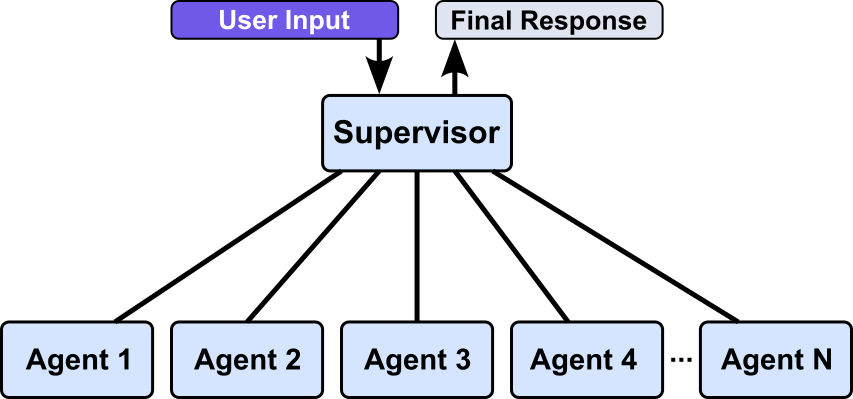
Because all decisions flow through a single point, the system's behavior is easier to understand, debug, and control, and it is straightforward to add safeguards such as human approval for risky actions. The trade-off is that the coordinator can become a bottleneck and a single point of failure, and it must understand enough about every worker's capabilities to delegate well.
Hierarchical. In hierarchical coordination, agents are arranged in layers, like an organizational chart. A top-level coordinator splits the user's goal into a few major parts and delegates each to a sub-coordinator. Each sub-coordinator repeats the process at its own level: it breaks its part into finer subtasks, assigns them to its worker agents, and merges their results. Instructions flow downward as increasingly specific subtasks, while results flow upward until the top-level coordinator assembles the final answer.
To give an example, the figure below shows a multi-agent system for software development. Users still submit questions of tasks to the supervising agents. However, each question or task is first decomposed to subtasks related to development, resource management, and testing, and then passed to specialized supervising agents. These agents then decompose the received subtasks even further to pass these final subtasks to the actual worker agents.
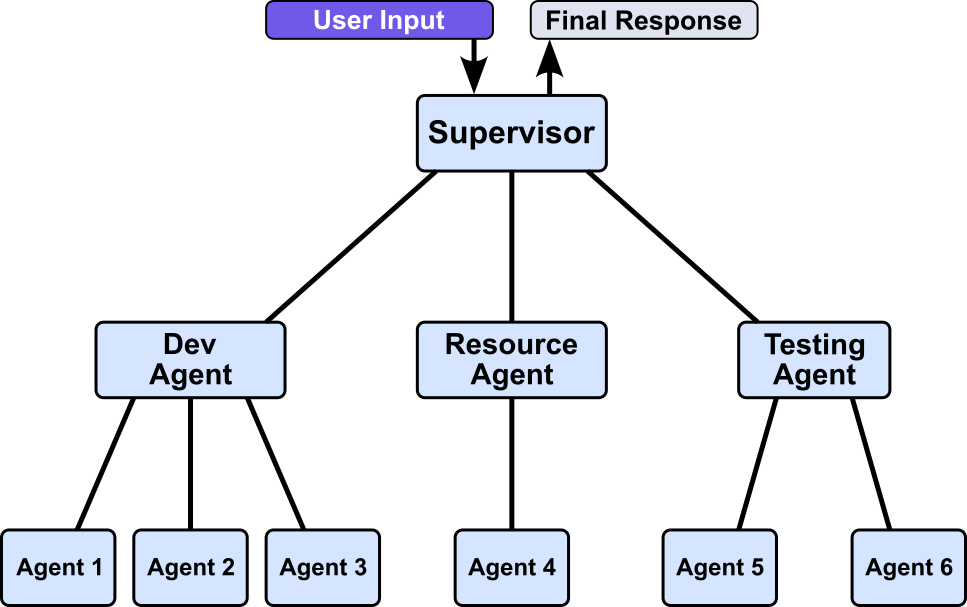
The main benefit of hierarchical coordination is scalability, since no single coordinator has to track every worker. The cost is added overhead, longer communication paths, and the risk that errors are amplified as they pass between layers.
Decentralized Coordination
In decentralized coordination, agents work together without relying on a designated coordinator. They may communicate directly, follow shared rules, or use a common workspace to divide tasks, share progress, and resolve dependencies. This can make the system more flexible and avoid a central bottleneck or single point of failure. However, coordination can be harder to manage: agents may duplicate work, disagree, or have difficulty maintaining a consistent view of the overall task. The system therefore needs clear communication and coordination protocols. Again, different decentralized strategies are common:
Peer-to-peer. In peer-to-peer coordination, agents interact directly as equals, with no orchestrator deciding who does what. Each agent can send messages to other agents, request help, share intermediate results, and hand over work when another agent is better suited to a subtask. Responsibilities are negotiated through these exchanges rather than assigned from above: for example, a coding agent that needs current information may ask a research agent directly, and a reviewer may send feedback straight back to the coder. The figure below illustrates this idea.
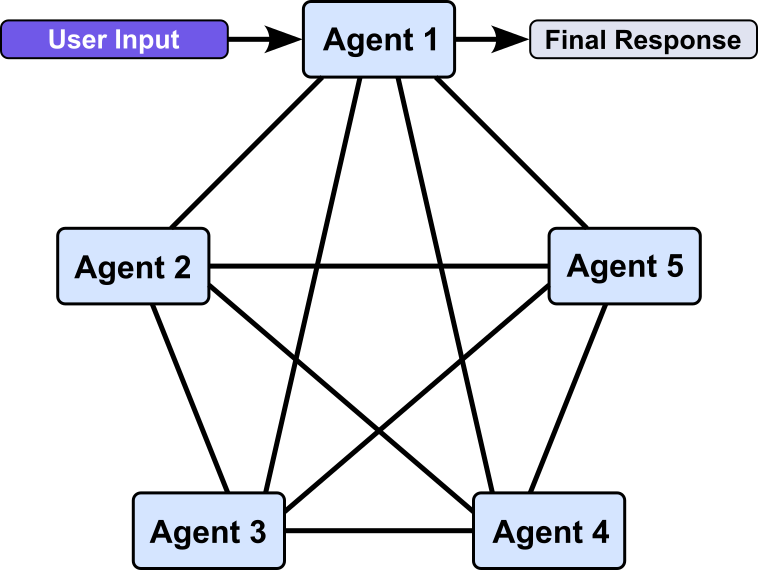
Because each agent only needs to know which peers it can contact and what they offer, the system stays flexible and has no single point of failure. The trade-off is that the overall result emerges from many interactions, which makes it harder to keep the work coherent, avoid duplication, and trace or control what happened. Peer-to-peer setups therefore work best when agents have clearly defined roles and a shared protocol for how to communicate and when a task counts as finished.
Shared workspace (blackboard). In a shared workspace (often called a blackboard), agents coordinate indirectly by reading from and writing to a common space instead of messaging each other or taking orders from a coordinator; see the figure below illustrating this setup. The workspace might be a shared memory, a document, a task board, or a database that holds the current problem state, intermediate results, and open questions. Each agent monitors it, picks up work that matches its expertise, and posts its contributions back, which other agents can then build on.
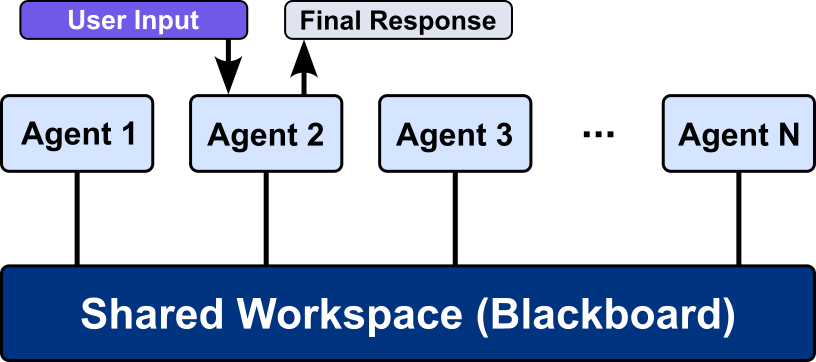
The benefit is loose coupling: agents can be added or removed easily, and all progress is visible in one place, which helps with transparency and debugging. The challenges are managing the shared content, such as preventing conflicting edits, keeping it from growing noisy, and deciding when the task counts as finished, since the workspace alone does not direct the agents' work.
Fixed Workflows (Pipeline or Handoff)
Fixed workflows decompose a complex task into predefined stages, each handled by a specialized agent with a narrow, well-defined role, so the overall behavior is predictable and easy to audit. Because the route is set at design time, you avoid the failure modes of open-ended coordination, such as agents looping, drifting off-task, or wasting tokens deciding who should act next. Fixed workflows come in two main flavors: pipeline and handoff.
Pipeline. The pipeline strategy chains agents in a fixed, linear sequence, where each agent receives the output of the previous one, performs its specialized step, and passes its result to the next until the final output is produced. Its main characteristic is that the order of execution is determined entirely at design time: no agent decides who acts next, so control flow is static and every run follows the same path. Given this fixed order of agents, we can visualize this pipeline strategy as a linear sequence of agents:

Handoff. The handoff strategy lets agents pass control to one another during execution, so the workflow is a set of allowed transitions rather than a single fixed sequence. Its main characteristic is that routing is decided at runtime: the agent currently in charge chooses whether to finish or to transfer the task, along with its context, to another agent better suited to the next step. The structure is still constrained by design, but the actual path varies with the input, which adds adaptivity at the cost of needing safeguards against loops and dead ends.
The figure below shows an example where the complete workflow contains three agents. While we know in this case that the workflow starts with Agent 1 and must go through all the agents, there are two possible paths:
- Agent 1 Agent 2 Agent 3
- Agent 1 Agent 3 Agent 2
This, of course, also means that the final response sent back to the user may come either from Agent 2 or Agent 3.
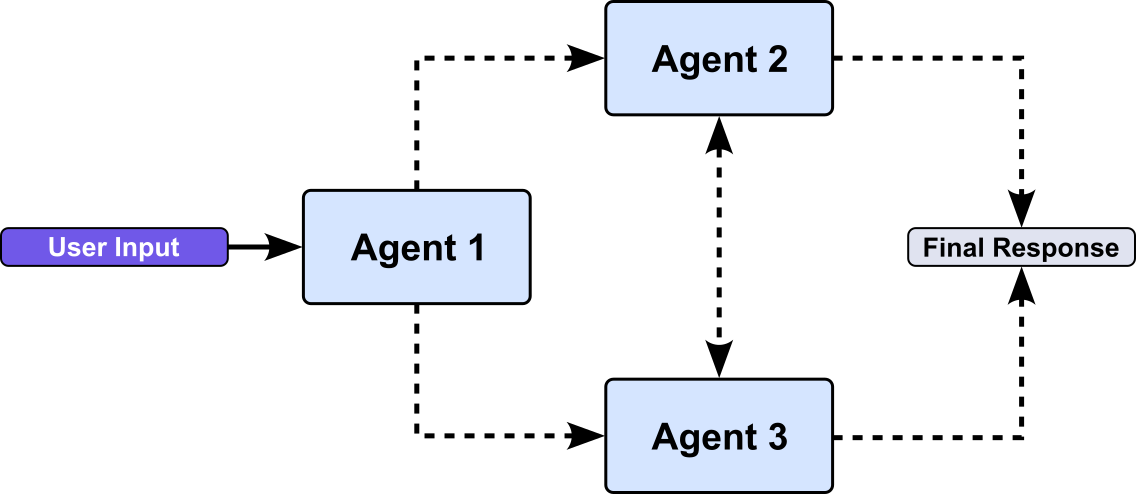
In general, fixed workflows are easy to understand, test, and debug, and each agent's inputs and outputs are clearly defined. The drawbacks are inflexibility and speed. The workflow cannot adapt well to tasks that deviate from the expected path, errors in an early stage propagate downstream, and stages that run strictly one after another cannot exploit parallelism.
Collaborative review (Critique and Debate)
In collaborative review, agents coordinate by checking and challenging one another's work rather than by dividing it up. In a critique setup, one agent produces a result, such as a draft, a piece of code, or a plan, and another agent reviews it, points out errors or weaknesses, and sends feedback back so the first agent can revise. In a debate setup, several agents independently propose answers or argue for different positions, respond to each other's arguments over one or more rounds, and converge on a final answer through consensus, voting, or a judge agent that decides. For example, a coding agent might write a function, a reviewer agent might spot a bug and suggest a fix, and a test agent might verify the result.
The figure below shows the most basic setup of using a single agent (the critic agent) to review the response generated by another single (the generator agent). Keep in mind that the back and forth between the generator and the critic agent may involve several iterations until the response is considered good enough to return it as the final response to the user.
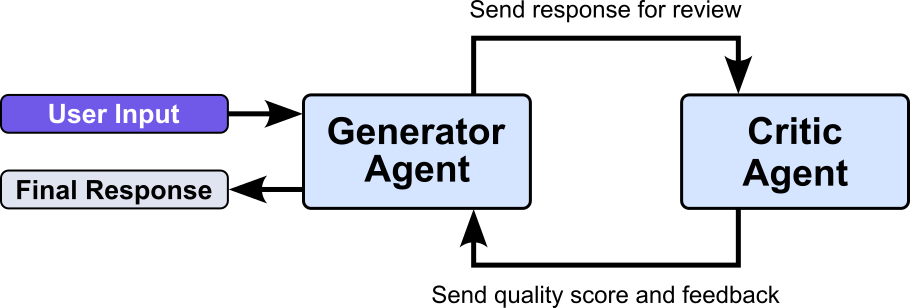
The general benefit is higher quality and reliability. Independent perspectives catch mistakes, reduce hallucinations, and expose weak reasoning that a single agent would miss. The drawbacks are increased cost and latency, since each round requires additional model calls, and the risk that agents reinforce a shared mistake, fail to converge, or get stuck in endless back-and-forth without a clear stopping rule.
Important: The coordination strategies described so far are best understood as building blocks rather than mutually exclusive choices. Each one has distinct strengths and weaknesses: centralized control is easy to manage but can become a bottleneck, decentralized interaction is robust but hard to keep coherent, fixed workflows are predictable but inflexible, and collaborative review improves quality but adds cost. Real-world tasks rarely fit neatly into a single pattern, so practical systems tend to combine strategies to get the benefits of several while offsetting their individual weaknesses.
A common example is a shared workspace that still features a central supervising agent. The agents read from and write to the common space and pick up work they are suited for, which keeps them loosely coupled and makes progress visible. The supervisor, in turn, monitors the workspace, resolves conflicts, prioritizes open items, and decides when the task is finished, which addresses the coherence and termination problems of a pure blackboard. Other typical hybrids include an orchestrator that delegates to a fixed pipeline of agents, a hierarchy whose teams collaborate peer-to-peer internally, or a workflow in which each stage's output passes through a critique-and-review step. The choice of combination depends on the task's complexity, the need for control and predictability, and the acceptable cost and latency.
Moving from a single agent to a multi-agent system is a significant jump in complexity. Beyond running one loop with one context and one set of tools, the system must decompose the task, assign subtasks to suitable agents, let them exchange information, merge their results, and handle failures, and these decisions interact: a poor decomposition makes coordination harder, and weak coordination undermines even a good decomposition. Behavior also becomes harder to predict and debug, since it emerges from many interacting agents. Building all of this from scratch for every application is costly, which is why a series of agentic frameworks, such as AutoGPT, LangChain, LangGraph, AutoGen, and CrewAI, have been proposed. They provide reusable abstractions for agents, tools, memory, and workflows, along with ready-made coordination patterns, so developers can focus on their task rather than the underlying plumbing, although the key design decisions about decomposition and coordination remain with them.
Summary
This notebook introduced the concept of AI agents and the central idea of extending the capabilities of Large Language Models (LLMs). While an LLM can generate text and provide information, an AI agent combines it with additional components that allow it to interact with external systems, use tools, retain relevant information, observe its environment, and — most importantly — perform actions. This makes it possible to move beyond simply describing how a task should be completed and instead enable the agent to carry out the task on a user's behalf.
The notebook first covered the core components of an AI agent, including the LLM, memory, tools, observations, and planning mechanisms. It then examined how these components work together within the agentic loop. In this loop, the agent receives a goal, reasons about the next step, performs an action, observes the resulting feedback, evaluates its progress, and continues or revises its plan as needed. This iterative interaction allows agents to handle tasks that are dynamic, multi-step, and not fully known in advance.
The notebook also briefly explored the extension from single-agent solutions to multi-agent systems. In such systems, multiple agents can specialize in different tasks and collaborate to solve a larger problem. Different coordination approaches were organized according to common system topologies, including centralized, decentralized, and hybrid arrangements. These topologies determine how agents communicate, how tasks are allocated, and whether one or more agents are responsible for coordinating the overall process.
AI agents and multi-agent systems are powerful abstractions for solving complex tasks and problems. Nevertheless, they still fundamentally rely on LLMs as their main reasoning and planning engines. Since the internal behavior of an LLM is difficult to interpret and can be viewed, in some respects, as a black box, it is challenging to provide formal guarantees about an agent's decisions and behavior. Practical agentic systems therefore often require additional mechanisms for validation, monitoring, constraint enforcement, and human oversight.