
Disclaimer: This Jupyter Notebook contains content generated with the assistance of AI. While every effort has been made to review and validate the outputs, users should independently verify critical information before relying on it. The SELENE notebook repository is constantly evolving. We recommend downloading or pulling the latest version of this notebook from Github.
Tutorial: Training a CNN Image Classifier (CIFAR-10)
Convolutional Neural Networks (CNNs) are widely used for image classification because they can learn useful patterns while taking the spatial structure of images into account. This notebook assumes you are already familiar with the basic concepts behind CNNs, such as convolutional layers, feature maps, and pooling. It focuses instead on the practical steps involved in using a CNN to build an image classifier. We will use CIFAR-10, a dataset of $60,000$ color images, each $32\times 32$ pixels and labeled as one of ten classes: airplane, automobile, bird, cat, deer, dog, frog, horse, ship, or truck. The dataset is divided into $50,000$ training images and $10,000$ test images. Its small image size and manageable number of classes make it a useful dataset for learning the image-classification workflow.
The notebook will guide you through preparing the data, building a CNN, training the model, and evaluating its predictions on held-out test data. As we go, we will consider practical choices that arise at each stage and examine how to assess the model's performance. The goal is not to achieve state-of-the-art results, but to make the main steps clear and approachable for beginners. Think of the notebook as a blueprint that you can adapt and extend. Once you understand the workflow, you can experiment with different model architectures, preprocessing methods, and training strategies, or apply the same steps to other image datasets.
Setting up the Notebook
Make Required Imports
This notebook requires the import of different Python packages but also additional Python modules that are part of the repository. If a package is missing, use your preferred package manager (e.g., conda or pip) to install it. If the code cell below runs with any errors, all required packages and modules have successfully been imported.
from src.utils.libimports.cifar10cnn import *
from src.utils.compute.gpu import *
from src.utils.plotting.ml import *
from src.utils.plotting.media import *
Checking & Setting Computing Device
PyTorch allows to train neural networks on supported GPU to significantly speed up the training process. If you have a support GPU, feel free to utilize it. However, for this notebook it's certainly not needed as our dataset is small and our network model is very simple. We provide an auxiliary method to automatically select the best device. It checks if a supported GPU is available and if so, uses it as the preferred device.
# Select preferred device (GPU, if available; CPU otherwise); you can enfore the use of the CPU
DEVICE = select_device(force_cpu=False)

print("Available device: {}".format(DEVICE))
Available device: cuda:0
Dataset Preparation
In this notebook, we will be using the CIFAR-10 dataset, a dataset of small color images commonly used to teach and benchmark image-classification methods. It contains 60,000 images, each 32 × 32 pixels with three color channels, divided among 10 classes: airplane, automobile, bird, cat, deer, dog, frog, horse, ship, and truck. The dataset is organized into 50,000 training images and 10,000 test images. Each image has one class label, and the class distribution is balanced, with 6,000 images per class overall.
CIFAR-10 was created by Alex Krizhevsky, Vinod Nair, and Geoffrey Hinton from larger images collected from the web and labeled through crowdsourcing. Its small size makes it popular in education: it needs relatively little storage and can be used for experiments without extensive computing resources. However, it is best suited to learning and comparing basic techniques. Its limited image resolution and dataset size are not enough to train state-of-the-art image classifiers, which typically require much larger datasets and substantially more computing resources.
Download Dataset
The CIFAR-10 dataset is easy to access through torchvision, which provides the CIFAR10 dataset class. It can download the dataset automatically and make its images and labels available to a PyTorch workflow; as shown in the code cell below. The variable target_folder specifies where the dataset files are stored — you can change this variable to your preferred location. The first CIFAR10 call loads the training split, while the second loads the test split; train=True and train=False select those respective parts of the dataset. With download=True, torchvision downloads the files if they are not already available in that folder. Finally, transforms.ToTensor() converts each image to a PyTorch tensor and scales its pixel values to the range $[0, 1]$. The resulting raw_train and raw_test objects provide access to the images and their labels.
Side note: Despite being considered a small educational dataset, its size as a compressed archive file is still ~165 MB, so downloading the dataset might take a few minutes.
target_folder = "./data/datasets/images/classification/cifar10"

raw_train = torchvision.datasets.CIFAR10(root=target_folder,  train=True, download=True, transform=transforms.ToTensor())
raw_test  = torchvision.datasets.CIFAR10(root=target_folder, train=False, download=True, transform=transforms.ToTensor())
First, we can check the basic dataset statistics in terms of the number of training and test images, as well as the list of class labels.
class_names = raw_train.classes

print(f"Number of training images: {len(raw_train)}")
print(f"Number of test images:     {len(raw_test)}")
print(f"List of class labels:      {class_names}")
Number of training images: 50000
Number of test images:     10000
List of class labels:      ['airplane', 'automobile', 'bird', 'cat', 'deer', 'dog', 'frog', 'horse', 'ship', 'truck']
Basic Explorative Data Analysis (EDA)
Before training a model, it is often useful to inspect the data. Looking at a few examples can reveal what the inputs actually look like, how labels correspond to them, and whether anything seems unexpected, such as unusual image dimensions or mislabeled samples. This simple check helps build an intuition for the task and can catch potential data issues before they affect training. We will begin by displaying a few images from the CIFAR-10 training set. This gives us a closer look at the small, low-resolution color images the CNN will learn from and helps set expectations for the classification task.
fig, axes = plt.subplots(2, 5, figsize=(12, 5))

for ax, (image, label) in zip(axes.flat, [raw_train[i] for i in range(10)]):
    ax.imshow(image.permute(1, 2, 0))
    ax.set_title(class_names[label])
    ax.axis("off")

plt.tight_layout()
plt.show()

At just 32 × 32 pixels, CIFAR-10 images contain relatively little visual detail, which can make their contents surprisingly difficult to recognize. For example, without its label, the brown blob in the first image may not be obviously a frog. Images are often easier to interpret when the object stands out clearly from its background, such as through a strong color contrast. This ambiguity makes CIFAR-10 a challenging classification task despite its small image size and limited number of classes. The CNN may struggle with images whose objects are unclear or blend into the background, and this is likely to affect its classification performance.
Additionally, using the code cell below, we can plot the class distribution to check how balanced and imbalanced the dataset is. If some classes are much more common than others, the model may favor them and perform poorly on less represented classes. Knowing the class distribution helps us interpret evaluation results and decide whether the imbalance needs to be addressed.
counts = Counter(raw_train.targets)
class_counts = [counts[i] for i in range(len(class_names))]

plt.figure(figsize=(10, 5))
plt.bar(class_names, class_counts)
plt.xlabel("Class", fontsize=14)
plt.ylabel("Number of images", fontsize=14)
plt.title("CIFAR-10 training class distribution")
plt.xticks(rotation=45, fontsize=14)
plt.tight_layout()
plt.show()

As the plot shows, the CIFAR-10 training set is perfectly balanced: each of its ten classes contains exactly 5,000 images. As a result, no class is represented more heavily than another in the training data. This balance gives the CNN an equal number of examples to learn from for each class. It also makes class-by-class performance easier to compare, since differences are less likely to be caused simply by some classes having fewer training examples.
Image Normalization
A very common preprocessing step when working with images for machine learning tasks is to normalize them before passing them to a model. Normalizing images by subtracting the training set's average value for each color channel centers the inputs around zero. This gives the CNN inputs on a more consistent scale and can make optimization easier: the model does not have to learn around a large, shared brightness or color offset, which can help gradients and training behave more steadily.
Without this centering, the model can still learn, but training may be less efficient or more sensitive to choices such as the learning rate and weight initialization. The channel means are typically calculated from the training data and then applied to the training, validation, and test images, so information from the held-out data does not influence preprocessing.
In the code cell below, we first compute the channel statistics (mean and standard deviation). Recall that raw_train is a CIFAR10 object containing the training images and their labels. Using torch.stack() and list comprehension to extract and combine all images tensors, we get single 4D tensors with the shape $(N, C, H, W)$: number of images ($N$), color channels ($C$), image height ($H$), and image width ($W$); for CIFAR-10, the shape is $(50000, 3, 32, 32)$. Using this tensor, we can now compute the channel statistics. The results each contain three values: one for red, one for green, and one for blue.
# Shape: (N, C, H, W)
images = torch.stack([image for image, _ in raw_train])

# One mean and standard deviation per channel, across all images and pixels
channel_mean = images.mean(dim=(0, 2, 3))
channel_std = images.std(dim=(0, 2, 3))

print("Mean:", channel_mean)
print("Std: ", channel_std)
Mean: tensor([0.4914, 0.4822, 0.4465])
Std:  tensor([0.2470, 0.2435, 0.2616])
Recall that the original image contains pixel values that have been scaled to the range $[0, 1]$. Seeing means of around $0.5$ and standard deviations of around $0.25$ is therefore quite expected.
With these channel statistics we can now normalize both the training and test images. torchvision makes it convenient to define image preprocessing as a sequence of transforms and apply it automatically whenever an image is retrieved from a dataset. transforms.Normalize standardizes each color channel by subtracting its mean and dividing by its standard deviation; transforms.Compose chains the steps together: each image is first converted to a tensor, then normalized using the training-set statistics. The transform is applied when an image is accessed via the CIFAR10 class, so you do not need to normalize and save a separate copy of every image. Although download=True is specified for convenience, torchvision checks the target folder first: because the dataset was downloaded there earlier, it will reuse the existing files rather than download them again.
normalize = transforms.Normalize(
    mean=channel_mean.tolist(),
    std=channel_std.tolist()
)

transform = transforms.Compose([
    transforms.ToTensor(),
    normalize
])

train_dataset = CIFAR10(root=target_folder,  train=True, download=True, transform=transform)
test_dataset  = CIFAR10(root=target_folder, train=False, download=True, transform=transform)
Split Training Data
The CIFAR-10 training set contains $50,000$ images. Using the code cell below, we further split it into $40,000$ training examples and $10,000$ validation examples. The model will learn from the training subset, while the validation subset lets us monitor how well it performs on data it did not use for learning. Although this notebook trains a single model and does not tune hyperparameters, using a validation set is still good practice. It lets us make development decisions without using the test set, which should remain unseen until the final evaluation. This helps keep the test results as an independent estimate of how well the model generalizes.
train_subset, val_subset = data.random_split(
    train_dataset,
    [40_000, 10_000],
    generator=torch.Generator().manual_seed(42)
)

print(f"Training samples:   {len(train_subset)}")
print(f"Validation samples: {len(val_subset)}")
Training samples:   40000
Validation samples: 10000
We will use a single validation set to monitor the model during development. More advanced approaches, such as k-fold cross-validation, divide the data into k subsets and repeat training and evaluation k times, using a different subset for validation each round. This can provide a more robust assessment, but it also greatly increases the time and computing needed. Since this notebook is intended as a basic tutorial, we will not use cross-validation. A single training and validation split is enough to demonstrate the main workflow while keeping the example manageable.
Create DataLoader Objects
Lastly, we create instances of the DataLoader class. This PyTorch class wraps a dataset and provides an iterator that supplies examples to a model in batches. It can also shuffle the training data each epoch and load data using multiple workers, which can make training more efficient. Instead of handling individual examples manually, you iterate through the loader to receive batches of images and labels. Creating separate DataLoader instances for the training, validation, and test datasets keeps the data pipeline consistent and convenient across each stage. You can configure each loader as needed (for example, shuffle the training data while keeping validation and test data in a fixed order) and use the same familiar batch-processing pattern with your PyTorch model.
BATCH_SIZE = 64

loader_train = data.DataLoader(train_subset, batch_size=BATCH_SIZE, shuffle=True)
loader_val   = data.DataLoader(val_subset, batch_size=BATCH_SIZE, shuffle=False)
loader_test  = data.DataLoader(test_dataset, batch_size=BATCH_SIZE, shuffle=False)
Shuffling the training data between epochs is a common practice because it changes the order in which the model sees examples. This helps prevent the model from repeatedly learning from the same sequence of batches, which could make updates sensitive to the data's original ordering. The model still sees the same training examples each epoch, but in a different order. Shuffling is generally unnecessary for validation and test data. The model is not being trained on those examples, so their order does not affect the evaluation results. Keeping a fixed order can also make evaluation easier to reproduce and compare.
Besides batch_size and shuffle, the class offers many options for controlling how data is prepared and delivered. For example, num_workers can load data in parallel, drop_last can discard an incomplete final batch, and pin_memory can help transfer batches to a GPU more efficiently. We will use only the options needed for this tutorial and leave a detailed exploration of the DataLoader class to another time. Its broader range of arguments can be useful when adapting a data pipeline to a particular model or hardware setup.
Now, we are finally ready to use the data to train and evaluate a CNN.
Model Training & Evaluation
CNN Architecture
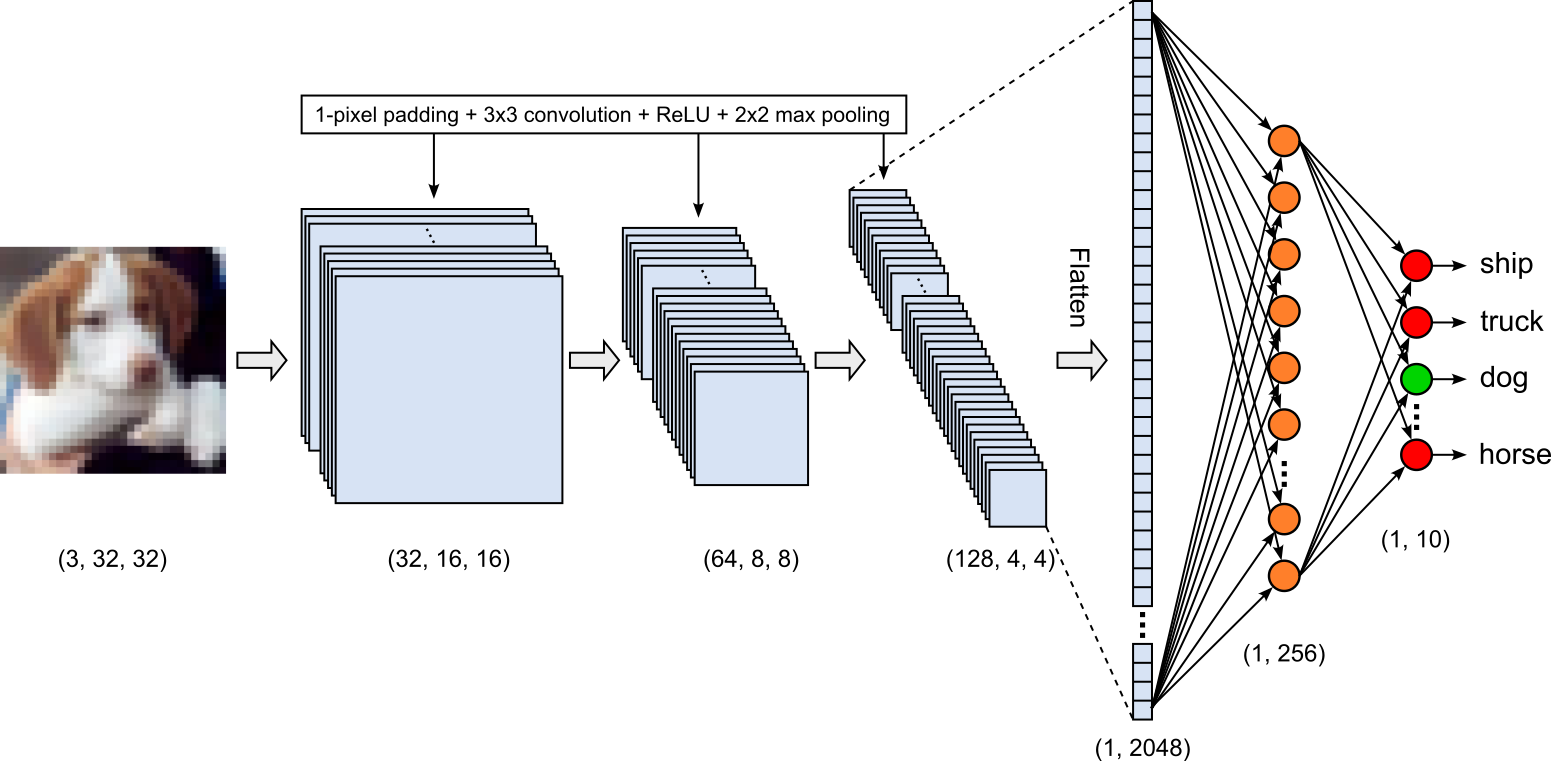
In the following, we consider the most basic architecture of a CNN model — that is (a) a series on convolutional layers for feature extraction and (b) a series of fully connected layers that eventually map the input to the $10$ output classes:
Feature extractor. CNNs typically stack multiple convolutional layers so the model can build increasingly useful image features. Earlier layers tend to respond to simple local patterns, such as edges, while later layers can combine those responses to recognize more complex patterns, such as textures, parts, or shapes. Each layer processes the feature maps produced by the previous one, allowing information from a wider region of the image to influence deeper representations. Together, these layers form a feature extraction module that turns raw pixel values into representations that are more useful for the classification task.
Classification head. The convolutional layers extract spatial features from the image, producing a set of feature maps that describe patterns detected in different locations. A classification head takes these learned features and uses them to predict which class the image belongs to. These layers combine information across the extracted features to produce class scores. Intermediate fully connected layers may learn useful combinations of features, often with nonlinear activation functions between them, while the final layer outputs one score, or logit, for each class.
The code cell contains the implementation of the CNN model in PyTorch. The class CnnClassifierCFIAR10 utilizes the utility class nn.Sequential to organize all layers into the feature extractor self.features and the classification head self.classifier. The feature extractor contains three convolutional layers that are quite similar in the sense that all three layers
- Use a kernel size of $3\times 3$ (an integer value
kernel_sizeimplies a square kernels) - Use 1-pixel padding — together with $3\times 3$ kernels this means that the ouput shapes are the same as the input shapes
- Are followed by a $\text{ReLU}$ activation function and a pooling layer with a window size of $2$ and a stride of $2$ (if
stride=None, the same value as for stride is used); these parameters mean that the pooling layers halves the size of feature map in terms of their heights and width.
The main difference between the three convolutional layers is with respect to their number of kernels. The number of kernels in a convolutional layer is a design choice. Each kernel can learn to respond to a different feature, so more kernels let a layer represent a wider variety of patterns. The trade-off is greater memory use and computation. In practice, the number is chosen based on the task, input size, available resources, and experiments with model performance; there is no single best value. It is common for CNNs to use more channels in deeper layers, often as the feature maps become smaller through, e.g., pooling. A smaller spatial size can make it more affordable to increase the channel count while keeping computation manageable. This is a widely used design pattern, though architectures vary, and increasing the number of kernels is not required at every layer.
class CnnClassifierCFIAR10(nn.Module):

    def __init__(self, num_classes=10):
        super().__init__()

        self.features = nn.Sequential(

            # 1st convolutional layer: # 32 x 32 -> 32 x 32
            nn.Conv2d(3, 32, kernel_size=3, padding=1),
            nn.ReLU(),
            nn.MaxPool2d(kernel_size=2),  # 32 x 32 -> 16 x 16

            # 2nd convolutional layer: # 16 x 16 -> 16 x 16
            nn.Conv2d(32, 64, kernel_size=3, padding=1),
            nn.ReLU(),
            nn.MaxPool2d(kernel_size=2),  # 16 x 16 -> 8 x 8

            # 3rd convolutional layer: # 8 x 8 -> 8 x 8
            nn.Conv2d(64, 128, kernel_size=3, padding=1),
            nn.ReLU(),
            nn.MaxPool2d(kernel_size=2),  # 8 x 8 -> 4 x 4
        )

        self.classifier = nn.Sequential(
            nn.Flatten(),
            nn.Linear(128 * 4 * 4, 256),
            nn.ReLU(),
            nn.Dropout(0.5),
            nn.Linear(256, num_classes)
        )

    def forward(self, x):
        x = self.features(x)
        return self.classifier(x)
Auxiliary Methods
To make the model training more convenient and the code easier to read, we define a couple of auxiliary methods. The first, train_epoch trains the given model for a single epoch with respect to the given data loader (which typically will be the data loader containing the training data). Fundamentally, this method implements the most basic training loop that iterates over all batches in the data loader and performs the core steps:
- Pass the inputs and labels to the model to get the model outputs
- Compute the loss with respect to the given loss function (often called criterion, in practice)
- Perform backpropagation and update the learnable parameters using the functionality provided by PyTorch
During these steps, the method keeps track of the total loss across all batches and returns that total loss at the end.
# training
def train_epoch(model, loader, optimizer, criterion):
    # Initialize epoch loss (cummulative loss fo all batchs)
    epoch_loss = 0.0
    # Use tqdm to get a nice progress bar
    with tqdm(total=len(loader)) as pbar:
        # Iterate over all batches
        for X_batch, y_batch in loader:
            # Move the batch to the correct device
            X_batch, y_batch = X_batch.to(DEVICE), y_batch.to(DEVICE)
            # Get model outputs as log probabiltiies
            log_probs = model(X_batch)
            # Calculate loss
            loss = criterion(log_probs, y_batch)
            ### Pytorch magic! ###
            optimizer.zero_grad()
            loss.backward()
            optimizer.step()
            # Keep track of overall epoch loss
            epoch_loss += loss.item()
            # Update progress bar
            pbar.update(1)
    # Return total loss across whole dataset
    return epoch_loss
Very similar to the method for training for a single epoch, the method evaluate() takes in a model and a data loader as arguments. Again, the model iterates over all batches of the data loader and passes the inputs (i.e., the images) to the model to get the predicted class labels. The method records all true and predicted class labels and returns both at lists; we can later use these lists to compute additional metrics to evaluate the performance of the model.
def evaluate(model, loader):
    # Define 2 lists holding all true labels and all predicted labels
    y_true, y_pred = [], []
    # Use tqdm to get a nice progress bar
    with tqdm(total=len(loader)) as pbar:
        # Iterate over all batches
        for X_batch, y_batch in loader:
            # Move the batch to the correct device
            X_batch, y_batch = X_batch.to(DEVICE), y_batch.to(DEVICE)
            # Get model outputs as log probabiltiies
            log_probs = model(X_batch)
            # Calculate predicted class labels based on largest log probability values
            y_batch_pred = torch.argmax(log_probs, dim=1)
            # Add the true labels and predicted labels for batch ot final lists
            y_true += list(y_batch.cpu())
            y_pred += list(y_batch_pred.cpu())
            # Update progress bar
            pbar.update(1)
    # Return all fround truth and predicted class labels
    return y_true, y_pred
Training the Model
We can finally train the model. For that the code cell below first creates an instance of the CnnClassifierCFIAR10 model with one output for each class in class_names, then moves it to DEVICE (for example, the CPU or a GPU, if available). It then sets up the training components: the Adam optimizer will update the model's parameters using a learning rate of 1e-3, and CrossEntropyLoss will measure how far the model's class predictions are from the correct labels. This loss function is commonly used for multi-class classification when the model outputs one score (logit) per class. Finally, we print the model's layers and their configuration; this is a convenient check that the architecture was constructed as intended before training begins.
# Instatiate model
model = CnnClassifierCFIAR10(len(class_names)).to(DEVICE)
# Define optimizer
optimizer = optim.Adam(model.parameters(), lr=1e-3)
# Define loss function
criterion = nn.CrossEntropyLoss()

# Print model to show the defined layers
print(model)
CnnClassifierCFIAR10(
  (features): Sequential(
    (0): Conv2d(3, 32, kernel_size=(3, 3), stride=(1, 1), padding=(1, 1))
    (1): ReLU()
    (2): MaxPool2d(kernel_size=2, stride=2, padding=0, dilation=1, ceil_mode=False)
    (3): Conv2d(32, 64, kernel_size=(3, 3), stride=(1, 1), padding=(1, 1))
    (4): ReLU()
    (5): MaxPool2d(kernel_size=2, stride=2, padding=0, dilation=1, ceil_mode=False)
    (6): Conv2d(64, 128, kernel_size=(3, 3), stride=(1, 1), padding=(1, 1))
    (7): ReLU()
    (8): MaxPool2d(kernel_size=2, stride=2, padding=0, dilation=1, ceil_mode=False)
  )
  (classifier): Sequential(
    (0): Flatten(start_dim=1, end_dim=-1)
    (1): Linear(in_features=2048, out_features=256, bias=True)
    (2): ReLU()
    (3): Dropout(p=0.5, inplace=False)
    (4): Linear(in_features=256, out_features=10, bias=True)
  )
)
Beyond just printing the model, the figure below visualizes the overall network architecture showing the set of feature maps together with their shape after each convolutional layer (including the pooling layer). The figure also shows the transition from the feature extraction phase using the convolutional layers to the last linear layers for the final classification, which requires the flattening of the final set of feature maps into a 1D vector.
The number of parameters is a common measure of a neural network's size and complexity. A model with more parameters has more values it can adjust during training, which can give it greater capacity to learn patterns — but may also require more memory and computation. Parameter count is a useful point of comparison between models, though it does not capture every aspect of their complexity or performance. The code cell below counts both the model's total parameters and the subset marked as learnable. In PyTorch, learnable parameters typically have requires_grad=True and are updated during training; the total count may also include parameters that are frozen.
# Total number of parameters
total_params = sum(p.numel() for p in model.parameters())
print(f"{total_params:,} total parameters")

# Number of trainable parameters
total_trainable_params = sum(p.numel() for p in model.parameters() if p.requires_grad)
print(f"{total_trainable_params:,} trainable parameters")
620,362 total parameters
620,362 trainable parameters
With the default parameter, our CNN model for classifying CIFAR10 images has slightly over $620,362$ parameters. Given our simple model, all these parameters refer to the weights in biases in the various layers. This also includes that all parameters are learnable parameters.
By default, we train the model for $10$ epoch. In each iteration, we first call the train_epoch() model to update all learnable parameters with respect to the training data. It then uses the evaluate_method() to compute the F1 scores with respect to both the training and the validation data — as we will see in a moment, having both scores gives us a good sense if our model might be underfitting or overfitting. During the whole training, we keep track of the loss and both F1 scores using lists; we use these lists later for plotting the results
Side note: In PyTorch, model.train() and model.eval() set the model's mode. We need to call model.train() before training so layers such as dropout and batch normalization behave as intended for training; we call model.eval() before validation or testing so dropout is disabled and batch normalization uses its learned running statistics. These methods do not start training or evaluation, and they do not disable gradient tracking. Alternatively, for evaluation, we can also use torch.no_grad() or torch.inference_mode() to avoid computing gradients and reduce memory use — we see later an example for that.
Note that running the code cell below to perform the training may take a few minutes depending on your hardware. That being said, training this rather simple model using this rather simple dataset does not really require a GPU.
num_epochs = 10
results = []

for epoch in range(1, num_epochs+1):
    # Set model into training mode
    model.train()
    # Train model for a single epch
    epoch_loss = train_epoch(model, loader_train, optimizer, criterion)
    # Set model into evaluation mode
    model.eval()
    # Calculate training and test f1 scores
    y_true_train, y_pred_train = evaluate(model, loader_train)
    y_true_val,   y_pred_val   = evaluate(model, loader_val)
    f1_train = f1_score(y_true_train, y_pred_train, average='macro')
    f1_val   = f1_score(y_true_val,   y_pred_val, average='macro')
    # Append the epoch loss, training f1 score, and test f1 score to final result list (for plotting later)
    results.append((epoch_loss, f1_train, f1_val))
    # Print progress(epoch loss, training f1 score, and test f1 score)
    print(f"[Epoch {epoch}] loss:\t{epoch_loss:.3f}, f1 train: {f1_train:.3f}, f1 test: {f1_val:.3f}")
100%|██████████████████████████████████████████████████████████████████████████████████████████████████████████████████████████| 625/625 [00:17<00:00, 36.63it/s]
100%|██████████████████████████████████████████████████████████████████████████████████████████████████████████████████████████| 625/625 [00:14<00:00, 42.17it/s]
100%|██████████████████████████████████████████████████████████████████████████████████████████████████████████████████████████| 157/157 [00:03<00:00, 42.78it/s]
[Epoch 1] loss: 947.883, f1 train: 0.590, f1 test: 0.577
100%|██████████████████████████████████████████████████████████████████████████████████████████████████████████████████████████| 625/625 [00:16<00:00, 37.25it/s]
100%|██████████████████████████████████████████████████████████████████████████████████████████████████████████████████████████| 625/625 [00:14<00:00, 42.64it/s]
100%|██████████████████████████████████████████████████████████████████████████████████████████████████████████████████████████| 157/157 [00:03<00:00, 42.70it/s]
[Epoch 2] loss: 693.946, f1 train: 0.691, f1 test: 0.658
100%|██████████████████████████████████████████████████████████████████████████████████████████████████████████████████████████| 625/625 [00:16<00:00, 36.95it/s]
100%|██████████████████████████████████████████████████████████████████████████████████████████████████████████████████████████| 625/625 [00:14<00:00, 42.60it/s]
100%|██████████████████████████████████████████████████████████████████████████████████████████████████████████████████████████| 157/157 [00:03<00:00, 42.98it/s]
[Epoch 3] loss: 580.495, f1 train: 0.746, f1 test: 0.700
100%|██████████████████████████████████████████████████████████████████████████████████████████████████████████████████████████| 625/625 [00:16<00:00, 36.78it/s]
100%|██████████████████████████████████████████████████████████████████████████████████████████████████████████████████████████| 625/625 [00:14<00:00, 41.96it/s]
100%|██████████████████████████████████████████████████████████████████████████████████████████████████████████████████████████| 157/157 [00:03<00:00, 42.66it/s]
[Epoch 4] loss: 514.923, f1 train: 0.770, f1 test: 0.712
100%|██████████████████████████████████████████████████████████████████████████████████████████████████████████████████████████| 625/625 [00:16<00:00, 37.03it/s]
100%|██████████████████████████████████████████████████████████████████████████████████████████████████████████████████████████| 625/625 [00:14<00:00, 42.63it/s]
100%|██████████████████████████████████████████████████████████████████████████████████████████████████████████████████████████| 157/157 [00:03<00:00, 40.24it/s]
[Epoch 5] loss: 453.665, f1 train: 0.806, f1 test: 0.732
100%|██████████████████████████████████████████████████████████████████████████████████████████████████████████████████████████| 625/625 [00:17<00:00, 36.60it/s]
100%|██████████████████████████████████████████████████████████████████████████████████████████████████████████████████████████| 625/625 [00:14<00:00, 42.54it/s]
100%|██████████████████████████████████████████████████████████████████████████████████████████████████████████████████████████| 157/157 [00:03<00:00, 41.83it/s]
[Epoch 6] loss: 407.219, f1 train: 0.831, f1 test: 0.739
100%|██████████████████████████████████████████████████████████████████████████████████████████████████████████████████████████| 625/625 [00:17<00:00, 36.43it/s]
100%|██████████████████████████████████████████████████████████████████████████████████████████████████████████████████████████| 625/625 [00:14<00:00, 41.82it/s]
100%|██████████████████████████████████████████████████████████████████████████████████████████████████████████████████████████| 157/157 [00:03<00:00, 42.34it/s]
[Epoch 7] loss: 368.310, f1 train: 0.863, f1 test: 0.751
100%|██████████████████████████████████████████████████████████████████████████████████████████████████████████████████████████| 625/625 [00:17<00:00, 36.74it/s]
100%|██████████████████████████████████████████████████████████████████████████████████████████████████████████████████████████| 625/625 [00:14<00:00, 41.80it/s]
100%|██████████████████████████████████████████████████████████████████████████████████████████████████████████████████████████| 157/157 [00:03<00:00, 42.59it/s]
[Epoch 8] loss: 341.231, f1 train: 0.874, f1 test: 0.746
100%|██████████████████████████████████████████████████████████████████████████████████████████████████████████████████████████| 625/625 [00:17<00:00, 36.73it/s]
100%|██████████████████████████████████████████████████████████████████████████████████████████████████████████████████████████| 625/625 [00:14<00:00, 42.52it/s]
100%|██████████████████████████████████████████████████████████████████████████████████████████████████████████████████████████| 157/157 [00:03<00:00, 42.55it/s]
[Epoch 9] loss: 304.476, f1 train: 0.895, f1 test: 0.751
100%|██████████████████████████████████████████████████████████████████████████████████████████████████████████████████████████| 625/625 [00:17<00:00, 36.39it/s]
100%|██████████████████████████████████████████████████████████████████████████████████████████████████████████████████████████| 625/625 [00:14<00:00, 41.90it/s]
100%|██████████████████████████████████████████████████████████████████████████████████████████████████████████████████████████| 157/157 [00:03<00:00, 42.26it/s]
[Epoch 10] loss: 276.009, f1 train: 0.914, f1 test: 0.756
Evaluating the Result
Although the training loop prints the loss and the two F1 scores (for the training and validation) data after each epoch, it is typically very useful to also visualize the result in a single plot. For this, we provide the auxiliary method plot_training_results() as shown in the code cell below.
plot_training_results(results, legend=['Loss (normalized)', 'F1 (train)', 'F1 (val)'])

The result plot shows that the training is still decreasing, and the training F1 score is still increasing after $10$ epoch. However, we can also see that the validation F1 score more or less stopped improving after around Epochs $5\text{-}7$; this can different between different runs. This clear moving apart between the training and validation performance indicates that our model is already starting to overfit. Of course, to really make this statement — even for the exact same model architecture — would require a more elaborate evaluation, e.g., by training with different learning rates and/or different optimizers. However, we skip those steps here to keep the notebook simple.
So far, we have only seen the F1 score for the validation set — and since we do not perform cross-validation together with any hyperparameter tuning, the validation F1 score already gives a good estimation for the overall model performance. Still, for the sake of completeness, let's now also compute the F1 score with respect to the test data.
y_test_true, y_test_pred = evaluate(model, loader_test)

f1_test = f1_score(y_test_true, y_test_pred, average='macro')

print(f"F1 score for test set: {f1_test:.3f}")
100%|██████████████████████████████████████████████████████████████████████████████████████████████████████████████████████████| 157/157 [00:03<00:00, 41.80it/s]
F1 score for test set: 0.759
Unsurprisingly, the test F1 score is very similar to the one for the validation data.
The F1 score combines precision and recall into a single metric, making it a useful summary of a model's overall performance, especially when both false positives and false negatives matter. For a multiclass task, however, a single aggregate F1 score can hide how performance differs across classes. A model may classify some classes reliably while struggling with others, even if its overall score looks reasonable.
A confusion matrix helps reveal these differences by showing which classes the model predicts correctly and which it confuses with one another. Looking at the off-diagonal entries can highlight false positives, where images from one class are assigned to another, and false negatives, where examples of a class are missed. This makes it easier to identify which classes pose the greatest challenges for the model. We therefore provide the auxiliary methods plot_confusion_matrix() to get a better assessment for how well our trained model performs.
plot_confusion_matrix(y_test_true, y_test_pred, class_names)

As the confusion matrix shows, the model may most often confuse cats and dogs because CIFAR-10 images are small and low-resolution, so details that distinguish the animals (such as facial features, body shape, or fur patterns) can be hard to see. Their colors and poses can also look similar, especially when the animal occupies only a small part of the image or blends into the background. This is not very surprising: cats and dogs share many visual features — but also the other two animal classes "deer" and "horse" — and even people may find some tiny or unclear examples difficult to identify. The confusion suggests that the model has learned useful visual patterns, but those patterns are not always detailed enough to separate these similar classes reliably.
Inspecting the Model
Metrics such as the F1 score, together with a confusion matrix, show how well a model predicts and which classes it tends to confuse. But these results do not tell us what visual cues the model relies on. For example, a classifier might learn to associate a particular background, watermark, or image border with a class instead of focusing on the object itself. Such shortcuts can produce good results on familiar data but fail when those artifacts are absent or changed.
Investigating what a model has learned is less straightforward than calculating performance metrics. It may require interpreting internal activations or learned parameters, and those results can be difficult to understand. To keep the discussion accessible within this notebook, we will look at a simple example involving a single image to illustrate how we might begin to inspect the model's behavior.
To this end, we get an image from the first batch of the test data. By default, we choose the 2nd image showing a ship (more specifically, a yacht) as it is arguably one where it is easy to spot the correct class. However, you are encouraged to try different images and see how the choice of the images affects the following evaluation results.
for X_batch, y_batch in loader_test:
    image = X_batch[1]
    break
Before continuing, let's first have a look at the image itself. While we provide the auxiliary method show_image_from_array() for that, remember that all images have been normalized and we have changed their shape to align them with the expected inputs for PyTorch models. We therefore need to undo both these operations so that we can show the original image in its restored state.
image_unnormalized = image.permute(1,2,0)
image_unnormalized = image_unnormalized * channel_std + channel_mean
image_unnormalized = image_unnormalized.clamp(0, 1)

show_image_from_array(image_unnormalized, pixel_size=5)

To get a first look at what the model responds to in an image, we can inspect the activations after the first convolutional layer and its $\text{ReLU}$ activation. Each convolutional filter produces a feature map showing where its learned pattern is detected; $\text{ReLU}$ sets negative responses to zero, leaving stronger positive activations visible. Displaying these maps can reveal which regions of the image excite different filters and whether they respond to patterns such as edges, color contrasts, or simple textures. This gives only a partial view of what the model has learned. Early-layer activations show responses to one image, but they do not by themselves explain how the model combines features in deeper layers to make a class prediction. Still, they provide an accessible starting point for seeing whether the network responds to meaningful parts of the image or appears sensitive to unexpected regions or patterns.
In the code cell below, we first create an "artificial batch" for our single image so we can pass it the trained model. From the output of the model above, we know that the first two layers in model.features refer to the first convolutional layer and the subsequent $\text{ReLU}$ activation function. We therefore pass our image only through these two layer to get the activation we want to inspect. Since the the first convolutional layer uses $32$ kernel, we get $32$ feature maps we can plot.
with torch.no_grad():
    x = image.unsqueeze(0).to(DEVICE)  # (1, 3, 32, 32)
    # Example: activations after the first convolution and ReLU
    activations = model.features[:2](x).squeeze(0).cpu()  # (channels, height, width)

fig, axes = plt.subplots(4, 8, figsize=(12, 6))
for i, ax in enumerate(axes.flat):
    ax.imshow(activations[i], cmap="viridis")
    ax.set_title(f"Map {i}")
    ax.axis("off")
plt.tight_layout()
plt.show()

For the yacht image, the strongest activations in some first-layer feature maps may appear along horizontal edges. This is expected because the image contains several strong horizontal lines, including the rows of windows and the boundary between the deck and the hull. These edges create sharp local changes in color and brightness that filters tuned to horizontal patterns can detect. Keep in mind, however, that the filters are not recognizing the yacht as a complete object; they respond to simple visual patterns in particular regions. Later layers can combine these edge responses with other features to build more complex representations.
Feature maps from later convolutional layers are harder to interpret because they respond to combinations of patterns detected by earlier layers. Instead of activating for a simple feature such as a horizontal edge, a deeper filter may respond to a more complex arrangement of edges, textures, and shapes. Its activations can also depend on a larger region of the image, making the pattern less obvious when viewed in isolation. As a result, later feature maps often look abstract or fragmented rather than like recognizable parts of an object. Their meaning is specific to the model and the input image, and generally cannot be identified just by looking at one map. They still carry useful information for classification, but interpreting them usually requires more involved methods.
Summary
In this notebook, we went through the basic workflow for training a CNN-based image classifier using CIFAR-10. We inspected example images and class distributions, prepared and normalized the data, and split the training set into training and validation subsets while keeping the test set for final evaluation. We then built a simple CNN, configured its optimizer and loss function, and trained and evaluated the model. The notebook's purpose was educational, so it used a small, straightforward model and dataset to make the main steps easier to follow. The results also showed that image classification can be challenging: CIFAR-10's low-resolution images can be ambiguous, and some classes, such as cats and dogs, are easy for the model to confuse.
The same overall workflow applies to larger datasets and more complex models, but each step may require more care. Data preparation, model design, training strategies, and evaluation can become more involved, and training may demand substantially more time, storage, and computing resources. Treat this notebook as a starting point and a blueprint for more practical image-classification projects. It provides a foundation you can build on by experimenting with stronger architectures, richer preprocessing, and more advanced training and evaluation methods.